
Auto Hide HUD
A simple yet highly configurable mod that auto hides the HUD after a period of inactivity
Screenshots


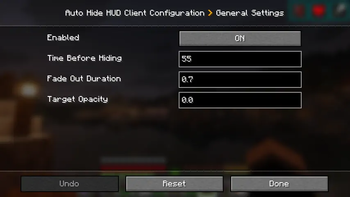
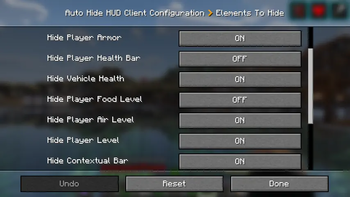
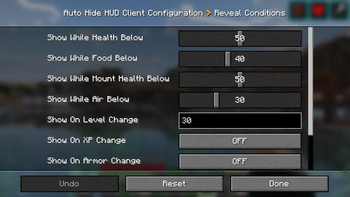
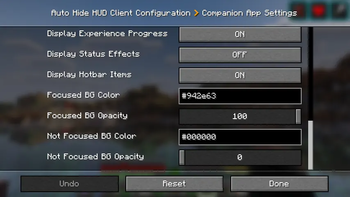
About this Mod
Have you even wanted the HUD elements to go away so you can enjoy the beauty of the world? I sure did. Welcome to Auto Hide HUD.
As the name implies, this mod will auto hide the HUD after a period of inactivity. DON'T panic. It's not gone forever. It will return when your health changes. Or your hunger goes down. Don't want it to do that? There are plenty of options to make this function exactly how you want. Want the HUD to disappear after 2.5 seconds and only comeback when your air levels are below 30%? There's a setting for that!
Using this mod makes your Minecraft experience so much more immersive. It really feels like the first time I used shaders again. Just beautiful.
Let me know if you have any issues or feature suggestions.
Companion App
I've added a little player-info data server that broadcasts things like your position, health, food, air, status effects, and hotbar items to a companion app running on the same machine. Disabled by default — enable it in the in-game config, then launch the mod jar directly (java -jar path/to/mod.jar, or double-click if on Windows).
The companion is very configurable: pick which info to show, choose a background color, even make the window transparent when unfocused (great for Wallpaper Engine users). I built it because I have a small monitor under my main one and I wanted to glance at position and health while keeping the in-game HUD hidden for a clean look.
Note: the companion's port must match the mod's playerDataServerPort config (default 25922).
If you enjoy this mod, please check out our other games and apps at KrookedLilly.com
Available Versions
How to Install Auto Hide HUD on Your Server
Order Server
Order a Minecraft Java server with at least 3 GB RAM (4 GB recommended).
Set neoforge Loader
In the panel under "Egg", select the neoforge loader and matching Minecraft version (26.1.2).
Install Mod
Open the mod browser in the dashboard and search for "Auto Hide HUD". Click "Install" – done! Alternatively, upload the .jar via SFTP to the /mods folder.
Compatibility
Mod Loaders
Minecraft Versions
26.1.2, 26.1.1, 26.1 (+11 more)
Server-side
✗ UnsupportedRecommended RAM
4 GB(min. 3 GB)Frequently Asked Questions
Auto Hide HUD server crashes on startup – what to do?
Most common cause: wrong neoforge version or insufficient RAM. Check the server log (latest.log) for "OutOfMemoryError" or "Mixin" errors. With Mado Hosting: ensure at least 3 GB RAM is allocated and the loader matches the mod version (26.1.2). You can switch loaders with one click in the panel.
Is Auto Hide HUD compatible with neoforge?
Auto Hide HUD officially supports neoforge for Minecraft 26.1.2, 26.1.1, 26.1. The Mado dashboard automatically detects incompatible loader combinations.
Server lagging with Auto Hide HUD – how to optimize performance?
Recommended RAM: 4 GB (per 8 players). Use /spark profiler to check if Auto Hide HUD consumes the most tick time. Common fixes: reduce server view-distance to 8-10, install "performant" or "starlight" as supplementary mods on Forge. With Mado Hosting, your server runs on NVMe SSDs with dedicated CPU cores for minimal latency.
Similar Mods

![[ETF] Entity Texture Features](https://cdn.modrinth.com/data/BVzZfTc1/af683d206d50b05258d865b0d6e4aa2f2cee12f2_96.webp)
![[EMF] Entity Model Features](https://cdn.modrinth.com/data/4I1XuqiY/6e5bbd0d06b1741bfdab6c0cfab6de8fdaf0064c_96.webp)



Rent Modded Server
Install Auto Hide HUD with just one click on your server.