
Auto Pillar Generator
Generate different sizes of pillars automatically.Convenient and fast.
Screenshots
About this Mod
Auto Pillar Generator
When constructing buildings or bridges in Minecraft, adding pillars often enhances structural authenticity. This mod implements one-click auto-generation of pillars.
Usage:
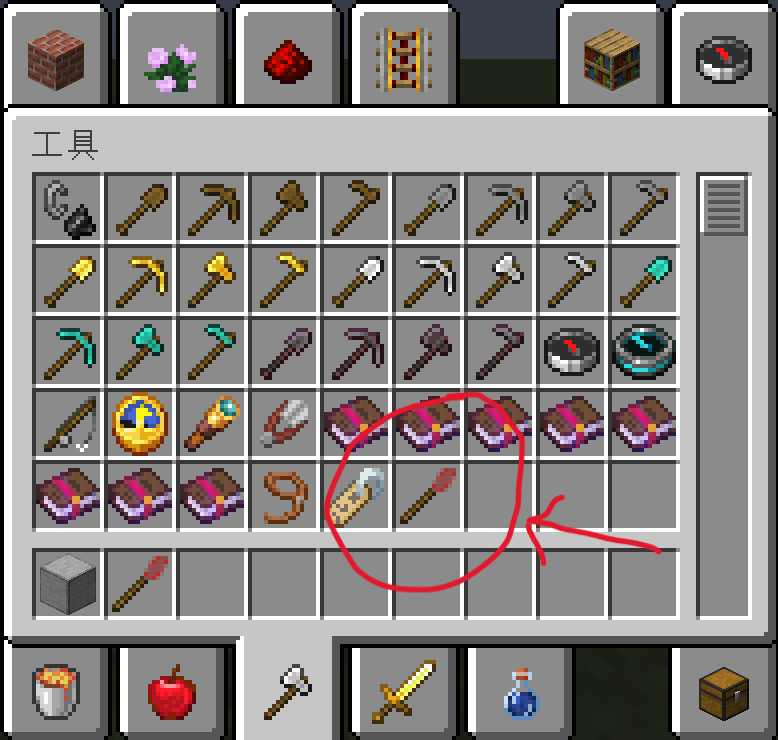
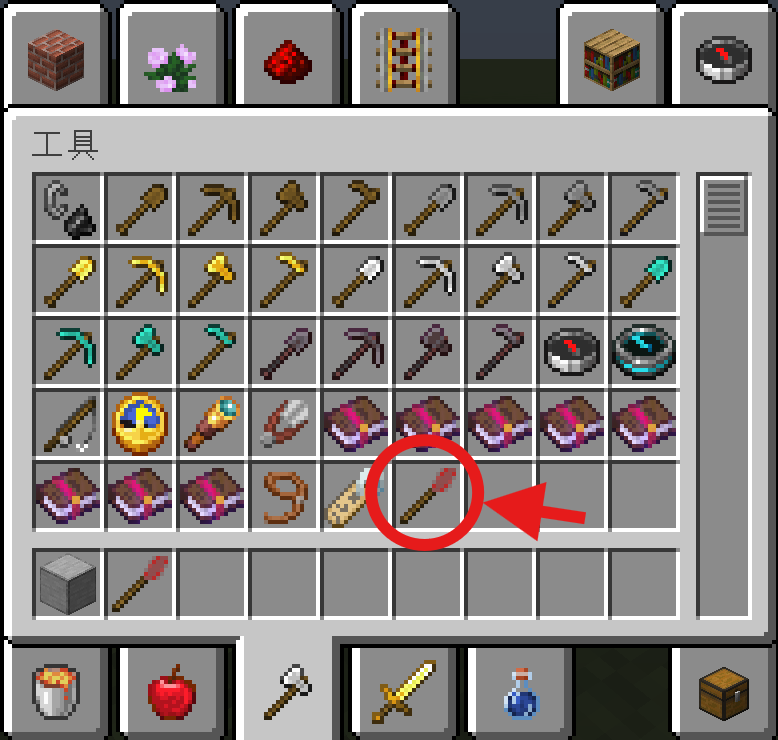
The mod item is located in the Creative Mode "Tools" category.
Shape Selection: Hold the mod item, then press Sneak (SHIFT) + Bound Key (default: ALT) simultaneously to cycle through pillar shapes.
Material Setting: Sneak (SHIFT) while targeting a block to set the pillar's material.
FAQ:
1.Will this mod supported other versions (1.20.x/1.18.x/Forge)?
Planned. Stay tuned for updates.
2.Why can't I switch shapes?
Check keybind conflicts. If none exist, try pressing Sneak first before ALT (default).
3.Can I use it on my server?
Of course.Note that both client and server must install the mod.
Problems?:
You can use TecnetQQ ask me. My QQ:1140514085
一键柱子生成
在mc建设建筑/桥梁时,添加柱子往往能使你的建筑更加真实,而本模组实现了柱子的一键自动生成。
用法:
模组物品位于创造模式“工具“分类中。
使用前先手持模组物品,同时按下潜行(SHIFT)+绑定按键(默认为ALT)即可切换生成柱子的形状。
同时,对着方块潜行(SHIFT)即可设置柱子的材质。
常见问题:
1.会移植到其它版本吗(1.20.x/1.18.x/forge)?
在计划之中,请耐心等待。
2.为什么没法切换形状?
检查按键绑定,如果没有冲突,可以试试先潜行,再按ALT(默认按键)。
3.我可以在服务器上用吗?
当然可以。需要注意的是服务端和客户端都需要安装本模组。
联系作者
如需反馈BUG或提建议可以加作者QQ,QQ号:1140514085
Available Versions
How to Install Auto Pillar Generator on Your Server
Order Server
Order a Minecraft Java server with at least 3 GB RAM (4 GB recommended).
Set fabric Loader
In the panel under "Egg", select the fabric loader and matching Minecraft version (1.20.1).
Install Mod
Open the mod browser in the dashboard and search for "Auto Pillar Generator". Click "Install" – done! Alternatively, upload the .jar via SFTP to the /mods folder.
Compatibility
Mod Loaders
Minecraft Versions
1.20.1, 1.19.2
Server-side
✓ RequiredRecommended RAM
4 GB(min. 3 GB)Frequently Asked Questions
Auto Pillar Generator server crashes on startup – what to do?
Most common cause: wrong fabric version or insufficient RAM. Check the server log (latest.log) for "OutOfMemoryError" or "Mixin" errors. With Mado Hosting: ensure at least 3 GB RAM is allocated and the loader matches the mod version (1.20.1). You can switch loaders with one click in the panel.
Is Auto Pillar Generator compatible with fabric?
Auto Pillar Generator officially supports fabric for Minecraft 1.20.1, 1.19.2. The Mado dashboard automatically detects incompatible loader combinations.
Server lagging with Auto Pillar Generator – how to optimize performance?
Recommended RAM: 4 GB (per 8 players). Use /spark profiler to check if Auto Pillar Generator consumes the most tick time. Common fixes: reduce server view-distance to 8-10, install "performant" or "starlight" as supplementary mods on Forge. With Mado Hosting, your server runs on NVMe SSDs with dedicated CPU cores for minimal latency.
Similar Mods




![[ETF] Entity Texture Features](https://cdn.modrinth.com/data/BVzZfTc1/af683d206d50b05258d865b0d6e4aa2f2cee12f2_96.webp)
![[EMF] Entity Model Features](https://cdn.modrinth.com/data/4I1XuqiY/6e5bbd0d06b1741bfdab6c0cfab6de8fdaf0064c_96.webp)
Rent Modded Server
Install Auto Pillar Generator with just one click on your server.