
Auto Reconnect Remote
Automatically reconnects you to servers with remote control notifications using ntfy. And Much more like auto command on rejoin!
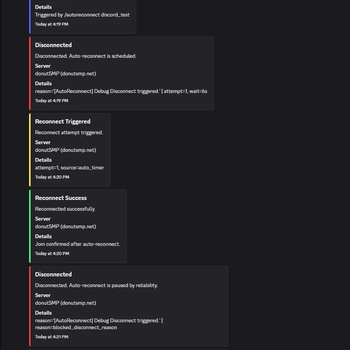
Screenshots


About this Mod
Auto Connect Remote
Auto Connect Remote is a client-side reconnect and remote alert mod for Minecraft.
It can:
- automatically reconnect after disconnects
- send ntfy alerts when something goes wrong
- let you remotely stop or trigger reconnects
- send Discord webhook notifications
- track queue position and ETA on supported queue servers
- notify you when you finally get in
v2.4.0 adds Queue Intelligence: setup wizard, queue tracking, queue ETA support, queue alerts, and queue-aware recovery.
Client-side only. No server plugin. No account required.
Discord and feature requests: https://discord.gg/nVWDdZBp
What’s New in v2.4.0
Setup Wizard
- New first-run setup flow
- Helps configure ntfy, setup profiles, and queue alerts faster
- Can be reopened any time with
/autoreconnect wizard
Queue Intelligence
Tracks queue position on supported servers
Falls back to local estimation when enough movement exists
Supports queue status/history commands
Adds queue-aware ntfy and Discord notifications
Queue Alerts
- Notify when queue tracking starts
- Notify on milestones
- Notify on ETA thresholds
- Notify when the queue appears stalled
- Notify when you finally join
Queue-Aware Recovery
- Supports reconnect + post-join recovery flows
- Useful for AFK, lobby, and queue-heavy servers
New Commands
/autoreconnect wizard/autoreconnect preset list/autoreconnect preset preview <id>/autoreconnect preset apply <id>/autoreconnect queue_status/autoreconnect queue_history/autoreconnect queue_reset
Core Features
Smart Reconnect
- Automatic reconnect countdown
- Optional reconnect jitter
- Non-recoverable disconnect filtering
- Max-attempt safety cap
- Reconnect backoff
- Manual override on the disconnect screen
ntfy Remote Alerts and Control
- Notify when disconnected
- Remote stop phrase to cancel reconnect countdown
- Remote reconnect phrase to trigger reconnect
- Queue alerts for supported servers
Discord Webhooks
- Outbound only
- No bot token
- No inbound Discord control
- Supports disconnect, reconnect, queue, and reliability events
- Privacy-safe defaults for address/reason visibility
Queue Tracking
- Queue position tracking from supported in-game queue text
- Queue ETA display
- Queue history and queue status commands
- Join alerts when you finally get in
Automation and Recovery
- Global auto-commands
- Per-server profiles
- AFK-oriented repeat command loops
- Hub/lobby detection
- Post-queue recovery support
Setup Wizard
The new Setup Wizard helps you get started faster.
It can help you:
- choose a setup profile
- enter an ntfy topic or generate one
- enable optional queue milestone notifications
- test your ntfy setup
Open it any time with:
/autoreconnect wizard
Quick Start
- Install dependencies:
Fabric APIorNeoForge,Cloth Config,Mod Menu - Open Mod Menu or run
/autoreconnect wizard - Enter an ntfy topic or press
Generate Topic - Pick a setup profile
- Optional: configure a Discord webhook URL and test it
- Trigger a disconnect or join a supported queue server to verify alerts
Commands
ntfy
/autoreconnect topic <name>/autoreconnect reconnect_phrase <phrase>/autoreconnect stop_phrase <phrase>
wizard and queue
/autoreconnect wizard/autoreconnect preset list/autoreconnect preset preview <id>/autoreconnect preset apply <id>/autoreconnect queue_status/autoreconnect queue_history/autoreconnect queue_reset
Discord
/autoreconnect discord_webhook <url>/autoreconnect discord_enabled <true|false>/autoreconnect discord_test [message]/autoreconnect discord_status
reliability
/autoreconnect reliability_status/autoreconnect reliability_reset/autoreconnect block_phrase_add <phrase>/autoreconnect block_phrase_remove <phrase>/autoreconnect block_phrase_list
debug and hub setup
/autoreconnect debug_disconnect/autoreconnect debug_hub_detect/autoreconnect debug_trigger_hub/autoreconnect set_hub_world <name>/autoreconnect hub_from_current
Compatibility
- Minecraft Java Edition
1.21.1-1.21.11 - Fabric or NeoForge
- Client-side only
License
CC0-1.0
Available Versions
How to Install Auto Reconnect Remote on Your Server
Order Server
Order a Minecraft Java server with at least 3 GB RAM (4 GB recommended).
Set fabric Loader
In the panel under "Egg", select the fabric loader and matching Minecraft version (1.21.11).
Install Mod
Open the mod browser in the dashboard and search for "Auto Reconnect Remote". Click "Install" – done! Alternatively, upload the .jar via SFTP to the /mods folder.
Compatibility
Mod Loaders
Minecraft Versions
1.21.11, 1.21.10, 1.21.9 (+8 more)
Server-side
✗ UnsupportedRecommended RAM
4 GB(min. 3 GB)Frequently Asked Questions
Auto Reconnect Remote server crashes on startup – what to do?
Most common cause: wrong fabric version or insufficient RAM. Check the server log (latest.log) for "OutOfMemoryError" or "Mixin" errors. With Mado Hosting: ensure at least 3 GB RAM is allocated and the loader matches the mod version (1.21.11). You can switch loaders with one click in the panel.
Is Auto Reconnect Remote compatible with fabric and neoforge?
Auto Reconnect Remote officially supports fabric, neoforge for Minecraft 1.21.11, 1.21.10, 1.21.9. The Mado dashboard automatically detects incompatible loader combinations.
Server lagging with Auto Reconnect Remote – how to optimize performance?
Recommended RAM: 4 GB (per 8 players). Use /spark profiler to check if Auto Reconnect Remote consumes the most tick time. Common fixes: reduce server view-distance to 8-10, install "performant" or "starlight" as supplementary mods on Forge. With Mado Hosting, your server runs on NVMe SSDs with dedicated CPU cores for minimal latency.
Similar Mods




Rent Modded Server
Install Auto Reconnect Remote with just one click on your server.