
AutoAim
Smooth, customizable aim assist for easier and more accurate targeting.
Screenshots
About this Mod

AutoAim - Smooth and accurate targeting!
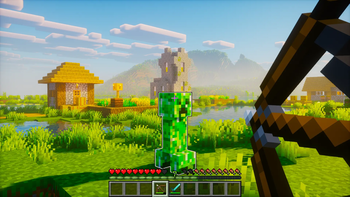
AutoAim adds smooth, customizable aim assistance for easier and more accurate targeting. It works client-side in singleplayer, and multiplayer use requires server-side opt-in.
✨ Features
- Smooth aim assist that stays locked while remaining easy to redirect
- Bow and charged crossbow support
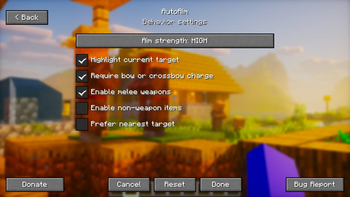
- Optional melee support for swords, axes, spears, and tridents
- Optional support for other held items
- Four aim strength levels:
- Super High
- High (default)
- Medium
- Low
- Adjustable targeting range:
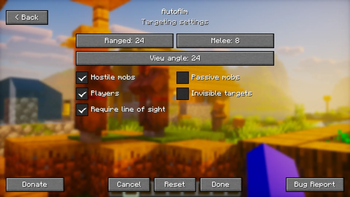
- Ranged: 24 blocks by default
- Melee: 8 blocks by default
- Adjustable target view angle
- Target filters:
- Hostile mobs
- Passive mobs
- Players
- Invisible targets
- Optional line-of-sight requirement
- Selected-target outline
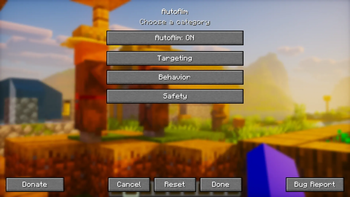
- Clean in-game settings menu
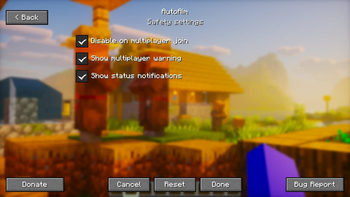
- Multiplayer safety warning
- Server-side opt-in for multiplayer: AutoAim cannot be enabled on multiplayer servers unless the server explicitly allows it
⌨️ Default keybinds
- K: Open settings
- J: Enable or disable AutoAim
Category: AutoAim. All keybinds are remappable.
🔧 Requirements
- Current loader:
- Fabric Loader and Fabric API
- Planned loaders:
- Quilt (planned)
- Forge (planned)
- NeoForge (planned)
- Java: 25+
- Singleplayer environment: Client required
- Multiplayer environment: Client required, server required for opt-in
⚙️ Default settings
- AutoAim: enabled
- Aim strength: High
- Ranged distance: 24 blocks
- Melee distance: 8 blocks
- Target view angle: 24 degrees
- Hostile mobs: enabled
- Players: enabled
- Passive mobs: disabled
- Invisible targets: disabled
- Line of sight required: enabled
- Selected-target outline: enabled
- Melee weapons: enabled
- Other held items: disabled
- Multiplayer auto-disable: enabled
📖 Usage
- Press
Kto open the settings menu. - Choose your targeting, behavior, and safety preferences.
- Hold a bow, load a crossbow, or equip an enabled melee weapon.
- Press
Jwhenever you want to enable or disable AutoAim.
⚠️ Multiplayer notice
AutoAim is disabled on multiplayer servers unless the server explicitly opts in.
For Fabric servers, install the same mod on the dedicated server. The server registers the autoaim:server_opt_in networking channel, and clients only allow AutoAim while connected if that channel is advertised by the server.
Without this server-side opt-in, the client refuses to enable AutoAim in multiplayer and will not apply aim rotation.
⬇️ Download



Planned loader support:



📜 License and permissions
- License: All Rights Reserved (ARR)
- Standalone redistribution and re-uploads are not allowed without permission
- Modpacks are allowed when the original mod is unmodified, credited as AutoAim by Zynwro, and linked back to the official project page
🤝 Credits
- Author: Zynwro
- Contact: linktr.ee/zynwro
- Donate: linktr.ee/zynwrodonate
Available Versions
How to Install AutoAim on Your Server
Order Server
Order a Minecraft Java server with at least 3 GB RAM (4 GB recommended).
Set fabric Loader
In the panel under "Egg", select the fabric loader and matching Minecraft version (26.1.2).
Install Mod
Open the mod browser in the dashboard and search for "AutoAim". Click "Install" – done! Alternatively, upload the .jar via SFTP to the /mods folder.
Compatibility
Mod Loaders
Minecraft Versions
26.1.2
Server-side
✗ UnsupportedRecommended RAM
4 GB(min. 3 GB)Frequently Asked Questions
AutoAim server crashes on startup – what to do?
Most common cause: wrong fabric version or insufficient RAM. Check the server log (latest.log) for "OutOfMemoryError" or "Mixin" errors. With Mado Hosting: ensure at least 3 GB RAM is allocated and the loader matches the mod version (26.1.2). You can switch loaders with one click in the panel.
Is AutoAim compatible with fabric?
AutoAim officially supports fabric for Minecraft 26.1.2. The Mado dashboard automatically detects incompatible loader combinations.
Server lagging with AutoAim – how to optimize performance?
Recommended RAM: 4 GB (per 8 players). Use /spark profiler to check if AutoAim consumes the most tick time. Common fixes: reduce server view-distance to 8-10, install "performant" or "starlight" as supplementary mods on Forge. With Mado Hosting, your server runs on NVMe SSDs with dedicated CPU cores for minimal latency.
Similar Mods




Rent Modded Server
Install AutoAim with just one click on your server.