
AutoCraftmod
AutoCraft is a simple client-side that allows players to craft items automatically using a convenient menu and customizable keybind
Screenshots
About this Mod
AutoCraft
AutoCraft is a lightweight crafting helper for Minecraft 1.16.5 on Forge.
It lets you browse available crafting recipes, pick how many times you want to craft them, and craft directly from your inventory (2x2) or a crafting table (3x3).
The mod is built around the normal container flow, so it feels close to vanilla and is much easier to use in everyday survival gameplay.
Features
- Browse recipes from the current crafting grid
- Works in the player inventory for 2x2 recipes
- Works in the crafting table for full 3x3 recipes
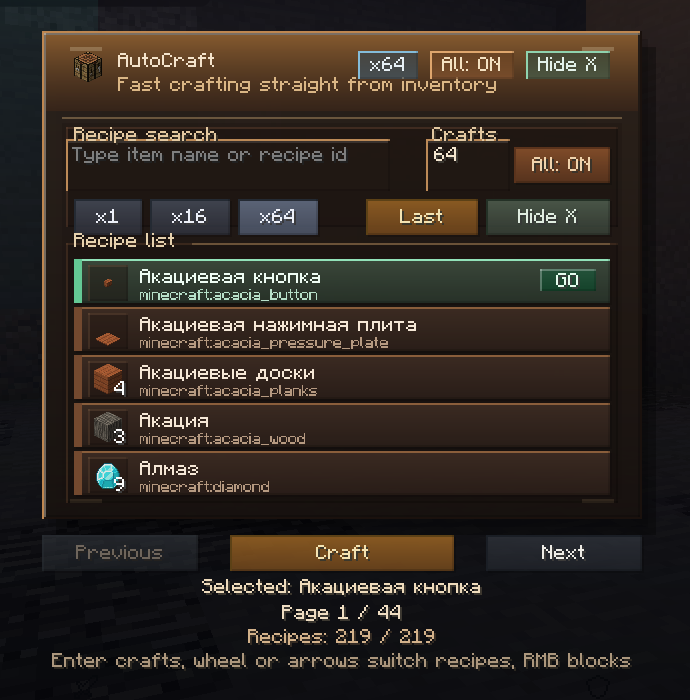
- Search recipes by item name or recipe id
- Set craft amount manually
- Quick amount buttons:
x1,x16,x64 Allmode to craft as much as possible- Repeat the last recipe quickly
- Keyboard-friendly navigation
- Optional recipe blocking to hide recipes you do not want to use
Controls
Ropens the AutoCraft menuShift + Rrepeats the last recipeEntercrafts the currently selected recipe- Mouse wheel or arrow keys switch between recipes
- Right-click on a recipe blocks or unblocks it
How To Use
- Open your inventory or a crafting table
- Press
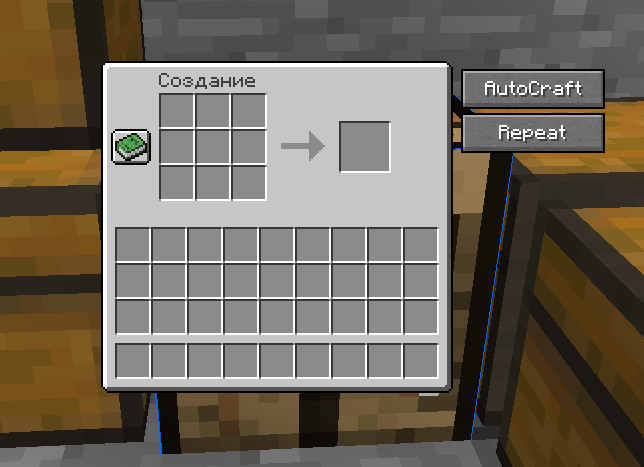
Ror click theAutoCraftbutton - Search for the recipe you want
- Pick the amount or enable
All - Press
Enter, click the recipe, or use theCraftbutton
Why Use AutoCraft
- Faster than manual recipe placement
- Useful for repetitive crafting sessions
- Keeps recipe browsing simple and clean
- Helps when you want to craft large batches quickly
- Still works through normal crafting interactions instead of adding a separate fake crafting system
Compatibility
- Minecraft `1.16.5 forg
The mod is intended for client-side use and is designed to work through normal crafting container actions for better singleplayer and multiplayer compatibility.
Notes
- Recipes shown depend on the crafting grid you currently have open
- 2x2-only menu usage works from the player inventory
- 3x3 recipes require a crafting table
- Some heavily customized servers or modpacks may affect crafting behavior.
Available Versions
How to Install AutoCraftmod on Your Server
Order Server
Order a Minecraft Java server with at least 3 GB RAM (4 GB recommended).
Set forge Loader
In the panel under "Egg", select the forge loader and matching Minecraft version (1.16.5).
Install Mod
Open the mod browser in the dashboard and search for "AutoCraftmod". Click "Install" – done! Alternatively, upload the .jar via SFTP to the /mods folder.
Compatibility
Mod Loaders
Minecraft Versions
1.16.5
Server-side
✗ UnsupportedRecommended RAM
4 GB(min. 3 GB)Frequently Asked Questions
AutoCraftmod server crashes on startup – what to do?
Most common cause: wrong forge version or insufficient RAM. Check the server log (latest.log) for "OutOfMemoryError" or "Mixin" errors. With Mado Hosting: ensure at least 3 GB RAM is allocated and the loader matches the mod version (1.16.5). You can switch loaders with one click in the panel.
Is AutoCraftmod compatible with forge?
AutoCraftmod officially supports forge for Minecraft 1.16.5. The Mado dashboard automatically detects incompatible loader combinations.
Server lagging with AutoCraftmod – how to optimize performance?
Recommended RAM: 4 GB (per 8 players). Use /spark profiler to check if AutoCraftmod consumes the most tick time. Common fixes: reduce server view-distance to 8-10, install "performant" or "starlight" as supplementary mods on Forge. With Mado Hosting, your server runs on NVMe SSDs with dedicated CPU cores for minimal latency.
Similar Mods




Rent Modded Server
Install AutoCraftmod with just one click on your server.