
AutoCraft&Block list
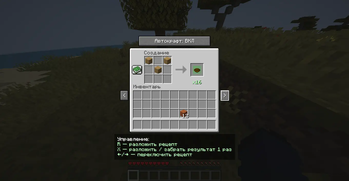
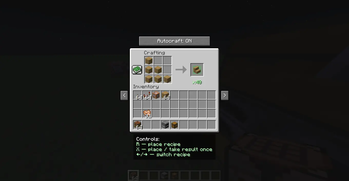
This mod will allow you to craft items automatically without laying them out, as well as switch between interfaces.
Screenshots
About this Mod
RU:
Автокрафты и переключение интерфейсов
Этот мод добавляет две ключевые функции: автоматический крафт и переключение между интерфейсами, которые делают игровой процесс более быстрым, удобным, ниже вы получите всю нужную информацию.
🔨 Автоматический крафт
Что делает?
Больше не нужно вручную расставлять предметы по ячейкам.
Мод сам размещает необходимые ресурсы в сетке крафта, если они есть в инвентаре.
Ускоряет процесс создания сложных предметов и экономит время.
🔄 Переключение между интерфейсами
Что делает?
Можно мгновенно переключаться между ближайшими рабочими интерфейсами (верстак, печь, сундук и т.д.), не закрывая интерфейса.
Упрощает взаимодействие с блоками — удобно, когда рядом несколько станций.
Повышает комфорт при игре и снижает количество лишних кликов.
✅ Особенности
Экономит время при одинаковых действиях.
Делает процесс крафта более быстрым.
Подходит как для одиночной игры, так и для серверов за неё вы бан не получите.
🔗 Социальная сеть
- Telegram - перейти
EN:
Auto crafts and interface switching
This mod adds two key features: automatic crafting and switching between interfaces, which make the gameplay faster and more convenient, below you will get all the necessary information.
🔨 Automatic crafting
What does it do?
You no longer need to manually arrange items in cells.
The mod itself places the necessary resources in the crafting grid, if they are in the inventory.
Speeds up the process of creating complex items and saves time.
Switching between interfaces
What does it do?
- You can instantly switch between the nearest work interfaces (workbench, oven, chest, etc.) without closing the interface.
*Simplifies interaction with blocks — it is convenient when there are several stations nearby.
- Increases the comfort of the game and reduces the number of unnecessary clicks.
✅ Features
Saves time with the same actions.
Makes the crafting process faster.
Suitable for both single player and server games, you will not get banned for it.
🔗 Social network
- Telegram - go to
Available Versions
How to Install AutoCraft&Block list on Your Server
Order Server
Order a Minecraft Java server with at least 3 GB RAM (4 GB recommended).
Set forge Loader
In the panel under "Egg", select the forge loader and matching Minecraft version (1.21.1).
Install Mod
Open the mod browser in the dashboard and search for "AutoCraft&Block list". Click "Install" – done! Alternatively, upload the .jar via SFTP to the /mods folder.
Compatibility
Mod Loaders
Minecraft Versions
1.21.1
Server-side
~ OptionalRecommended RAM
4 GB(min. 3 GB)Frequently Asked Questions
AutoCraft&Block list server crashes on startup – what to do?
Most common cause: wrong forge version or insufficient RAM. Check the server log (latest.log) for "OutOfMemoryError" or "Mixin" errors. With Mado Hosting: ensure at least 3 GB RAM is allocated and the loader matches the mod version (1.21.1). You can switch loaders with one click in the panel.
Is AutoCraft&Block list compatible with forge?
AutoCraft&Block list officially supports forge for Minecraft 1.21.1. The Mado dashboard automatically detects incompatible loader combinations.
Server lagging with AutoCraft&Block list – how to optimize performance?
Recommended RAM: 4 GB (per 8 players). Use /spark profiler to check if AutoCraft&Block list consumes the most tick time. Common fixes: reduce server view-distance to 8-10, install "performant" or "starlight" as supplementary mods on Forge. With Mado Hosting, your server runs on NVMe SSDs with dedicated CPU cores for minimal latency.
Similar Mods




Rent Modded Server
Install AutoCraft&Block list with just one click on your server.