
Autocut
Automatically cut videos based on your gameplay
Screenshots
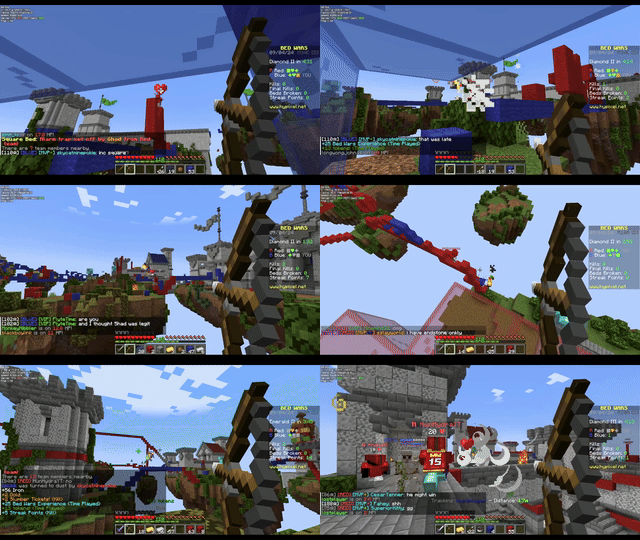
About this Mod
Cut videos based on your gameplay!
Usage
- Install FFmpeg
- Install OBS
- Open OBS
- In OBS, go to Tools -> WebSocket Server Settings
- Enable web server
- Under Tools -> WebSocket Server Settings, go to Connection Information and copy the password
- In game, run
/autocut connect <password here> - Start Recording in OBS
- Do fun gameplay stuff
- Stop Recording in OBS
- (optional) Delete clips you don't want (see the wiki)
- Run
/autocut finish - When it's finished a new video starting with
cutwill be in your recordings folder.
You can also optionally run /autocut finish "path/to/database" to cut an old video. This will fail if the original video is moved or deleted.
Dependencies
- Includes OBS WebSocket Java, used under MIT
- Includes SQLite JDBC Driver, used under Apache 2.0
- SQLite JDBC Driver also includes software by David Crawshaw under BSD 2-Clause
- The NOTICE file is both available in the sources and in the mod itself
- Includes FFmpeg CLI Wrapper for Java, used under BSD 2-Clause "Simplified"
- Requires FFmpeg, used under LGPL v2.1+
- Requires Fabric API, used under Apache 2.0
- Requires Fabric Loader 0.15.11 or later, used under Apache 2.0
- Requires YACL 3.5.0+1.21-fabric or later, used under LGPL 3.0 or later
- Optionally integrates with Mod Menu 11.0.2 or later, used under MIT
Licensing
...is a mess.
TLDR
Modpacks
You can use this mod in a modpack! Don't re-host the file without permission though. I'd love a mention somewhere for bragging rights.
Videos
You can use this mod to make videos! I'd love a mention somewhere in a description or something so I can have bragging rights.
Programming
You can use and reference all the code in the GitHub repo under MIT.
What's actually going on
Autocut is licensed under MIT, but the JAR file includes several dependencies:
- OBS WebSocket Java is under MIT.
- SQLite JDBC Driver is dual licensed (GPL and Apache) - I used it under Apache.
- It includes a NOTICE
- This is why there's a NOTICE file
- This is why there's a LICENSE.zentus file (it's mentioned in the NOTICE)
- It includes a NOTICE
- FFmpeg CLI Wrapper for Java is licensed under BSD 2-Clause "Simplified"
- This is why there's a LICENSE.bramp file
It also requires a few other things, which are NOT included in the jar
- FFmpeg is used under LGPL
- This is why there's a LICENSE.lgpl
- This is why there's a LICENSE.gpl (required by lgpl)
- Fabric API is used under Apache 2.0
- There's no NOTICE file
- Fabric Loader is used under Apache 2.0
- There's no NOTICE file
- YACL is used under LGPL 3.0 or greater
- Covered by the LICENSE.lgpl and LICENSE.gpl from FFmpeg
- Mod Menu is used under MIT
Available Versions
How to Install Autocut on Your Server
Order Server
Order a Minecraft Java server with at least 3 GB RAM (4 GB recommended).
Set fabric Loader
In the panel under "Egg", select the fabric loader and matching Minecraft version (1.21.4).
Install Mod
Open the mod browser in the dashboard and search for "Autocut". Click "Install" – done! Alternatively, upload the .jar via SFTP to the /mods folder.
Compatibility
Mod Loaders
Minecraft Versions
1.21.4, 1.21.1, 1.21 (+1 more)
Server-side
✗ UnsupportedRecommended RAM
4 GB(min. 3 GB)Frequently Asked Questions
Autocut server crashes on startup – what to do?
Most common cause: wrong fabric version or insufficient RAM. Check the server log (latest.log) for "OutOfMemoryError" or "Mixin" errors. With Mado Hosting: ensure at least 3 GB RAM is allocated and the loader matches the mod version (1.21.4). You can switch loaders with one click in the panel.
Is Autocut compatible with fabric?
Autocut officially supports fabric for Minecraft 1.21.4, 1.21.1, 1.21. The Mado dashboard automatically detects incompatible loader combinations.
Server lagging with Autocut – how to optimize performance?
Recommended RAM: 4 GB (per 8 players). Use /spark profiler to check if Autocut consumes the most tick time. Common fixes: reduce server view-distance to 8-10, install "performant" or "starlight" as supplementary mods on Forge. With Mado Hosting, your server runs on NVMe SSDs with dedicated CPU cores for minimal latency.
Similar Mods




![[ETF] Entity Texture Features](https://cdn.modrinth.com/data/BVzZfTc1/af683d206d50b05258d865b0d6e4aa2f2cee12f2_96.webp)
![[EMF] Entity Model Features](https://cdn.modrinth.com/data/4I1XuqiY/6e5bbd0d06b1741bfdab6c0cfab6de8fdaf0064c_96.webp)
Rent Modded Server
Install Autocut with just one click on your server.