
AutoDrop Manager
Automatically drops selected items when they enter your inventory
Screenshots
About this Mod
📥 AutoDrop Manager [Fabric 1.21.1]
AutoDrop Manager is a lightweight, client-side mod designed to automatically keep your inventory clean from unwanted trash. Tired of cobbles, dirt, gravel, or diorite clogging up your slots while strip-mining or excavating? This mod does all the tedious inventory cleaning for you instantly!
📺 Video Showcase & Tutorial
Watch the mod in action and learn how to set it up in less than a minute!
✨ Features
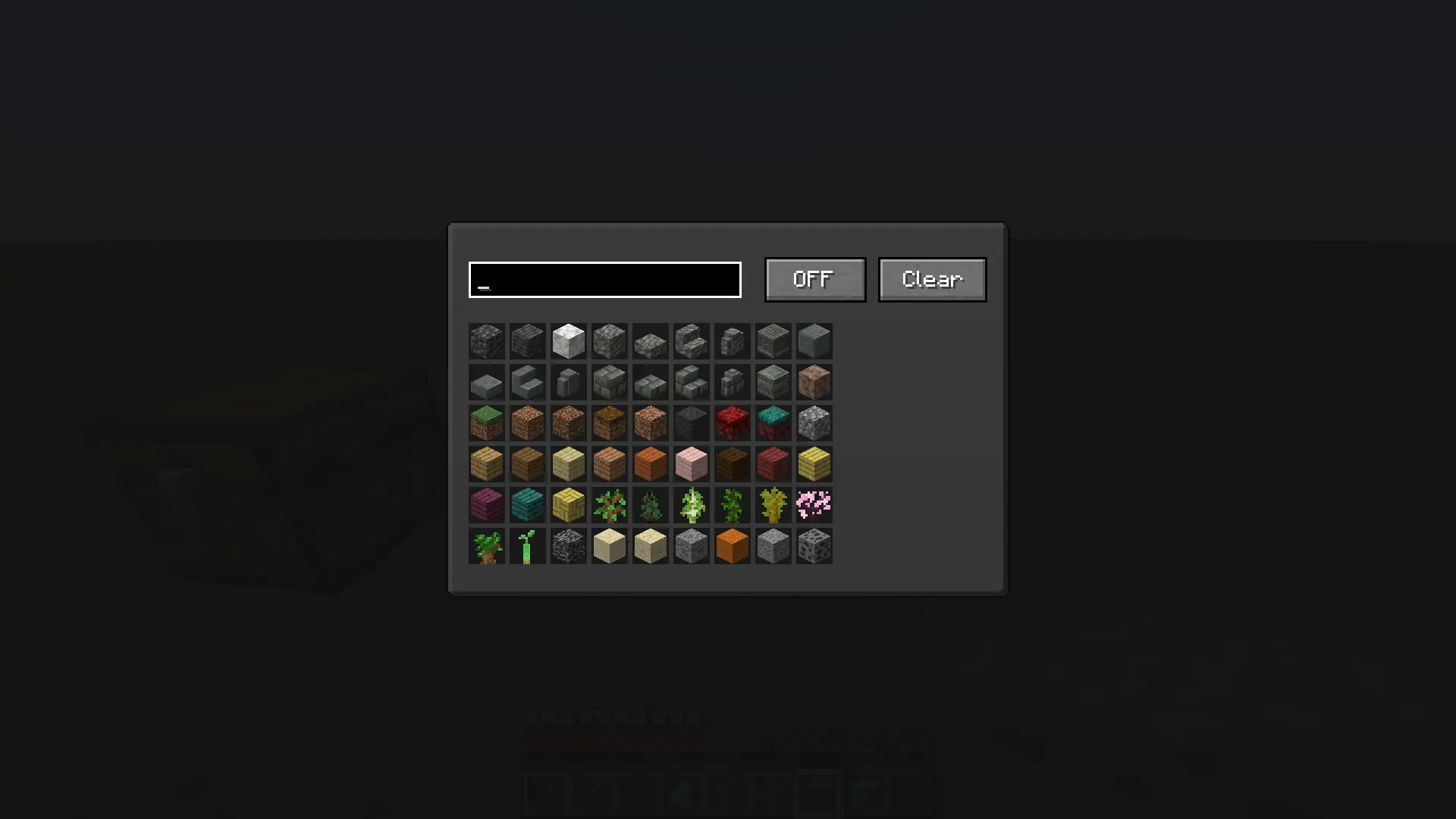
- Smart Item Filter: Easily select any block or item from the entire game using a clean grid layout.
- Instant Auto-Dropping: As soon as a blacklisted item enters your inventory, the mod drops it on the ground immediately.
- Responsive Search Bar: Quickly search for blocks and items by their localized names or technical IDs.
- Effortless Management: Features a global ON/OFF toggle switch and a Clear button to wipe your blacklist in one click.
- Full Keybind Support: Change the menu opening key to any button you prefer inside the standard Minecraft Controls menu.
🛠 How to Use
- Go to Minecraft Options -> Controls -> Key Binds and assign a comfortable key for "Open Mod Menu" (Default is
O). - Press the assigned key in-game to open the custom interface.
- Use the search text box to find the items you want to get rid of.
- Click on an item in the grid — a red highlight will appear. This means the item is now blacklisted.
- Make sure the toggle button at the top right is set to ON.
- That's it! The blacklisted trash will no longer stay in your inventory.
Available Versions
How to Install AutoDrop Manager on Your Server
Order Server
Order a Minecraft Java server with at least 3 GB RAM (4 GB recommended).
Set fabric Loader
In the panel under "Egg", select the fabric loader and matching Minecraft version (1.21.1).
Install Mod
Open the mod browser in the dashboard and search for "AutoDrop Manager". Click "Install" – done! Alternatively, upload the .jar via SFTP to the /mods folder.
Compatibility
Mod Loaders
Minecraft Versions
1.21.1
Server-side
✗ UnsupportedRecommended RAM
4 GB(min. 3 GB)Frequently Asked Questions
AutoDrop Manager server crashes on startup – what to do?
Most common cause: wrong fabric version or insufficient RAM. Check the server log (latest.log) for "OutOfMemoryError" or "Mixin" errors. With Mado Hosting: ensure at least 3 GB RAM is allocated and the loader matches the mod version (1.21.1). You can switch loaders with one click in the panel.
Is AutoDrop Manager compatible with fabric?
AutoDrop Manager officially supports fabric for Minecraft 1.21.1. The Mado dashboard automatically detects incompatible loader combinations.
Server lagging with AutoDrop Manager – how to optimize performance?
Recommended RAM: 4 GB (per 8 players). Use /spark profiler to check if AutoDrop Manager consumes the most tick time. Common fixes: reduce server view-distance to 8-10, install "performant" or "starlight" as supplementary mods on Forge. With Mado Hosting, your server runs on NVMe SSDs with dedicated CPU cores for minimal latency.
Similar Mods




Rent Modded Server
Install AutoDrop Manager with just one click on your server.