
Automining
Keep mining while leaving the game.
About this Mod
Updates and Infos
Moving forward, only fabric and neoforge will be supported, since Architectury droped forge support more or less.
Make sure to use the correct version of architectury together with this mod for it to run.
Description
Simple client side Mod that allows you to leave the game while mining in Background. Keeps swapping tools of the same type in hotbar. Very useful for cobblestone generators or other blockstreams for example from a tree-farm
❗ This mod may be considered as cheating or boting on some servers, so don't use it, if it is not allowed and don't blame me for use it against server rules ❗
Everything can be controlled via ingame menu. Check key bounds for it, default is n to activate Mining and o for the Ingame Config (was m and p in older versions). Sneaking while activating the mod allows automatic attacking.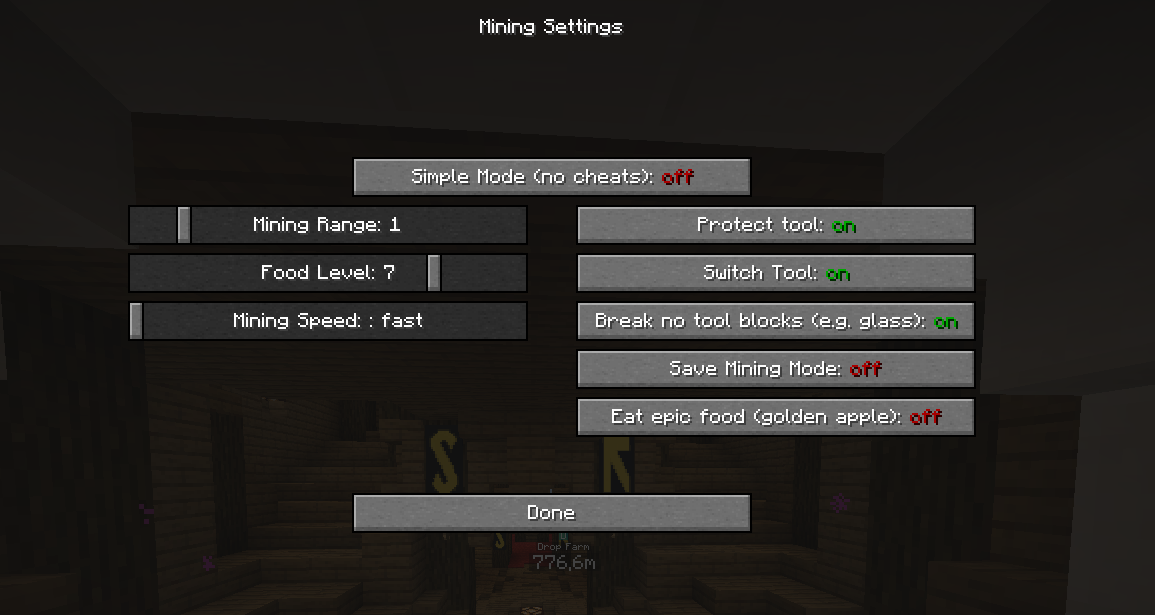
Meaning of all the settings:
Simple Mode: The mod just presses the mouse button, if there is a block or entity in attacking mode in front of you.
Scaling Settings:
Mining Range: Increases the range of mining. Always centered on the block you are aiming at. (See picture) 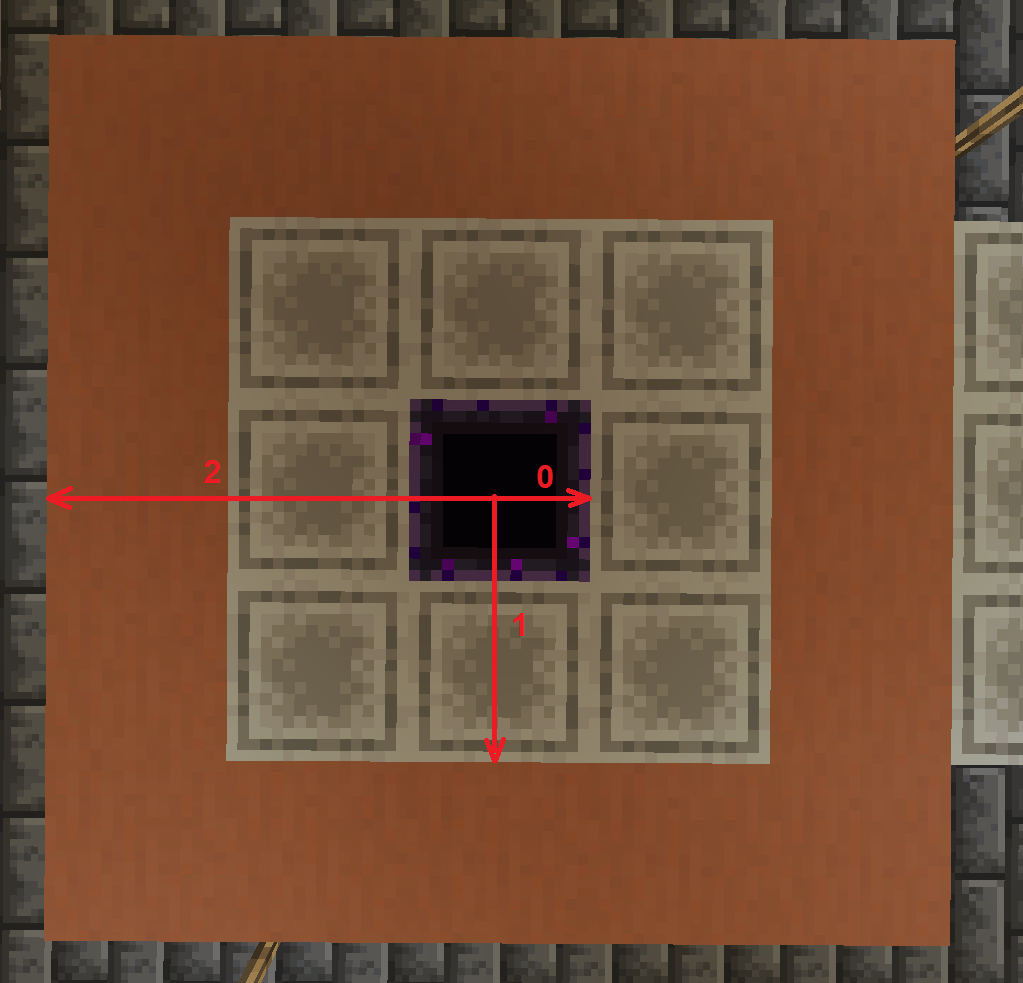
Food Level: The amount of hunger bars that should be hold.
Mining speed: The speed of which blocks should be broken. Fast can cause some issues between client and server, so blocks may reappear.
Boolean Settings:
Protect tool: Protects your tool from breaking and stops using it at low durability. Higher mining range increases that minimum durability.
Switch Tool: Makes you switch the tool for the appropriate one. Turning that of, allows to only mine the appropriate material (pickaxe -> stone, shovel -> dirt etc.)
Break no tool blocks: Toggle weather blocks that don't have a tool should be broken or not. A simple example is glas or glowstone.
Save Mining Mode: Lock the position on the block you activated first time. You can look independently and as long as you are close enough, the blocks in the target area will be broken.
Eat epic food: Toggles weather gold apples and enchanted golden apples should be eaten or not.
If you have any Questions, feel free to ask in comments.
German-translations is added too.
Feel free to check out my other mods:
give me more mod (refills your current inventory slot if empty, helpful for building, also works only client side)
moretooltips (shows the nbt-data of an item in the inventory)
Client Builders Wand (Allows Building like you have a builders wand.)
Beschreibung
Eine kleine Mod, die es dir erlaubt, Minecraft in den Hintergrund zu stellen, z.B. über den Pause oder Inventar Screen und im Hintergrund weiter abzubauen. Die Modifikation wechselt automatisch zu Werkzeugen den selben Typs und besitz einen umschaltbaren Werkzeugschutz.
Zudem ist eine automatischer Hungerschutz eingebaut, der essen aus der Hotbar oder Offhand nutz, um ein gewisses Hungerlevel zu halten. Das Hungerlevel ist umschaltbar oder auch ganz abschaltbar.
Diese Modifikation kann bei einigen Servern als Cheaten oder Boten angesehen werden, also benutze sie nicht, wenn sie nicht erlaubt ist und beschuldige mich nicht, wenn du die Modifikation gegen die Serverregeln verwendest.
Fragen können gerne in den Kommentaren gestellt werden.
Available Versions
How to Install Automining on Your Server
Order Server
Order a Minecraft Java server with at least 3 GB RAM (4 GB recommended).
Set fabric Loader
In the panel under "Egg", select the fabric loader and matching Minecraft version (1.21.11).
Install Mod
Open the mod browser in the dashboard and search for "Automining". Click "Install" – done! Alternatively, upload the .jar via SFTP to the /mods folder.
Compatibility
Mod Loaders
Minecraft Versions
1.21.11, 1.21.10, 1.21.9 (+17 more)
Server-side
✗ UnsupportedRecommended RAM
4 GB(min. 3 GB)Frequently Asked Questions
Automining server crashes on startup – what to do?
Most common cause: wrong fabric version or insufficient RAM. Check the server log (latest.log) for "OutOfMemoryError" or "Mixin" errors. With Mado Hosting: ensure at least 3 GB RAM is allocated and the loader matches the mod version (1.21.11). You can switch loaders with one click in the panel.
Is Automining compatible with fabric and forge and neoforge?
Automining officially supports fabric, forge, neoforge for Minecraft 1.21.11, 1.21.10, 1.21.9. Note: Forge and Fabric mods are NOT cross-compatible – pick one loader and stick with it. The Mado dashboard automatically detects incompatible loader combinations.
Server lagging with Automining – how to optimize performance?
Recommended RAM: 4 GB (per 8 players). Use /spark profiler to check if Automining consumes the most tick time. Common fixes: reduce server view-distance to 8-10, install "performant" or "starlight" as supplementary mods on Forge. With Mado Hosting, your server runs on NVMe SSDs with dedicated CPU cores for minimal latency.
Similar Mods




![[ETF] Entity Texture Features](https://cdn.modrinth.com/data/BVzZfTc1/af683d206d50b05258d865b0d6e4aa2f2cee12f2_96.webp)
![[EMF] Entity Model Features](https://cdn.modrinth.com/data/4I1XuqiY/6e5bbd0d06b1741bfdab6c0cfab6de8fdaf0064c_96.webp)
Rent Modded Server
Install Automining with just one click on your server.