
AutoMLG+
AutoMLG+ (Press M to toggle) is a client-side Fabric mod that negates lethal fall damage using water/fish buckets, powder snow, boats, cobwebs, scaffolding, sweet berries, slime, hay bales, twisting vines, beds, slow falling potions, and chorus fruits.
Screenshots
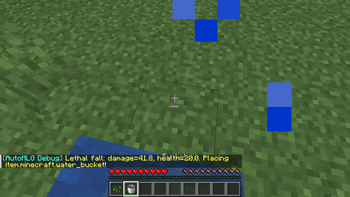
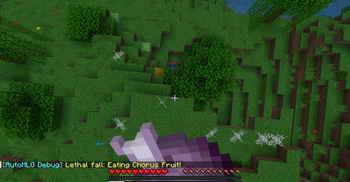
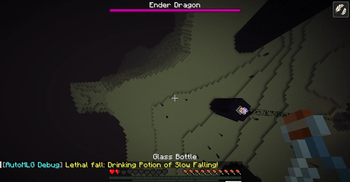
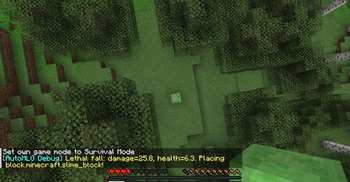
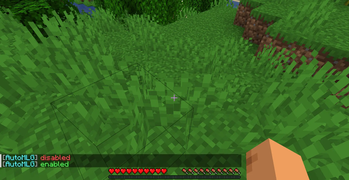
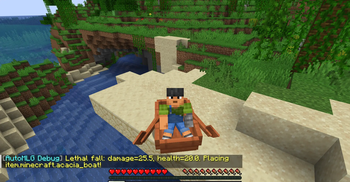
About this Mod
AutoMLG+
AutoMLG+ (press M to toggle) is a client-side Fabric mod that negates lethal fall damage using water/fish buckets, powder snow, boats, cobwebs, scaffolding, sweet berries, slime blocks, hay bales, twisting vines, beds, slow falling potions, and chorus fruits.
What This Mod Does
AutoMLG+ automatically clutches and negates lethal fall damage immediately before you hit the ground. Simply fall or jump from any height as usual, and the mod instantly places a saving block, mounts a boat, teleports you, or slows your descent using items from your inventory.
Perfect for surviving high cliffs, exploration, and hardcore worlds without the fear of falling.
Key Features
Lag-Immune Direct Placement – Bypasses the vanilla 2-tick keybind input delays. Placements are sent to the server the exact microsecond you cross the survival reach boundary.
Dimension-Aware Smart Priorities – Filters priority lists dynamically. Ignores water buckets and beds in the Nether, handles water-sensitive checks in the End, and prefers boat clutches over lava.
Dynamic Heart Protection – Calculates lethal fall damage dynamically based on your current health (hearts) and golden absorption hearts. The mod will never waste items or place blocks on non-lethal falls.
Auto-Boat Riding – Places the boat under your feet and instantly triggers a mount interaction, seating you safely inside the boat to negate 100% of fall damage.
Auto-Fluid Pickup – Places water or powder snow and automatically scoops it back up exactly 250ms (5 ticks) later, dynamically verified by the state of your held bucket.
Multi-Stage Clutches
Auto Scaffolding Sneak – Places scaffolding and immediately sneaks to suspend you safely without taking damage.
Consumption Clutching (Chorus Fruit & Potions) – Detects when you hold a Chorus Fruit or drinkable Potion of Slow Falling, expands ground scanning up to 120.0 blocks, and drinks/eats it in mid-air to safe-teleport or slow your fall in time. Also supports splash and lingering Slow Falling potions.
Trajectory & Safe-Landing Scanning – Scans block collisions below your falling path. If climbable ladders, vines, water, leaves, or scaffolding are already present, the mod skips clutching, saving your items.
Auto-Inventory Swap – If a clutch item isn't in your hotbar, the mod automatically swaps the highest-priority item from your main inventory to your selected hotbar slot in a split second.
Smooth Camera Control – Locks your pitch straight down for block placements and fluid clutches, but remains unlocked when consuming chorus fruits or potions.
Simple Toggle – Press M anytime to enable or disable AutoMLG+.
Supports Multiple Clutch Items
- Water & Fish Buckets
- Powder Snow Buckets
- Boats & Chest Boats
- Cobwebs
- Scaffolding
- Sweet Berries
- Slime Blocks
- Hay Bales
- Twisting Vines
- Beds
- Slow Falling Potions
- Chorus Fruits
Lightweight – Minimal performance impact.
Clean & Simple – Mimics client-side packet interactions with zero configuration needed.
How to Use
Quick Start
- Fall from a high place normally.
- The clutch is executed automatically before impact.
- Press M anytime to toggle AutoMLG+ on or off.
Installation
Requirements
- Minecraft 1.21+
- Fabric Loader
- Fabric API
Steps
- Install Fabric Loader for Minecraft 1.21+.
- Download and install Fabric API.
- Download AutoMLG+.
- Place both mods into your
modsfolder. - Launch Minecraft and enjoy worry-free exploration.
Perfect For
- Survival Exploration – Scale high mountains and deep caves safely.
- Hardcore Worlds – An extra safety layer to protect your long-term progress.
- Nether & End Travelling – Travel safely around lava lakes and void islands.
- Risky Building – Build huge structures without worrying about falling off.
- Casual Survival – Relax knowing you are safe from sudden falling deaths.
Technical Details
- Client-side lightweight utility mod
- Fabric 1.21+ compatible
- Low resource usage
- Simple keybind support
- Easy to use with no configuration needed
Support
Donation: Buy Me Mo:Mo
Available Versions
How to Install AutoMLG+ on Your Server
Order Server
Order a Minecraft Java server with at least 3 GB RAM (4 GB recommended).
Set fabric Loader
In the panel under "Egg", select the fabric loader and matching Minecraft version (1.21.3).
Install Mod
Open the mod browser in the dashboard and search for "AutoMLG+". Click "Install" – done! Alternatively, upload the .jar via SFTP to the /mods folder.
Compatibility
Mod Loaders
Minecraft Versions
1.21.3, 1.21.2, 1.21.1 (+1 more)
Server-side
✗ UnsupportedRecommended RAM
4 GB(min. 3 GB)Frequently Asked Questions
AutoMLG+ server crashes on startup – what to do?
Most common cause: wrong fabric version or insufficient RAM. Check the server log (latest.log) for "OutOfMemoryError" or "Mixin" errors. With Mado Hosting: ensure at least 3 GB RAM is allocated and the loader matches the mod version (1.21.3). You can switch loaders with one click in the panel.
Is AutoMLG+ compatible with fabric?
AutoMLG+ officially supports fabric for Minecraft 1.21.3, 1.21.2, 1.21.1. The Mado dashboard automatically detects incompatible loader combinations.
Server lagging with AutoMLG+ – how to optimize performance?
Recommended RAM: 4 GB (per 8 players). Use /spark profiler to check if AutoMLG+ consumes the most tick time. Common fixes: reduce server view-distance to 8-10, install "performant" or "starlight" as supplementary mods on Forge. With Mado Hosting, your server runs on NVMe SSDs with dedicated CPU cores for minimal latency.
Similar Mods




![[ETF] Entity Texture Features](https://cdn.modrinth.com/data/BVzZfTc1/af683d206d50b05258d865b0d6e4aa2f2cee12f2_96.webp)
![[EMF] Entity Model Features](https://cdn.modrinth.com/data/4I1XuqiY/6e5bbd0d06b1741bfdab6c0cfab6de8fdaf0064c_96.webp)
Rent Modded Server
Install AutoMLG+ with just one click on your server.