
AutoRelog
Automatically reconnect to a restarting server while AFK!
Screenshots
About this Mod
AutoRelog


A mod that lets you automatically reconnect to a restarting Minecraft server when AFK.
Make sure to have proper overflow protection in your farms!
Using AutoRelog
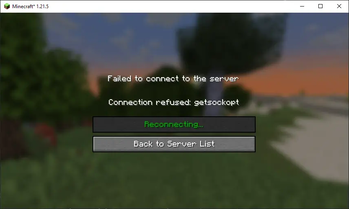
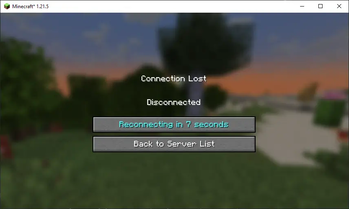
When getting disconnected from a server with AutoRelog active (see AFK Detection),
the disconnect screen will show a button with a countdown before it will try to
automatically reconnect to the server:

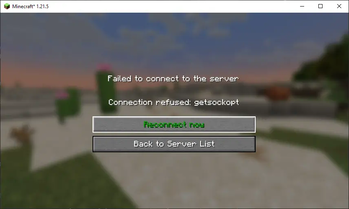
Hovering on the button will give you the option to try reconnecting right away.
This can be used if you know the server is accessible again before the countdown is over:

When AutoRelog is trying to reconnect the button becomes inactive:

AFK Detection
AutoRelog wil automatically try to reconnect 60 seconds after you are disconnected. If you
want to activate AutoRelog manually, check out the Mod Menu settings, or change the setting
in the autorelog.json file to "mode": "AUTOMATIC".
Type /autorelog to activate automatic reconnection after 60 seconds.
Leave the server or use /autorelog again to deactivate.
FAQ
Will AutoRelog be backported to Minecraft 1.x.x?
Since we use Stonecutter now (#37) it's much easier to backport to older versions. But since I don't necessarily play
those old versions, I'll wait with backporting further than 1.19 for now.
If you play on an older version, and you want to use AutoRelog, just create
a ticket titled "1.18 support" or something, and I'll see if I have
time for it.
Version 1.x.x of AutoRelog crashes/doesn't work
All the versions should work, but sometimes I miss something in the changes in Minecraft, Fabric, or the Yarn mappings.
If you encounter any crashes or other issues just create a ticket,
and I'll test for that version specifically.
Will AutoRelog be ported to Forge/Neoforge?
I mostly play with Fabric mods, so I don't really have a need for a Forge version of AutoRelog. However, adding support
might be something I'd like to add in the future.
Contributing
If you want to help out by creating a pull request, please add version updates to a separate pull request.
Thanks for your contribution!
- yichifauzi and notlin4 for Chinese translations
- EEHoveckis for Latvian translations~~~~
Available Versions
How to Install AutoRelog on Your Server
Order Server
Order a Minecraft Java server with at least 3 GB RAM (4 GB recommended).
Set fabric Loader
In the panel under "Egg", select the fabric loader and matching Minecraft version (1.21.11).
Install Mod
Open the mod browser in the dashboard and search for "AutoRelog". Click "Install" – done! Alternatively, upload the .jar via SFTP to the /mods folder.
Compatibility
Mod Loaders
Minecraft Versions
1.21.11, 1.21.10, 1.21.9 (+21 more)
Server-side
✗ UnsupportedRecommended RAM
4 GB(min. 3 GB)Frequently Asked Questions
AutoRelog server crashes on startup – what to do?
Most common cause: wrong fabric version or insufficient RAM. Check the server log (latest.log) for "OutOfMemoryError" or "Mixin" errors. With Mado Hosting: ensure at least 3 GB RAM is allocated and the loader matches the mod version (1.21.11). You can switch loaders with one click in the panel.
Is AutoRelog compatible with fabric?
AutoRelog officially supports fabric for Minecraft 1.21.11, 1.21.10, 1.21.9. The Mado dashboard automatically detects incompatible loader combinations.
Server lagging with AutoRelog – how to optimize performance?
Recommended RAM: 4 GB (per 8 players). Use /spark profiler to check if AutoRelog consumes the most tick time. Common fixes: reduce server view-distance to 8-10, install "performant" or "starlight" as supplementary mods on Forge. With Mado Hosting, your server runs on NVMe SSDs with dedicated CPU cores for minimal latency.
Similar Mods




![[ETF] Entity Texture Features](https://cdn.modrinth.com/data/BVzZfTc1/af683d206d50b05258d865b0d6e4aa2f2cee12f2_96.webp)
![[EMF] Entity Model Features](https://cdn.modrinth.com/data/4I1XuqiY/6e5bbd0d06b1741bfdab6c0cfab6de8fdaf0064c_96.webp)
Rent Modded Server
Install AutoRelog with just one click on your server.