
AutoSwitch Enchant
AutoSwitch Enchant — Smart tool switching with enchantment rules awareness
Screenshots
About this Mod
AutoSwitch Enchant
Automatic tool switching based on enchantment rules for Minecraft 1.21.10 (Fabric).
Features
- Automatic Switching — the mod automatically selects the right tool when you start mining a block
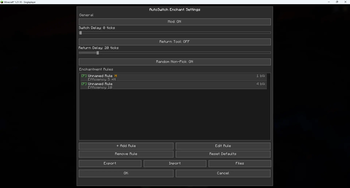
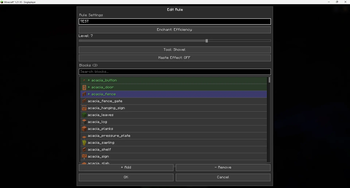
- Enchantment Rules — configure which enchanted tool to use for each block
- Efficiency 1–10 (supports mods with levels above the vanilla maximum)
- Silk Touch
- Fortune 1–3
- Smart Haste Awareness — rules with the
considerHasteflag only activate when the Haste effect is active, saving tool durability - Tool Type — choose which tool the rule applies to: pickaxe, shovel, axe, hoe, sword, shears, or any
- Instant-Mine — the mod calculates mining speed accounting for Efficiency, Haste, and Mining Fatigue, and picks the tool with the minimum level sufficient for instant mining
- Rule Priority — Silk Touch > Fortune > Efficiency
- Tool Return — optionally switch back to the previous hotbar slot after mining
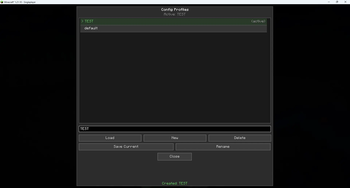
- Configuration Profiles — create and switch between multiple config profiles
- Base64 Import/Export — share your settings with other players via a Base64 string
- Minecraft Keybind Settings — two reassignable keys in the "AutoSwitch" category:
- B — open the config menu
- H — toggle the mod on/off
- ModMenu Integration — access settings through the ModMenu mod list
- 12 Languages — EN, RU, UK, DE, FR, ES, IT, PL, PT-BR, KO, JA, ZH-CN
How It Works
- You create rules like: "For Stone — Pickaxe with Efficiency 5 + Haste"
- When you start breaking a block, the mod checks:
- Do you have the Haste effect?
- Is the Efficiency level high enough for instant mining?
- Which tool in your inventory is the best match?
- The mod automatically switches your hotbar slot to the optimal tool
- If tool return is enabled — it switches back to the previous tool after mining
Example: Haste + Efficiency 5
Stone (hardness 1.5) requires a mining speed ≥ 45 for instant mining.
| Situation | Pickaxe | Speed | Instant? |
|---|---|---|---|
| No Haste | Eff 5 Diamond | ~45 | Barely |
| Haste II | Eff 5 Diamond | ~63 | Yes |
| No Haste | Eff 10 Diamond | ~126 | Yes |
The mod will choose Eff 5 if you have Haste (saving durability!), and Eff 10 if you don't have Haste.
Installation
- Install Fabric Loader for Minecraft 1.21.10
- Install Fabric API
- (Optional) Install ModMenu to access settings from the mod menu
Configuration
- In-game: press B (default) or open via ModMenu
- Toggle key: press H (default) — toggles the mod on/off with an action bar notification
- In Minecraft settings: Options → Controls → Key Bindings → "AutoSwitch" category
Requirements
- Minecraft 1.21.10
- Fabric Loader 0.19.2+
- Fabric API
- Java 21+
Available Versions
How to Install AutoSwitch Enchant on Your Server
Order Server
Order a Minecraft Java server with at least 3 GB RAM (4 GB recommended).
Set fabric Loader
In the panel under "Egg", select the fabric loader and matching Minecraft version (1.21.10).
Install Mod
Open the mod browser in the dashboard and search for "AutoSwitch Enchant". Click "Install" – done! Alternatively, upload the .jar via SFTP to the /mods folder.
Compatibility
Mod Loaders
Minecraft Versions
1.21.10
Server-side
✗ UnsupportedRecommended RAM
4 GB(min. 3 GB)Frequently Asked Questions
AutoSwitch Enchant server crashes on startup – what to do?
Most common cause: wrong fabric version or insufficient RAM. Check the server log (latest.log) for "OutOfMemoryError" or "Mixin" errors. With Mado Hosting: ensure at least 3 GB RAM is allocated and the loader matches the mod version (1.21.10). You can switch loaders with one click in the panel.
Is AutoSwitch Enchant compatible with fabric?
AutoSwitch Enchant officially supports fabric for Minecraft 1.21.10. The Mado dashboard automatically detects incompatible loader combinations.
Server lagging with AutoSwitch Enchant – how to optimize performance?
Recommended RAM: 4 GB (per 8 players). Use /spark profiler to check if AutoSwitch Enchant consumes the most tick time. Common fixes: reduce server view-distance to 8-10, install "performant" or "starlight" as supplementary mods on Forge. With Mado Hosting, your server runs on NVMe SSDs with dedicated CPU cores for minimal latency.
Similar Mods




Rent Modded Server
Install AutoSwitch Enchant with just one click on your server.