
AxisLock
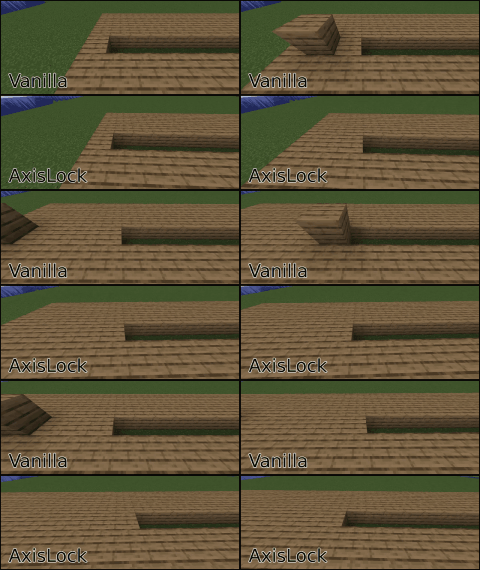
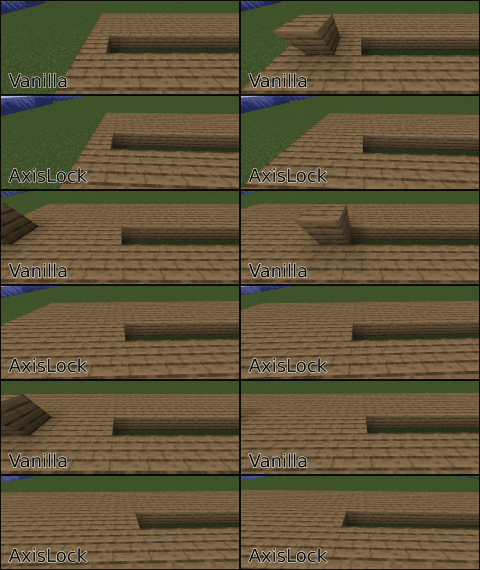
Axis Lock is a mod that prevents you from placing blocks out of a given axis.
Screenshots
About this Mod
Tired of wobbly lines and uneven floors? This client-side mod lets you lock block placement to the X, Y, or Z axis for perfectly straight walls, flat floors, and aligned structures.
How to Use:
- Activate AxisLock:
Press R (default) to toggle the mod on/off. Or, assign a key in settings to hold for temporary lock. - Select Axis: Press Y (default) to cycle through X, Y, or Z.
- Place First Block: This sets the reference point on your chosen axis.
- Build Straight: While holding your "place block" key (right-click), axislock will prevent you from placing blocks out of the selected axis coordinate!
This mod uses Architectury API and Cloth Config API. If you're using fabric or quilt, you may also need Mod Menu
Manual Reference Point
- AxisLock now allows you to manually set a specific block as the reference point by pressing the assigned key (default: B). Once set, this block will remain as the fixed reference point even after releasing the mouse button, allowing for more precise and consistent locking. To update the reference point, press the reference point key again.
- You can reset the reference point, look at the air and press the key or press the key quickly twice.
AxisLock Modes
- By using the Cycle Mode Key (default: N) you can choose to block block placement, block breaking or both.
Client-side only. Before using this mod on servers check the server rules or ask a moderator. Use at your own risk.
AxisLock is a Fabric (Quilt compatible) and NeoForge mod. There probably won't be a build for Forge until it supports Architectury API in 1.21
It is recommended to use this mod together with accurate block placement or an autoclicker.
AxisLock is now feature complete. This doesn't mean It won't get any more features anymore. But by now I will only update It to fix bugs or when new Minecraft versions come out.
Available Versions
How to Install AxisLock on Your Server
Order Server
Order a Minecraft Java server with at least 3 GB RAM (4 GB recommended).
Set fabric Loader
In the panel under "Egg", select the fabric loader and matching Minecraft version (1.21.7).
Install Mod
Open the mod browser in the dashboard and search for "AxisLock". Click "Install" – done! Alternatively, upload the .jar via SFTP to the /mods folder.
Compatibility
Mod Loaders
Minecraft Versions
1.21.7, 1.21.6, 1.21.5
Server-side
✗ UnsupportedRecommended RAM
4 GB(min. 3 GB)Frequently Asked Questions
AxisLock server crashes on startup – what to do?
Most common cause: wrong fabric version or insufficient RAM. Check the server log (latest.log) for "OutOfMemoryError" or "Mixin" errors. With Mado Hosting: ensure at least 3 GB RAM is allocated and the loader matches the mod version (1.21.7). You can switch loaders with one click in the panel.
Is AxisLock compatible with fabric and neoforge and quilt?
AxisLock officially supports fabric, neoforge, quilt for Minecraft 1.21.7, 1.21.6, 1.21.5. The Mado dashboard automatically detects incompatible loader combinations.
Server lagging with AxisLock – how to optimize performance?
Recommended RAM: 4 GB (per 8 players). Use /spark profiler to check if AxisLock consumes the most tick time. Common fixes: reduce server view-distance to 8-10, install "performant" or "starlight" as supplementary mods on Forge. With Mado Hosting, your server runs on NVMe SSDs with dedicated CPU cores for minimal latency.
Similar Mods




Rent Modded Server
Install AxisLock with just one click on your server.