
AxisRuler
A clean and lightweight axis & measurement overlay for Minecraft — build with precision and perfect alignment.
Screenshots


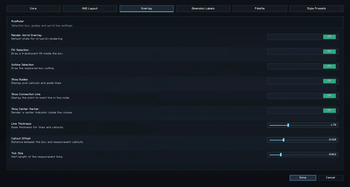
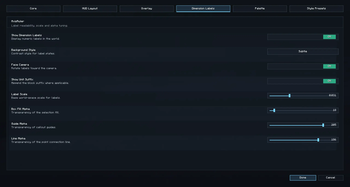

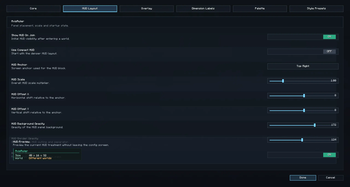
About this Mod
AxisRuler
Build with precision, not guesswork.
AxisRuler is a clean and lightweight client-side tool that shows exact dimensions directly in your Minecraft world, helping you align, measure, and build with confidence.
Instead of counting blocks or placing temporary markers, you get clear X, Y, and Z measurements instantly, right where you need them.

✨ What it does
AxisRuler gives you real-time spatial feedback so you can:
• measure width, height, and depth between two points
• preview the result before confirming the second point
• understand structure size at a glance
• check alignment before placing blocks
• keep important measurements visible while building
Everything is designed to stay readable and useful without cluttering your screen.
🧱 Built for builders
Whether you are:
• designing interiors
• planning layouts
• building large structures
• refining symmetry and spacing
AxisRuler helps you make faster and more accurate decisions.
🕹 How to use
AxisRuler works with Alt + keybinds.
Basic workflow:
- Look at a block and press
Alt + Zto set Point A - Look at another block and press
Alt + Xto set Point B - AxisRuler will show the X / Y / Z size in-world and in the HUD
After Point A is set, the mod shows a live preview on the block under your crosshair before you confirm Point B.
Default controls:
• Alt + Z set Point A
• Alt + X set Point B
• Alt + C clear points
• Alt + V swap points
• Alt + R cycle measurement mode
• Alt + H toggle HUD
• Alt + G toggle guides
• Alt + L toggle labels
• Alt + J toggle connection line
• Alt + M copy current measurement
• Alt + P pin current measurement
• Alt + U clear all pinned measurements
Pinned measurements let you keep finished boxes visible while working on something else.
You can also rebind everything in:
Options -> Controls -> AxisRuler
⚙️ Key Features
• Two-point measurement system with exact X / Y / Z readouts
• Live in-world preview after setting Point A
• Pinned measurements for keeping finished boxes visible on screen
• Clean in-world visualization with selection box, axis guides, labels, and connection lines
• Compact HUD with always-visible measurements
• Full color customization for overlay and HUD
• Built-in presets plus custom preset saving
• Lightweight and optimized rendering
• Fully client-side, no server setup required
🎨 Customization
AxisRuler adapts to your setup instead of forcing a fixed style.
You can customize:
• overlay colors for points, box, lines, and axis guides
• label and measurement text colors
• full HUD styling including text, background, border, and accents
• HUD position, scale, and layout
• visual presets or your own saved styles
All changes apply instantly, so tuning feels natural and fast.
⚡ Performance
AxisRuler is designed for real gameplay and long building sessions:
• no heavy background systems
• optimized rendering
• smooth performance in normal play and large builds
• works well with Sodium and modern Fabric setups
🔧 Compatibility
• Fabric
• Client-side only
• Safe to use on multiplayer servers
• No server installation required
Supported Minecraft lines:
• 1.21.4
• 1.21.8
• 1.21.11
• 26.1 to 26.1.2
Make sure to download the jar that matches your Minecraft version.
🧠 Philosophy
AxisRuler is built around clarity, precision, and usability.
It gives you the information you need in a form that stays clean, reliable, and easy to use while you build.
Available Versions
How to Install AxisRuler on Your Server
Order Server
Order a Minecraft Java server with at least 3 GB RAM (4 GB recommended).
Set fabric Loader
In the panel under "Egg", select the fabric loader and matching Minecraft version (26.1.2).
Install Mod
Open the mod browser in the dashboard and search for "AxisRuler". Click "Install" – done! Alternatively, upload the .jar via SFTP to the /mods folder.
Compatibility
Mod Loaders
Minecraft Versions
26.1.2, 26.1.1, 26.1 (+3 more)
Server-side
✗ UnsupportedRecommended RAM
4 GB(min. 3 GB)Frequently Asked Questions
AxisRuler server crashes on startup – what to do?
Most common cause: wrong fabric version or insufficient RAM. Check the server log (latest.log) for "OutOfMemoryError" or "Mixin" errors. With Mado Hosting: ensure at least 3 GB RAM is allocated and the loader matches the mod version (26.1.2). You can switch loaders with one click in the panel.
Is AxisRuler compatible with fabric?
AxisRuler officially supports fabric for Minecraft 26.1.2, 26.1.1, 26.1. The Mado dashboard automatically detects incompatible loader combinations.
Server lagging with AxisRuler – how to optimize performance?
Recommended RAM: 4 GB (per 8 players). Use /spark profiler to check if AxisRuler consumes the most tick time. Common fixes: reduce server view-distance to 8-10, install "performant" or "starlight" as supplementary mods on Forge. With Mado Hosting, your server runs on NVMe SSDs with dedicated CPU cores for minimal latency.
Similar Mods




Rent Modded Server
Install AxisRuler with just one click on your server.