
Axolostry
The axolotl breeding is greate
Screenshots

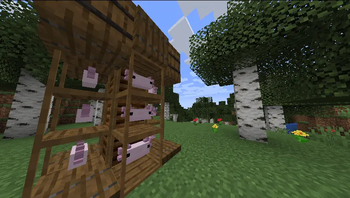
About this Mod
Axolostry
Axolostry adds an axolotl breeding system that allows you to breed new varieties that inherit traits from their parents. The mod was inspired by the Forestry mod and copies some of its ideas.
Mechanics
1 Genetic system
When axolotls are bred, their offspring inherit a set of characteristics from their parents. The inherited parameters include color, speed, health, and regeneration. Genes can be identified in the analyzer.
2 New species
When crossing axolotls of different colors, it will be possible to obtain axolotls of a completely different color. For example, when crossing pink and blue, you can get lavender.
3 Life system
In order for axolotls to live, reproduce, and provide resources, they must be placed in a farm block. You need to fill it with water; 1 block holds 6 buckets, and 1 axolotl consumes half a bucket of water per life. To increase or decrease the life span, you can put pieces of fish in the block.
4 Resources
Axolotls can provide different resources depending on the species. The more complex the axolotl is bred, the cooler its resources will be. The speed of resource generation depends on genes, but it can also be influenced in other ways.
Available Versions
How to Install Axolostry on Your Server
Order Server
Order a Minecraft Java server with at least 3 GB RAM (4 GB recommended).
Set fabric Loader
In the panel under "Egg", select the fabric loader and matching Minecraft version (1.21.1).
Install Mod
Open the mod browser in the dashboard and search for "Axolostry". Click "Install" – done! Alternatively, upload the .jar via SFTP to the /mods folder.
Compatibility
Mod Loaders
Minecraft Versions
1.21.1
Server-side
✓ RequiredRecommended RAM
4 GB(min. 3 GB)Frequently Asked Questions
Axolostry server crashes on startup – what to do?
Most common cause: wrong fabric version or insufficient RAM. Check the server log (latest.log) for "OutOfMemoryError" or "Mixin" errors. With Mado Hosting: ensure at least 3 GB RAM is allocated and the loader matches the mod version (1.21.1). You can switch loaders with one click in the panel.
Is Axolostry compatible with fabric?
Axolostry officially supports fabric for Minecraft 1.21.1. The Mado dashboard automatically detects incompatible loader combinations.
Server lagging with Axolostry – how to optimize performance?
Recommended RAM: 4 GB (per 8 players). Use /spark profiler to check if Axolostry consumes the most tick time. Common fixes: reduce server view-distance to 8-10, install "performant" or "starlight" as supplementary mods on Forge. With Mado Hosting, your server runs on NVMe SSDs with dedicated CPU cores for minimal latency.
Similar Mods




Rent Modded Server
Install Axolostry with just one click on your server.
Details
- License
- Creative Commons Attribution Non Commercial Share Alike 4.0 International
- Server-side
- Required