
Backpack Display
A mod to show what's in your backpacks, drawers, or any similar containers
Screenshots
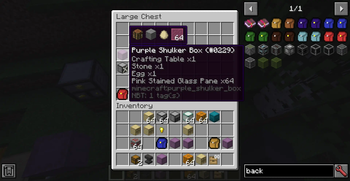
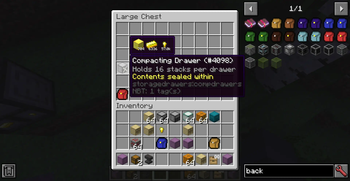
About this Mod
BackpackDisplay
Adds a tooltip to show what's in your backpack, shulker box or other container item.
Configurable of how to get contents for the container item.
The mod has out-of-the-box support for vanilla shulker boxes, storage drawers drawers, and forestry backpacks. You can add support to more items by writing custom rules in the mod's config.
Configurable options(See the mod's config):
- The items that the mod's tooltip should be shown for
- Position and color of the tooltip
- Optional hold or release a keybind to show the tooltip
Config Format
displayRules is the main config of the mod. It lets you to add new container items to display the backpack tooltip, with the following format:
Format: <modID>:<itemID>[:meta]#<rule type>#<rule definition>
meta is a comma-separated list for meta-values to match.
For example,1,2,5-8 allows tooltip to show on the item with metadata 1,2,5,6,7,8.
When meta is absent, tooltip to show on the item ignoring meta.
Rule definition is according to the rule type selected.
Paths
Path is commonly used in the rules, and have a format like path.to.the.item.
For example, in this NBT structure:
{"list":[{"key1":"value"},{"key2":"item"}]}
The path list.1.key2 will get the tag "item" from it.
List rule
Rule type: list
In this rule, items are all under a NBTTagList or a NBTTagCompound.
Rule definition:path.to.the.list[;path.to.the.itemstack[;path.to.the.counts]]
The last 2 paths is relative to the tag item in the list.
If the counts is absent, the count in the itemstack is used instead.
Example: Show contents when hovering a purple shulker box
minecraft:purple_shulker_box#list#BlockEntityTag.Items
Single rule
Rule type: single
In this rule, an item is under a fixed path, with an optional external count value.
Rule definition:path.to.the.itemstack[;path.to.the.counts[;calculations for the counts]]
If the counts is absent, the count in the itemstack is used instead.
Example: Show content for every basic drawers in storage drawers mod
storagedrawers:basicdrawers:0#single#BlockEntityTag.Drawers.0.Item;BlockEntityTag.Drawers.0.Count
storagedrawers:basicdrawers:1,3#single#BlockEntityTag.Drawers.0.Item;BlockEntityTag.Drawers.0.Count
storagedrawers:basicdrawers:1,3#single#BlockEntityTag.Drawers.1.Item;BlockEntityTag.Drawers.1.Count
storagedrawers:basicdrawers:2,4#single#BlockEntityTag.Drawers.0.Item;BlockEntityTag.Drawers.0.Count
storagedrawers:basicdrawers:2,4#single#BlockEntityTag.Drawers.1.Item;BlockEntityTag.Drawers.1.Count
storagedrawers:basicdrawers:2,4#single#BlockEntityTag.Drawers.2.Item;BlockEntityTag.Drawers.2.Count
storagedrawers:basicdrawers:2,4#single#BlockEntityTag.Drawers.3.Item;BlockEntityTag.Drawers.3.Count
This rule supports further calculation to get the real item count if it's not in the tag directly but can be calculated from the values in the tag.
Calculations are a string starting with a operator in +-*/^% and followed by a path. The order of calculation is like that on a basic calculator that cannot input expressions.
All calculations is done in integer.
Example: Show content for compact drawers in storage drawers mod
storagedrawers:compdrawers#single#BlockEntityTag.Drawers.Items.0.Item;BlockEntityTag.Drawers.Count;/BlockEntityTag.Drawers.Items.0.Conv
storagedrawers:compdrawers#single#BlockEntityTag.Drawers.Items.1.Item;BlockEntityTag.Drawers.Count;/BlockEntityTag.Drawers.Items.1.Conv
storagedrawers:compdrawers#single#BlockEntityTag.Drawers.Items.2.Item;BlockEntityTag.Drawers.Count;/BlockEntityTag.Drawers.Items.2.Conv
Available Versions
How to Install Backpack Display on Your Server
Order Server
Order a Minecraft Java server with at least 3 GB RAM (4 GB recommended).
Set fabric Loader
In the panel under "Egg", select the fabric loader and matching Minecraft version (1.20.1).
Install Mod
Open the mod browser in the dashboard and search for "Backpack Display". Click "Install" – done! Alternatively, upload the .jar via SFTP to the /mods folder.
Compatibility
Mod Loaders
Minecraft Versions
1.20.1, 1.12.2
Server-side
✗ UnsupportedRecommended RAM
4 GB(min. 3 GB)Frequently Asked Questions
Backpack Display server crashes on startup – what to do?
Most common cause: wrong fabric version or insufficient RAM. Check the server log (latest.log) for "OutOfMemoryError" or "Mixin" errors. With Mado Hosting: ensure at least 3 GB RAM is allocated and the loader matches the mod version (1.20.1). You can switch loaders with one click in the panel.
Is Backpack Display compatible with fabric and forge?
Backpack Display officially supports fabric, forge for Minecraft 1.20.1, 1.12.2. Note: Forge and Fabric mods are NOT cross-compatible – pick one loader and stick with it. The Mado dashboard automatically detects incompatible loader combinations.
Server lagging with Backpack Display – how to optimize performance?
Recommended RAM: 4 GB (per 8 players). Use /spark profiler to check if Backpack Display consumes the most tick time. Common fixes: reduce server view-distance to 8-10, install "performant" or "starlight" as supplementary mods on Forge. With Mado Hosting, your server runs on NVMe SSDs with dedicated CPU cores for minimal latency.
Similar Mods




![[ETF] Entity Texture Features](https://cdn.modrinth.com/data/BVzZfTc1/af683d206d50b05258d865b0d6e4aa2f2cee12f2_96.webp)
![[EMF] Entity Model Features](https://cdn.modrinth.com/data/4I1XuqiY/6e5bbd0d06b1741bfdab6c0cfab6de8fdaf0064c_96.webp)
Rent Modded Server
Install Backpack Display with just one click on your server.