
Balanced Skeleton
Balanced Skeletons fixes that by making skeletons less oppressive while keeping them part of the game.
Screenshots

About this Mod
Balanced Skeletons
Skeletons can be frustrating, especially in large modpacks. They shoot too fast, too far, and too accurately, making combat feel unfair even with good gear.
Balanced Skeletons fixes that by making skeletons less oppressive while keeping them part of the game.
Features
- Reduces skeleton arrow damage
- Slows down skeleton attack speed
- Shortens attack range
- Adds real inaccuracy (they miss more often)
- Works with Skeletons and Strays
- Optional Wither Skeleton support
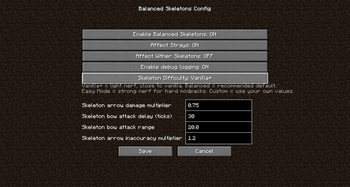
- Fully configurable
- Skeleton Difficulty
Choose how strong skeletons should be:
- Vanilla+ – Light nerf, close to vanilla
- Balanced – Recommended default
- Easy Mode – Strong nerf for hard modpacks
- Custom – Use your own values
Changing the difficulty automatically updates all balance settings.
Config Options
Enable/disable the mod
Damage multiplier
Attack delay
Attack range
Inaccuracy multiplier
Toggle Strays / Wither Skeletons
Debug logging
Purpose
This mod is designed for players and modpacks that feel skeletons are too strong or annoying, especially when combined with many other mobs.
It keeps skeletons dangerous, but makes combat more fair.
Notes
Does not change drops, health, or spawn rates
Lightweight and performance-friendly
Safe to use in existing worlds
Available Versions
How to Install Balanced Skeleton on Your Server
Order Server
Order a Minecraft Java server with at least 3 GB RAM (4 GB recommended).
Set forge Loader
In the panel under "Egg", select the forge loader and matching Minecraft version (1.20.1).
Install Mod
Open the mod browser in the dashboard and search for "Balanced Skeleton". Click "Install" – done! Alternatively, upload the .jar via SFTP to the /mods folder.
Compatibility
Mod Loaders
Minecraft Versions
1.20.1
Server-side
✓ RequiredRecommended RAM
4 GB(min. 3 GB)Frequently Asked Questions
Balanced Skeleton server crashes on startup – what to do?
Most common cause: wrong forge version or insufficient RAM. Check the server log (latest.log) for "OutOfMemoryError" or "Mixin" errors. With Mado Hosting: ensure at least 3 GB RAM is allocated and the loader matches the mod version (1.20.1). You can switch loaders with one click in the panel.
Is Balanced Skeleton compatible with forge?
Balanced Skeleton officially supports forge for Minecraft 1.20.1. The Mado dashboard automatically detects incompatible loader combinations.
Server lagging with Balanced Skeleton – how to optimize performance?
Recommended RAM: 4 GB (per 8 players). Use /spark profiler to check if Balanced Skeleton consumes the most tick time. Common fixes: reduce server view-distance to 8-10, install "performant" or "starlight" as supplementary mods on Forge. With Mado Hosting, your server runs on NVMe SSDs with dedicated CPU cores for minimal latency.
Similar Mods




Rent Modded Server
Install Balanced Skeleton with just one click on your server.