
BandwidthOptimizer
Save your MC bandwidth with big quantities.
Screenshots
About this Mod
BandwidthOptimizer
BandwidthOptimizer is a client-and-server network bandwidth optimization mod for
heavily modded Minecraft servers. It reduces repeated and compressible PLAY
traffic while trying to preserve the original Minecraft packet stream after
decoding.
It is designed for modpacks and public servers where login sync, custom payloads,
machine networks, storage systems, and repeated chunk visits can generate large
amounts of network traffic. It is not an FPS optimizer, and it should not be
treated as a replacement for normal server, proxy, or network tuning.


Support
Development Status
BandwidthOptimizer is still under active development. Bugs and mod compatibility
issues are still possible, especially in large modpacks, proxy networks, and
servers with heavy custom payload traffic.
The mod is designed to optimize network packets, not to modify world data or save
files. When a packet, boundary, or mod interaction looks unsafe, BandwidthOptimizer
tries to fall back to direct or bypass behavior instead of forcing optimization.
If you encounter an issue, please report it with client logs, server logs, proxy
logs if applicable, and BandwidthOptimizer report files. Compatibility reports,
suggestions, and contributions are welcome.
What It Does
- Wraps already encoded Minecraft packets into reversible transport frames.
- Compresses suitable packet payloads with streaming Zstd.
- Uses synchronized literal/template mapping for repeated packet structures.
- Batches safe small packet groups while respecting protocol and flush
boundaries. - Reuses chunk data through
full,ref, andpatchtransport decisions. - Keeps reusable chunk cache data across reconnects and compatible proxy server
switches. - Bypasses sensitive packets, protocol transitions, and unsafe timing boundaries
instead of forcing every packet through the same optimization path. - Provides HUD, server stats, source reports, bypass reports, and decoder dump
files for debugging and reproducible measurements.
How It Works
BandwidthOptimizer works below normal gameplay logic. On the sending side, it
observes packets after Minecraft or the loader has encoded a complete packet into
bytes. The transport layer may then wrap, batch, compress, or bypass that encoded
packet.
On the receiving side, the transport frame is unwrapped back into the original
encoded packet bytes before normal packet handling continues. The design goal is
packet-stream equivalence: after restoration, the receiver should see the same
packet types, packet contents, and relative order that it would have seen without
BandwidthOptimizer.
| Layer | Purpose |
|---|---|
| Transparent transport | Carries already encoded packet bytes without rewriting gameplay logic. |
| Streaming Zstd | Compresses packet bodies that benefit from byte-level compression. |
| Literal/template mapping | Reduces repeated packet structures while keeping sender and receiver state synchronized. |
| Light batch path | Uses cheaper batch encoding for sensitive flush paths where full template work is too expensive. |
| Chunk transport | Chooses full, ref, patch, or bypass for chunk-related traffic based on available cache state and safety checks. |
| Boundary control | Forces flush, bypass, warmup, or reset around protocol transitions, login/config/play changes, proxy switches, and stale epochs. |
| Reports | Records raw traffic, optimized traffic, bypass causes, packet ranks, and decoder failures for troubleshooting. |
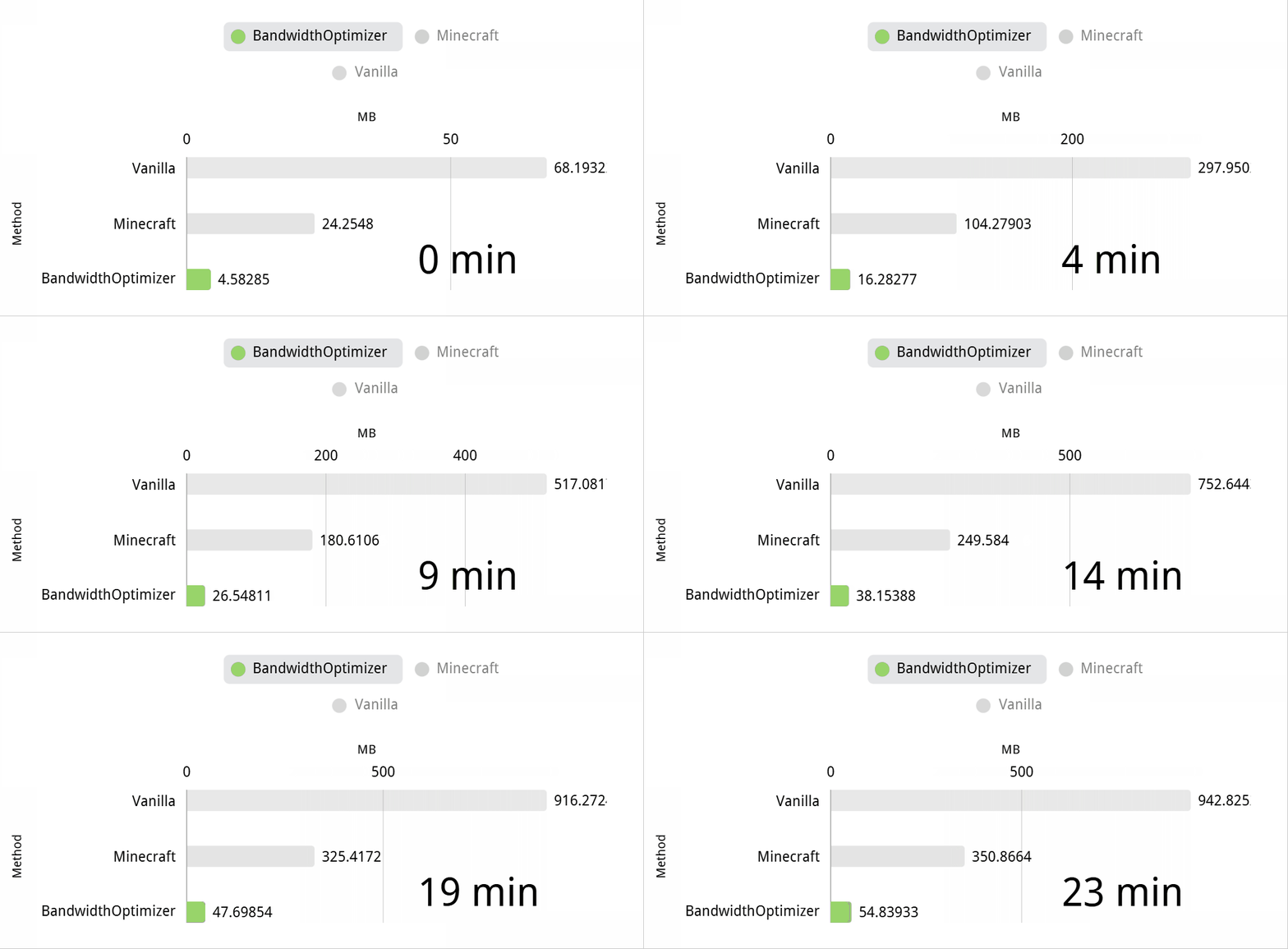
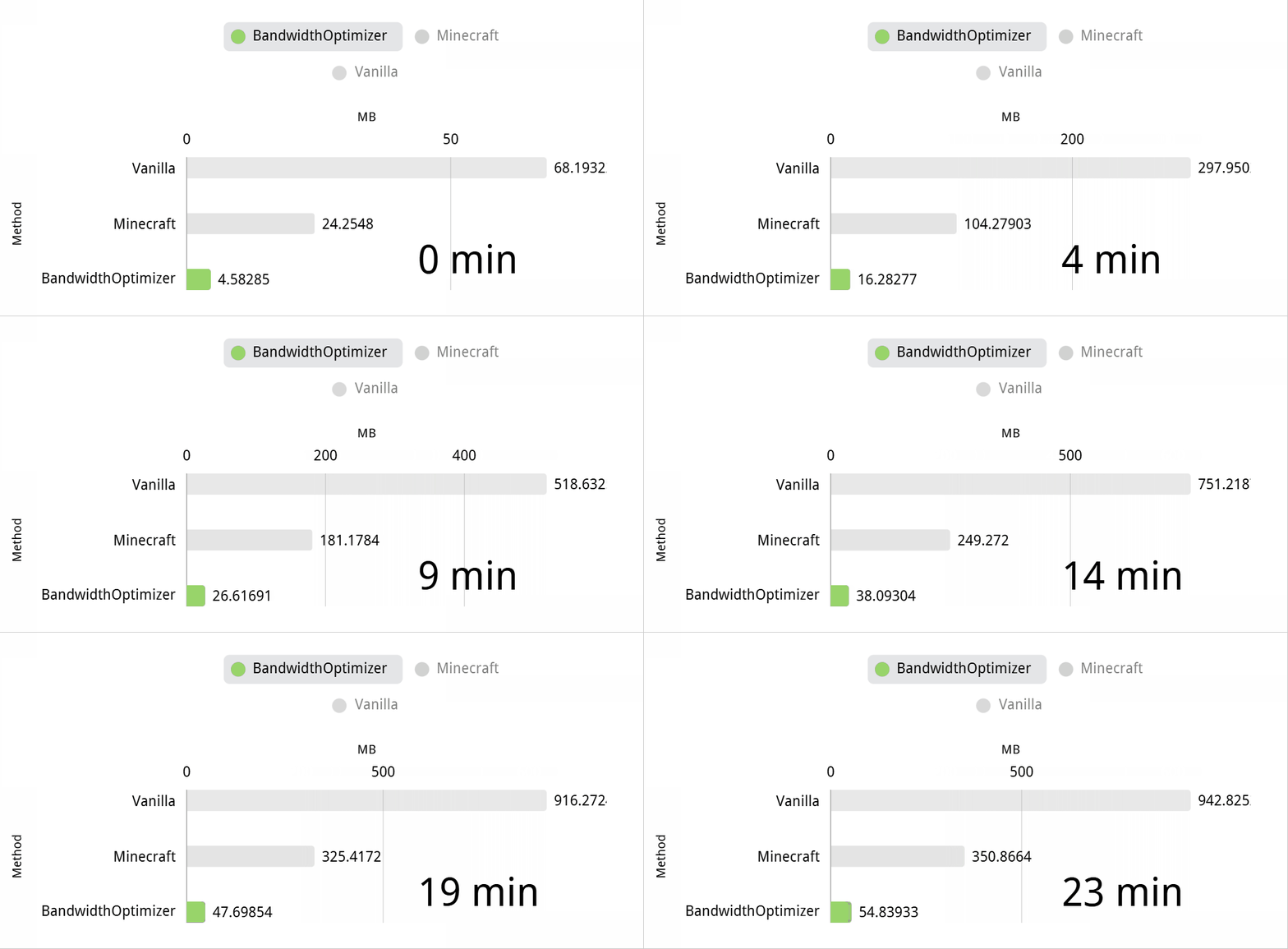
Measured Results
Bandwidth reduction depends on the modpack, player activity, proxy setup, and
which packets dominate the traffic. The examples below are from BandwidthOptimizer
report files collected during real heavily modded server testing. They are
examples, not guaranteed results.
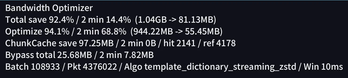
The main metric for this mod is the compression ratio of traffic that actually
enters BandwidthOptimizer's transport path. Whole-server raw/actual totals are
useful context, but they also include direct packets, compatibility bypasses,
cache reuse, and traffic from mods that should not or cannot be compressed.
For example, some mod traffic such as WATUT/YSM-style presence or model updates
may be bypassed or may compress poorly, so it should not be mixed into the main
transport-compression claim.
Live HUD snapshots:
| Environment | Client optimized flow | Server raw to actual | Server optimized flow | Direct flow | Players | Source |
|---|---|---|---|---|---|---|
| Create Delight Remake server 1 | 23.21 MB -> 3.93 MB (16.9%) |
305.35 GB -> 51.12 GB (16.7%) |
40.28 GB (13.2%) |
49.46 GB (16.2%) |
13 | HUD snapshot, v2.7.6.10. |
| Create Delight Remake server 2 | 24.51 MB -> 4.15 MB (16.9%) |
516.70 GB -> 83.24 GB (16.1%) |
57.57 GB (11.1%) |
57.01 GB (11.0%) |
15 | HUD snapshot, v2.7.6.10. |
Source-report managed transport totals:
| Environment | Managed transport | Without WATUT/YSM-like streams | Notes |
|---|---|---|---|
| Create-focused core server | 38976.09 MiB -> 9455.03 MiB (24.3%) |
34580.44 MiB -> 5236.56 MiB (15.1%) |
Real mixed traffic with large already-compressed/poorly-compressible sources. |
| Create-focused mirror server | 1046.16 MiB -> 253.89 MiB (24.3%) |
902.82 MiB -> 113.55 MiB (12.6%) |
Smaller mixed sample; WATUT-like traffic is visible. |
| Create-focused test server | 1174.31 MiB -> 112.24 MiB (9.6%) |
same sample | No WATUT/YSM exception in this TopN sample. |
| Create Delight | 7865.72 MiB -> 1622.43 MiB (20.6%) |
7774.54 MiB -> 1539.90 MiB (19.8%) |
Public modpack source-report snapshot. |
| Create Delight secondary snapshot | 4567.66 MiB -> 603.15 MiB (13.2%) |
not separated | Earlier report snapshot. |
High-impact traffic-source examples:
| Source | Environment | Raw observed | Actual transmitted | Actual/raw ratio |
|---|---|---|---|---|
ClientboundLevelChunkWithLightPacket |
Create-focused core server | 9062.88 MiB |
481.85 MiB |
5.3% |
ClientboundLevelChunkWithLightPacket |
Create-focused test server | 713.65 MiB |
16.84 MiB |
2.4% |
ClientboundTabListPacket |
Create-focused core server | 6354.97 MiB |
655.45 MiB |
10.3% |
lightmanscurrency:network |
Create-focused core server | 8206.80 MiB |
593.69 MiB |
7.2% |
create:deployer block entity data |
Create Delight | 510.41 MiB |
71.61 MiB |
14.0% |
Low-benefit traffic-source examples:
| Source | Environment | Raw observed | Actual transmitted | Actual/raw ratio | Path |
|---|---|---|---|---|---|
watut:main |
Create-focused core server | 4157.94 MiB |
3974.80 MiB |
95.6% |
BATCH_DIRECT_FALLBACK |
yes_steve_model:2_6_0 |
Create-focused core server | 514.63 MiB |
510.50 MiB |
99.2% |
BATCH_TRANSPORT_SHARE |
watut:main |
Create-focused mirror server | 146.07 MiB |
143.07 MiB |
97.9% |
BATCH_TRANSPORT_SHARE |
watut:main |
Create Delight | 91.18 MiB |
82.53 MiB |
90.5% |
BATCH_TRANSPORT_SHARE |
These streams are already compressed, encrypted, or near-random enough that a
second compression layer has little room to help. They are still shown here
because they explain why mixed-server totals can look worse than the high-impact
packet families above.
To reproduce comparable measurements on your own server:
- Install the same BandwidthOptimizer version on the server and clients.
- Run the same activity pattern for a fixed period, such as login bursts,
repeated chunk travel, machine-heavy areas, or normal online play. - Prefer the HUD
optimized flowline, or filter source reports to rows whose
path enters transport, such asBATCH_TRANSPORT_*,SINGLE_TRANSPORT, or
chunk transport rows. - Keep direct/bypass rows separate. Do not count
bandwidthoptimizer:transport
carrier packets as new raw source traffic. - Include the modpack, loader, Minecraft version, player count, and test
duration when sharing results.
Important report locations:
bandwidthoptimizer-native/transport-source-report/latest-source-report.md
bandwidthoptimizer-native/transport-bypass-report/latest-bypass-report.md
bandwidthoptimizer-native/decoder-exception-dump/
Mechanomania was also checked with BandwidthOptimizer diagnostic output in the
current test set. The available snapshot contained bypass and packet-rank reports
but not a source raw/actual summary, so it is listed as a tested environment
rather than used as a compression-ratio claim.
Tested Modpack Environments
The author has tested BandwidthOptimizer in several heavily modded environments,
including:
- Create Delight
- Brass Concerto
- Aeronautics
- Mechanomania
This means these environments have been used for compatibility testing. It does
not guarantee that every possible mod combination, proxy topology, or server
configuration is covered.
Supported Versions
Choose the build that matches both your Minecraft version and loader.
| Loader | Minecraft | Notes |
|---|---|---|
| Forge | 1.19.2 | Forge 43.x target. |
| Forge | 1.20.1 | Forge 47.x target. |
| Fabric / Quilt | 1.20.1 | Requires Fabric API. Published for Fabric and Quilt loaders. |
| Fabric / Quilt | 1.21.1 | Requires Fabric API. Published for Fabric and Quilt loaders. |
| NeoForge | 1.21.1 | NeoForge 21.x target. |
Dependencies
- Minecraft and the matching mod loader for the downloaded build.
- Fabric API for Fabric and Quilt builds.
- The same BandwidthOptimizer version on both the server and every client.
Forge and NeoForge builds use loader config files generated under config/.
Fabric and Quilt builds include matching runtime code and still require Fabric
API.
Installation
- Download the BandwidthOptimizer jar for your loader and Minecraft version.
- Put the jar into the server
modsfolder. - Put the same BandwidthOptimizer version into each client
modsfolder. - Install Fabric API when using the Fabric or Quilt build.
- Restart the server and clients.
If client and server versions do not match, the transport channel may be disabled
or fail to negotiate correctly.
Configuration
Main loader-generated config files:
config/bandwidthoptimizer-common.toml
config/bandwidthoptimizer-client.toml
Important areas:
| Area | Purpose |
|---|---|
| PLAY batch options | Controls reference deduplication, SHA-256 dictionary, template dictionary, Zstd, streaming Zstd, and async batch encoding. |
| Template dictionary limits | Caps packet size, entry count, payload bytes, diff runs, and changed bytes for mapping work. |
| Chunk cache budget | Controls client-side chunk cache memory and persistent backup behavior. |
| Debug analysis | Enables heavier manual analysis commands such as transport reports and packet ranks. |
| Decoder dump | Writes detailed packet dumps when decoder failures are detected. |
| Runtime properties | Advanced overrides such as bandwidthoptimizer.transport.batchWindowMillis, bandwidthoptimizer.transport.mappingEnabled, and bandwidthoptimizer.transport.zstdEnabled. |
Most servers should start with the default configuration and only change these
options while comparing report output before and after the change.
Commands
| Command | Description |
|---|---|
/bandwidthoptimizer |
Shows available BandwidthOptimizer commands. |
/bandwidthoptimizer hud |
Toggles the client HUD. |
/bandwidthoptimizer stats |
Shows server bandwidth totals. |
/bandwidthoptimizer stats total |
Shows persisted total server bandwidth stats. |
/bandwidthoptimizer stats players [limit] |
Shows top player/channel bandwidth stats. |
/bandwidthoptimizer stats reset |
Resets persisted server bandwidth stats. |
/bandwidthoptimizer test transportreport run [ticks] |
Starts a short transport compression report. Requires debug analysis. |
/bandwidthoptimizer test transportreport status |
Shows transport report capture status. |
/bandwidthoptimizer test packetrank run [ticks] |
Starts a packet-rank capture. Requires debug analysis. |
/bandwidthoptimizer test packetrank status |
Shows packet-rank capture status. |
Compatibility Scope
BandwidthOptimizer intentionally bypasses or flushes around packets and states
where optimization could change observable timing or ordering. This includes
protocol transitions, strong timing boundaries, stale transport epochs, unsafe
serverbound carrier sizes, selected compatibility cases, and packets where direct
delivery is safer than wrapping.
Velocity proxy setups are supported and tested, but proxy switching and reconnect
behavior can expose timing-sensitive bugs in any transport layer. When reporting a
proxy issue, include client logs, backend server logs, proxy logs, and the
generated BandwidthOptimizer report files.
Limitations
- Both the client and server must install the mod.
- Results vary by modpack, online count, traffic source, and activity pattern.
- Already-compressed, encrypted, or near-random streams such as WATUT/YSM-style
presence or model data may have little or no additional compression benefit. - Some packets are deliberately sent directly because optimizing them would cost
more than it saves or could risk compatibility. - Large login or reconnect bursts can still create network pressure even when
compressed. - BandwidthOptimizer reduces network traffic; it does not directly optimize FPS,
TPS, world generation, database latency, or proxy routing.
Reporting Issues
When reporting a problem, please include:
- Minecraft version, loader, and BandwidthOptimizer version.
- Whether a proxy such as Velocity is used.
- Client logs and server logs around the issue time.
- Proxy logs when the problem involves server switching or reconnects.
latest-source-report.mdandlatest-bypass-report.mdif available.- Decoder dump files if a packet decoder error was reported.
- The modpack name or a short list of major networking-heavy mods.
Acknowledgments
Thanks to the server owners, modpack maintainers, and players who provided logs,
packet dumps, compatibility reports, and real traffic samples from heavily modded
servers. Those reports are what make the optimization and compatibility rules
practical instead of theoretical.
License
This project is licensed under GNU LGPL 2.1-only.
Available Versions
How to Install BandwidthOptimizer on Your Server
Order Server
Order a Minecraft Java server with at least 3 GB RAM (4 GB recommended).
Set fabric Loader
In the panel under "Egg", select the fabric loader and matching Minecraft version (1.21.1).
Install Mod
Open the mod browser in the dashboard and search for "BandwidthOptimizer". Click "Install" – done! Alternatively, upload the .jar via SFTP to the /mods folder.
Compatibility
Mod Loaders
Minecraft Versions
1.21.1, 1.20.1, 1.19.2
Server-side
✓ RequiredRecommended RAM
4 GB(min. 3 GB)Frequently Asked Questions
BandwidthOptimizer server crashes on startup – what to do?
Most common cause: wrong fabric version or insufficient RAM. Check the server log (latest.log) for "OutOfMemoryError" or "Mixin" errors. With Mado Hosting: ensure at least 3 GB RAM is allocated and the loader matches the mod version (1.21.1). You can switch loaders with one click in the panel.
Is BandwidthOptimizer compatible with fabric and forge and neoforge and quilt?
BandwidthOptimizer officially supports fabric, forge, neoforge, quilt for Minecraft 1.21.1, 1.20.1, 1.19.2. Note: Forge and Fabric mods are NOT cross-compatible – pick one loader and stick with it. The Mado dashboard automatically detects incompatible loader combinations.
Server lagging with BandwidthOptimizer – how to optimize performance?
Recommended RAM: 4 GB (per 8 players). Use /spark profiler to check if BandwidthOptimizer consumes the most tick time. Common fixes: reduce server view-distance to 8-10, install "performant" or "starlight" as supplementary mods on Forge. With Mado Hosting, your server runs on NVMe SSDs with dedicated CPU cores for minimal latency.
Similar Mods


Rent Modded Server
Install BandwidthOptimizer with just one click on your server.