
Bannerpoint
Turn banners into locator bar waypoints
About this Mod
Bannerpoint
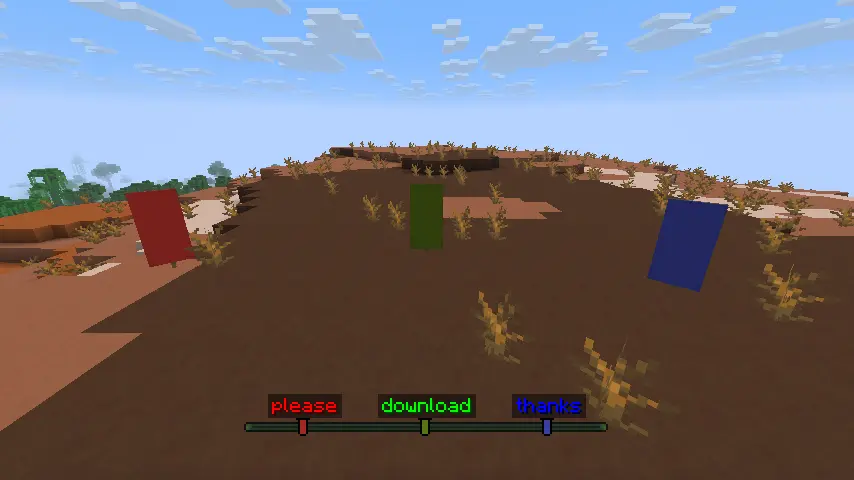
Bannerpoint allows turning banners into waypoints that show up in the locator bar. Waypoints can be made by either naming the banner in an anvil and placing it, or by binding it to a map. Both methods can be toggled in the config. Waypoints made this way have unique icons with a color matching the banner's base color. Hold Tab to show all banner names above their icons in the locator bar, or Shift to show only the name of the banner you're looking towards. To deactivate the waypoint, simply break the banner or remove it from the map it's bound to. The maximum range of banner waypoints can be configured, with the default being the same as the maximum range of player waypoints (60 million blocks).
Bannerpoint requires Fzzy Config and all of its dependencies.
Bannerpoint can be used as a fully server-side mod, but requires a resource pack on the client for banner waypoint icons. The resource pack can be installed either by simply downloading it and enabling it on in the client, or if running a Fabric server, by installing Polymer on the server and turning on Auto Host, which will automatically prompt connecting clients to download the resource pack. Showing banner names using Tab and Shift requires having the mod installed on the client.
Additional recommended locator bar mods:
Available Versions
How to Install Bannerpoint on Your Server
Order Server
Order a Minecraft Java server with at least 3 GB RAM (4 GB recommended).
Set fabric Loader
In the panel under "Egg", select the fabric loader and matching Minecraft version (26.2).
Install Mod
Open the mod browser in the dashboard and search for "Bannerpoint". Click "Install" – done! Alternatively, upload the .jar via SFTP to the /mods folder.
Compatibility
Mod Loaders
Minecraft Versions
26.2, 26.1.2, 1.21.11 (+5 more)
Server-side
✓ RequiredRecommended RAM
4 GB(min. 3 GB)Frequently Asked Questions
Bannerpoint server crashes on startup – what to do?
Most common cause: wrong fabric version or insufficient RAM. Check the server log (latest.log) for "OutOfMemoryError" or "Mixin" errors. With Mado Hosting: ensure at least 3 GB RAM is allocated and the loader matches the mod version (26.2). You can switch loaders with one click in the panel.
Is Bannerpoint compatible with fabric and neoforge?
Bannerpoint officially supports fabric, neoforge for Minecraft 26.2, 26.1.2, 1.21.11. The Mado dashboard automatically detects incompatible loader combinations.
Server lagging with Bannerpoint – how to optimize performance?
Recommended RAM: 4 GB (per 8 players). Use /spark profiler to check if Bannerpoint consumes the most tick time. Common fixes: reduce server view-distance to 8-10, install "performant" or "starlight" as supplementary mods on Forge. With Mado Hosting, your server runs on NVMe SSDs with dedicated CPU cores for minimal latency.
Similar Mods




Rent Modded Server
Install Bannerpoint with just one click on your server.