
BarrierVariant
A Minecraft Mod that adds Stairs, Slabs, Iron Bars & Fences in a Barrier Block model. Its easy to use.
Screenshots
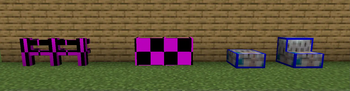
About this Mod
Barrier Variant
Expand your building projects with invisible blocks
This mod adds various barrier variants that are perfect for hidden mechanics, invisible bridges, and creative builds.
Features
Four new barrier variants:
- Barrier Slabs - Half barriers for fine details
- Barrier Stairs - Invisible stairs
- Barrier Iron Bars - Invisible bars that connect to each other
- Barrier Fence - Invisible fences with connection system
Three visibility modes:
- Visible - Blocks are always visible (default)
- Invisible - Only visible when holding barrier items
- Creative - Only visible in creative mode
Commands
All commands require operator permissions:
Get blocks
/barrier slab [count]      - Gives barrier slabs (1-64)
/barrier stairs [count]    - Gives barrier stairs (1-64)
/barrier bars [count]      - Gives barrier iron bars (1-64)
/barrier fence [count]     - Gives barrier fence (1-64)
Change visibility mode
/barrier mode visible    - Blocks are always visible
/barrier mode invisible  - Only visible with barrier items
/barrier mode creative   - Only visible in creative mode
Help
/barrier - Shows all available commands
Examples:
/barrier slab 16- Gives 16 barrier slabs/barrier mode invisible- Switches to invisible mode/barrier fence- Gives 1 barrier fence
Installation
Singleplayer / Client
- Install Fabric Loader for your Minecraft version
- Download Barrier Variant mod and place in mods folder
- Start Minecraft and enjoy
Multiplayer Server
- Set up Fabric Server for your Minecraft version
- Place Barrier Variant mod in server mods folder
- Restart server
- Clients also need the mod for correct rendering
Technical Details
- Mod Loader: Fabric
- Supported Minecraft Versions: 1.21.1
- Requires: Fabric API
- Client-Side: Required for rendering
- Server-Side: Required for commands and logic
Use Cases
- Hidden passages with invisible stairs
- Parkour maps with invisible steps
- Redstone builds with hidden barriers
- Adventure maps with secret paths
- PvP arenas with invisible obstacles
- Build servers for temporary structures
Support
Found a bug or have an idea? Dm @.t4bzzz on Discord.
Changelog
Version 1.0.0
- Initial release
- Added 4 barrier variants
- Implemented 3 visibility modes
- Created command system
- Full multiplayer support
Happy building with invisible blocks!
Available Versions
How to Install BarrierVariant on Your Server
Order Server
Order a Minecraft Java server with at least 3 GB RAM (4 GB recommended).
Set fabric Loader
In the panel under "Egg", select the fabric loader and matching Minecraft version (1.21.1).
Install Mod
Open the mod browser in the dashboard and search for "BarrierVariant". Click "Install" – done! Alternatively, upload the .jar via SFTP to the /mods folder.
Compatibility
Mod Loaders
Minecraft Versions
1.21.1
Server-side
✓ RequiredRecommended RAM
4 GB(min. 3 GB)Frequently Asked Questions
BarrierVariant server crashes on startup – what to do?
Most common cause: wrong fabric version or insufficient RAM. Check the server log (latest.log) for "OutOfMemoryError" or "Mixin" errors. With Mado Hosting: ensure at least 3 GB RAM is allocated and the loader matches the mod version (1.21.1). You can switch loaders with one click in the panel.
Is BarrierVariant compatible with fabric?
BarrierVariant officially supports fabric for Minecraft 1.21.1. The Mado dashboard automatically detects incompatible loader combinations.
Server lagging with BarrierVariant – how to optimize performance?
Recommended RAM: 4 GB (per 8 players). Use /spark profiler to check if BarrierVariant consumes the most tick time. Common fixes: reduce server view-distance to 8-10, install "performant" or "starlight" as supplementary mods on Forge. With Mado Hosting, your server runs on NVMe SSDs with dedicated CPU cores for minimal latency.
Similar Mods

![[ETF] Entity Texture Features](https://cdn.modrinth.com/data/BVzZfTc1/af683d206d50b05258d865b0d6e4aa2f2cee12f2_96.webp)
![[EMF] Entity Model Features](https://cdn.modrinth.com/data/4I1XuqiY/6e5bbd0d06b1741bfdab6c0cfab6de8fdaf0064c_96.webp)



Rent Modded Server
Install BarrierVariant with just one click on your server.