
Battle Music
Plays your imported music during mob/PVP battles. No resource pack needed. Easy drag and drop setup!
Screenshots

About this Mod
Battle Music for Fabric
This mod plays your imported music during mob/PVP battles. No resource pack needed!
Check the Setup section to see how to get started
Features
- Configurable everything: detection range, thresholds, fade times, pools, and more, editable in-game (req. ModMenu and Cloth Config) or via the JSON config.
- Mob battles: starts when 5 hostile mobs are aggroed on you.
- Heavy mode: changes to a separate "heavy" playlist when the health drops low, many mobs are attacking or fighting a boss. Smoothly crossfades from the regular playlist!
- PvP trigger: Taking a set number damage from another player starts combat music (by default plays the Heavy playlist).
- Boss detection: Starts playing the heavy playlist when bosses are in range, plus optional mini-bosses (Elder Guardian, Ravager, Evoker, Piglin Brute) and any extra entity IDs configured.
- Battle resume: if a new fight starts right after the last, it picks the track back up where it faded.
Dependencies
- Requires Fabric Loader for Minecraft 26.1.2.
- Fabric API
- (optional, very recommended) Mod Menu and Cloth Config.
Setup

Adding your music
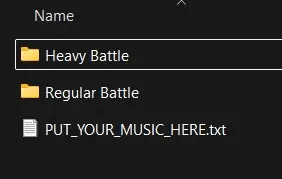
On first launch the mod makes a battlemusic folder inside your Minecraft instance directory with two subfolders:
Regular Battle/
Heavy Battle/
Add your music corresponding to the folder (see below what both of these folders mean.) No restart needed. Requires Vorbis (.ogg) audio files.
This folder can be opened from ModMenu too!
You can tweak the settings to your liking further in the Modmenu. Below are the default settings.
Music play conditions
- Regular battle starts when a number of mobs (default 5) in the detection radius (default 25) are attacking the player.
- Heavy battle crossfades when your health is at/below a threshold (default 6HP / 3 hearts), or a boss is nearby. Once heavy, it stays heavy until the whole fight ends.
- PvP: receiving damage (default 6HP / 3 hearts) within a time windows (default 5 seconds) plays combat music (the default music pool is heavy, configurable to regular, heavy or both). The timer resets every hit + the configured timeout for all battles (default 15s)
- When there is no detected battle activity, the music continues to play for a set amount of time (default 15s) before beginning to fade out.
Please submit any issues on the mod's Github issue tracker!
License
MIT
Available Versions
How to Install Battle Music on Your Server
Order Server
Order a Minecraft Java server with at least 3 GB RAM (4 GB recommended).
Set fabric Loader
In the panel under "Egg", select the fabric loader and matching Minecraft version (26.2).
Install Mod
Open the mod browser in the dashboard and search for "Battle Music". Click "Install" – done! Alternatively, upload the .jar via SFTP to the /mods folder.
Compatibility
Mod Loaders
Minecraft Versions
26.2, 26.1.2, 26.1.1 (+1 more)
Server-side
✗ UnsupportedRecommended RAM
4 GB(min. 3 GB)Frequently Asked Questions
Battle Music server crashes on startup – what to do?
Most common cause: wrong fabric version or insufficient RAM. Check the server log (latest.log) for "OutOfMemoryError" or "Mixin" errors. With Mado Hosting: ensure at least 3 GB RAM is allocated and the loader matches the mod version (26.2). You can switch loaders with one click in the panel.
Is Battle Music compatible with fabric?
Battle Music officially supports fabric for Minecraft 26.2, 26.1.2, 26.1.1. The Mado dashboard automatically detects incompatible loader combinations.
Server lagging with Battle Music – how to optimize performance?
Recommended RAM: 4 GB (per 8 players). Use /spark profiler to check if Battle Music consumes the most tick time. Common fixes: reduce server view-distance to 8-10, install "performant" or "starlight" as supplementary mods on Forge. With Mado Hosting, your server runs on NVMe SSDs with dedicated CPU cores for minimal latency.
Similar Mods




Rent Modded Server
Install Battle Music with just one click on your server.