
BBS CML EDITION
A bbs mod version that improves or adds some basic features
About this Mod
We would like to give special recognition to the developers who make the development of BBS CML Edition possible. Thanks to the effort, dedication, and talent of elgatopro300, sebolla, imraphy, diobede, and mattux, this project continues to grow and improve every day. Their work is key to making this edition a reality.
We also want to acknowledge those who contributed to the code: Ramusalte, bay4lly, Redstoniano, "SIRSY P", and Afegor. Their contributions are an important part of making this project a reality.
Thank you very much for your incredible contribution!
What is BBS CML EDITION?
BBS CML Edition is a modified version of the original BBS mod’s source code.
Its goal is to expand and enhance the animation tools while maintaining full compatibility with the original system, adding advanced features for creators, animators, and users who want a more complete and powerful workflow.

🔧 Main improvements over the original BBS
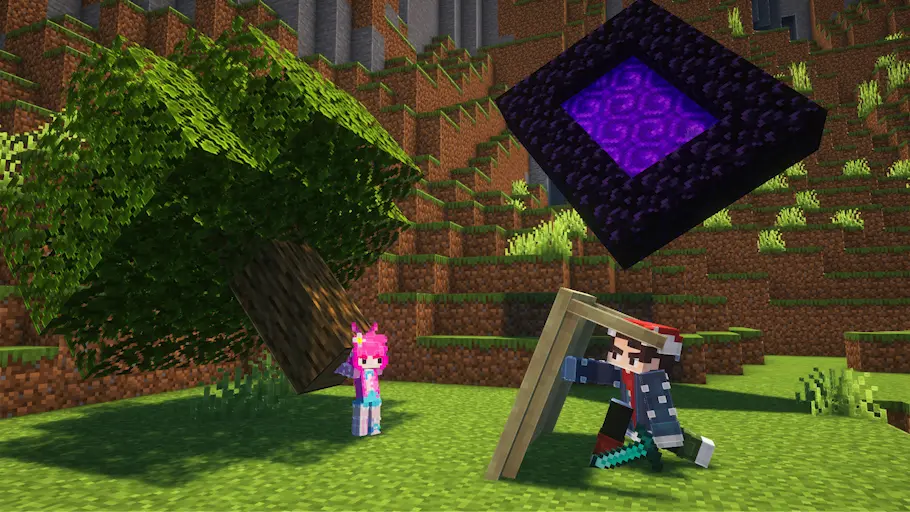
🧱 Structure Models
- Allows you to animate entire structures simply by saving them in-game.
- Structures can be viewed, organized, and used just like any other model.
- To use them, simply save it with a structure block, then go into the tree model and select it from the list.
Example: This is a miniature made with the structural models.
🎚️ Advanced Gizmos
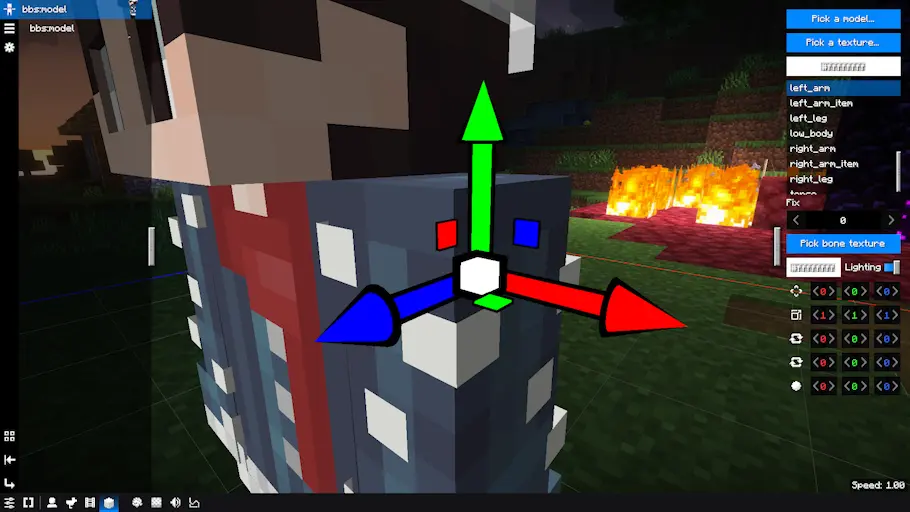
- Visual tools for moving, rotating, and scaling, similar to professional animation software.
- Improves precision, speed, and comfort while animating inside the editor.
- alternates with the "U" key
Example: This is the gizmo for translating, and there are other variations (rotate, scale, and pivot).
🖌️ Per-bone Textures
- Each bone in the model can have its own texture while keeping the original UV mapping.
- Ideal for complex models, advanced customization, or highly detailed designs.
🦴 Bone Anchoring
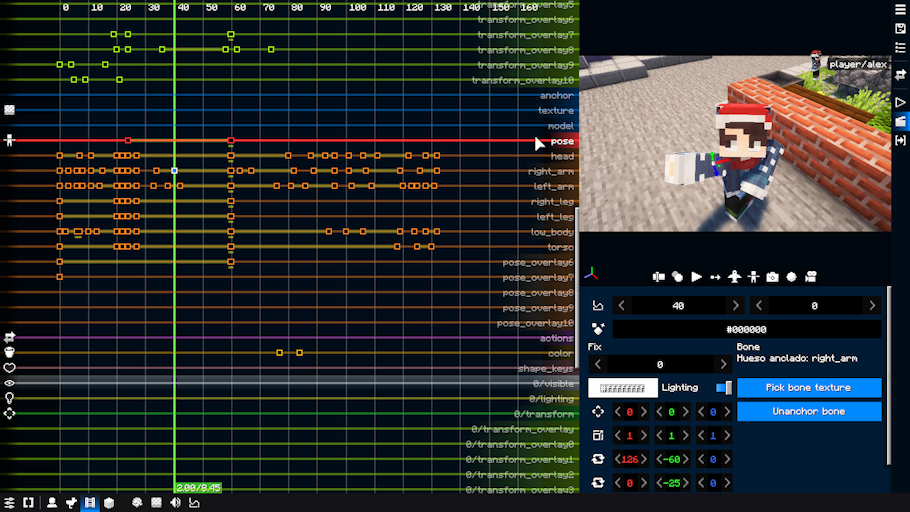
- Allows you to anchor bones to pose tracks for more controlled and flexible animation.
- This option is enabled in the mod settings
Here's an example of what the bone anchoring would look like (this is to animate each bone individually):
🎯 Editable Pivot
- You can change the pivot point of any model directly inside the editor.
- No need for external software to adjust pivot positions.
- This is more useful if you work with obj models
🗂️ Group System
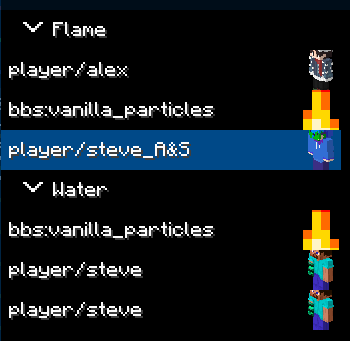
- Organize your replays into categories, improving order and workflow in complex animations.
- To create a group of replays, you must first select the models you want to group, then right-click and use the groups button.
an example of what the replays category would look like
This fork is under the MIT license
Available Versions
How to Install BBS CML EDITION on Your Server
Order Server
Order a Minecraft Java server with at least 3 GB RAM (4 GB recommended).
Set fabric Loader
In the panel under "Egg", select the fabric loader and matching Minecraft version (1.21.4).
Install Mod
Open the mod browser in the dashboard and search for "BBS CML EDITION". Click "Install" – done! Alternatively, upload the .jar via SFTP to the /mods folder.
Compatibility
Mod Loaders
Minecraft Versions
1.21.4, 1.21.1, 1.20.4 (+1 more)
Server-side
~ OptionalRecommended RAM
4 GB(min. 3 GB)Frequently Asked Questions
BBS CML EDITION server crashes on startup – what to do?
Most common cause: wrong fabric version or insufficient RAM. Check the server log (latest.log) for "OutOfMemoryError" or "Mixin" errors. With Mado Hosting: ensure at least 3 GB RAM is allocated and the loader matches the mod version (1.21.4). You can switch loaders with one click in the panel.
Is BBS CML EDITION compatible with fabric and forge and neoforge?
BBS CML EDITION officially supports fabric, forge, neoforge for Minecraft 1.21.4, 1.21.1, 1.20.4. Note: Forge and Fabric mods are NOT cross-compatible – pick one loader and stick with it. The Mado dashboard automatically detects incompatible loader combinations.
Server lagging with BBS CML EDITION – how to optimize performance?
Recommended RAM: 4 GB (per 8 players). Use /spark profiler to check if BBS CML EDITION consumes the most tick time. Common fixes: reduce server view-distance to 8-10, install "performant" or "starlight" as supplementary mods on Forge. With Mado Hosting, your server runs on NVMe SSDs with dedicated CPU cores for minimal latency.
Similar Mods

![[ETF] Entity Texture Features](https://cdn.modrinth.com/data/BVzZfTc1/af683d206d50b05258d865b0d6e4aa2f2cee12f2_96.webp)
![[EMF] Entity Model Features](https://cdn.modrinth.com/data/4I1XuqiY/6e5bbd0d06b1741bfdab6c0cfab6de8fdaf0064c_96.webp)



Rent Modded Server
Install BBS CML EDITION with just one click on your server.