
BBS Together
A multiplayer-compatible BBS fork!
Screenshots
About this Mod
Welcome to BBS Together!
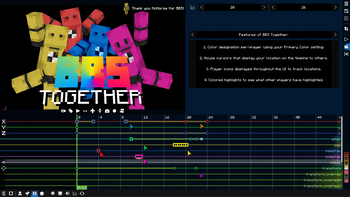
BBS Together is a forked version of the original BBS Mod made by McHorse with full compatibility for a multiplayer environment! This fixes all of the packet and desync issues without compromising any of the existing features within the mod, along with a few new features to help visualize the experience of working alongside your friends!
BBS Together also works with Sinytra Connector!
New features include:
- Color designation per-player using the Primary Color in the Settings panel.
- Colored mouse cursors that display where other player's mouses are on each screen.
- Player icons to display Film and Replay locations of players.
- Selection highlights to display what other players have selected.
- BBS asset syncing for all server types.
- "/bbs record [selector]" to have all players record actors at the same time.
Early Development
This fork is still early in development, so any feedback would be greatly appreciated! If you want to provide direct feedback and conversation, head over to the BBS Together Discord server for any form of discussion directly about the mod! It will likely be a dead server so join and leave as you please!
Future Features
- Ability to enable or disable asset syncing or toggle what exactly is sent.
Known Issues / Incompatibilities
- No known incompatibilities.
Available Versions
How to Install BBS Together on Your Server
Order Server
Order a Minecraft Java server with at least 3 GB RAM (4 GB recommended).
Set fabric Loader
In the panel under "Egg", select the fabric loader and matching Minecraft version (1.20.4).
Install Mod
Open the mod browser in the dashboard and search for "BBS Together". Click "Install" – done! Alternatively, upload the .jar via SFTP to the /mods folder.
Compatibility
Mod Loaders
Minecraft Versions
1.20.4, 1.20.1
Server-side
~ OptionalRecommended RAM
4 GB(min. 3 GB)Frequently Asked Questions
BBS Together server crashes on startup – what to do?
Most common cause: wrong fabric version or insufficient RAM. Check the server log (latest.log) for "OutOfMemoryError" or "Mixin" errors. With Mado Hosting: ensure at least 3 GB RAM is allocated and the loader matches the mod version (1.20.4). You can switch loaders with one click in the panel.
Is BBS Together compatible with fabric and forge?
BBS Together officially supports fabric, forge for Minecraft 1.20.4, 1.20.1. Note: Forge and Fabric mods are NOT cross-compatible – pick one loader and stick with it. The Mado dashboard automatically detects incompatible loader combinations.
Server lagging with BBS Together – how to optimize performance?
Recommended RAM: 4 GB (per 8 players). Use /spark profiler to check if BBS Together consumes the most tick time. Common fixes: reduce server view-distance to 8-10, install "performant" or "starlight" as supplementary mods on Forge. With Mado Hosting, your server runs on NVMe SSDs with dedicated CPU cores for minimal latency.
Similar Mods

![[ETF] Entity Texture Features](https://cdn.modrinth.com/data/BVzZfTc1/af683d206d50b05258d865b0d6e4aa2f2cee12f2_96.webp)
![[EMF] Entity Model Features](https://cdn.modrinth.com/data/4I1XuqiY/6e5bbd0d06b1741bfdab6c0cfab6de8fdaf0064c_96.webp)



Rent Modded Server
Install BBS Together with just one click on your server.