
be_lod-compat
This mod make some modded blocks rendered better in DistantHorizon.
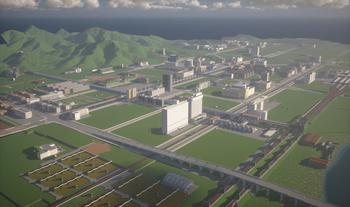
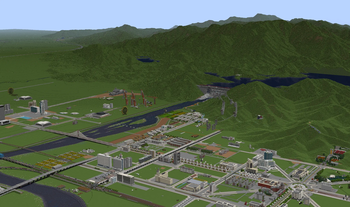
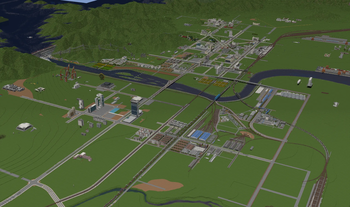
Screenshots
About this Mod
Current status: Please use 0.6a for DH-2.3.5DH-2.4.5, 0.7.2a for DH-3.0.2DH-3.0.3, 0.7.3a for DH-3.1.0 and above
BeLodCompat
This mod improves how Distant Horizons renders blocks from certain mods. Without it, those blocks may look wrong or disappear entirely in the distance.
Features
Without this mod, LittleTiles blocks are treated as avoided blocks by Distant Horizons (similar to flowers), making them mostly invisible or appearing as gray when visible. Immersive Railroading rails appear as pure white.
- LittleTiles – Extracts one tile's block state and color from LittleTiles blocks. Color blending requires database caching to be enabled and the Distant Horizons config option
common.lodBuilding.worldCompressionset to"MERGE_SAME_BLOCKS"for stable rendering. - Immersive Railroading – Reads the rail bed fill material ID from the parent block's NBT. If the fixed block override is not enabled, database caching must be active to ensure reliable long‑distance display.
- Database support – Each dimension maintains its own SQLite database, stored in separate locations:
- Singleplayer:
<save_folder>/belodcompat/<dimension>.db - Multiplayer client:
.minecraft/belodcompat_servers/<server_ip>/<dimension>.db - Dedicated server:
<world_root>/belodcompat/<dimension>.db
This per‑dimension isolation prevents data mixing and ensures correct LOD rendering across all dimensions.
- Singleplayer:
Requirements
- Minecraft: 1.20.1 (Forge) or 1.21.1 (NeoForge)
- Distant Horizons 2.3.5/3.0.2 or later
- LittleTiles (optional)
- Immersive Railroading (optional)
Configuration
A config file is generated at config/belodcompat.cfg. The file is automatically reloaded when changed (except for enableDatabase, which requires a restart). The following options are available:
| Option | Description | Default |
|---|---|---|
debugLogging |
Enable debug logging (some debug messages may not be written to the log in certain situations) | false |
overrideIrRailBlock |
Force all IR rails to use a custom block instead of their bed fill material | false |
overrideIrRailBlockId |
Block ID used when override is enabled (falls back to minecraft:soul_sand if invalid) |
minecraft:soul_sand |
getIrDataFromParentDirectly |
Retrieve bed fill color directly from parent rail (faster but may slow down slightly) | false |
replaceIrIfAir |
Replace the bed fill color with a fallback if the original is air | false |
enableDatabase |
Enable SQLite database caching (requires restart) | true |
useAsyncDbWrite |
Use asynchronous database writes (better performance but may lose data on crash) | true |
Commands
The mod adds the /belodcompat command with the following subcommands:
| Command | Description |
|---|---|
/belodcompat dumpIR [dimension] |
Dump all cached IR block states for the specified dimension (or current dimension if omitted) |
/belodcompat dumpLT [dimension] |
Dump all cached LT block states with colors |
/belodcompat showConfig |
Display current configuration values |
/belodcompat getLtColor <x> <y> <z> [dimension] |
Show the cached LT color at the given position |
/belodcompat getBlockStateOfLT <x> <y> <z> [dimension] |
Show the cached LT block state |
/belodcompat getBlockStateOfIR <x> <y> <z> [dimension] |
Show the cached IR block state |
License
LGPL 3.0
Project Links
Available Versions
How to Install be_lod-compat on Your Server
Order Server
Order a Minecraft Java server with at least 3 GB RAM (4 GB recommended).
Set forge Loader
In the panel under "Egg", select the forge loader and matching Minecraft version (1.21.1).
Install Mod
Open the mod browser in the dashboard and search for "be_lod-compat". Click "Install" – done! Alternatively, upload the .jar via SFTP to the /mods folder.
Compatibility
Mod Loaders
Minecraft Versions
1.21.1, 1.20.1
Server-side
~ OptionalRecommended RAM
4 GB(min. 3 GB)Frequently Asked Questions
be_lod-compat server crashes on startup – what to do?
Most common cause: wrong forge version or insufficient RAM. Check the server log (latest.log) for "OutOfMemoryError" or "Mixin" errors. With Mado Hosting: ensure at least 3 GB RAM is allocated and the loader matches the mod version (1.21.1). You can switch loaders with one click in the panel.
Is be_lod-compat compatible with forge and neoforge?
be_lod-compat officially supports forge, neoforge for Minecraft 1.21.1, 1.20.1. The Mado dashboard automatically detects incompatible loader combinations.
Server lagging with be_lod-compat – how to optimize performance?
Recommended RAM: 4 GB (per 8 players). Use /spark profiler to check if be_lod-compat consumes the most tick time. Common fixes: reduce server view-distance to 8-10, install "performant" or "starlight" as supplementary mods on Forge. With Mado Hosting, your server runs on NVMe SSDs with dedicated CPU cores for minimal latency.
Similar Mods




![[ETF] Entity Texture Features](https://cdn.modrinth.com/data/BVzZfTc1/af683d206d50b05258d865b0d6e4aa2f2cee12f2_96.webp)
![[EMF] Entity Model Features](https://cdn.modrinth.com/data/4I1XuqiY/6e5bbd0d06b1741bfdab6c0cfab6de8fdaf0064c_96.webp)
Rent Modded Server
Install be_lod-compat with just one click on your server.