
Beacon Bounding Box
Client-side mod to visualize beacon's effect range.
Screenshots
About this Mod
Beacon Bounding Box
Take the guesswork out of beacon coverage.
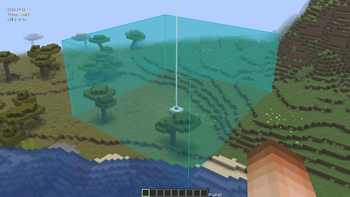
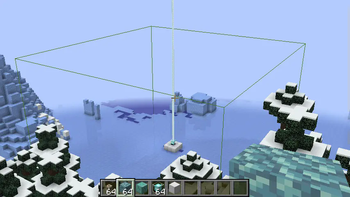
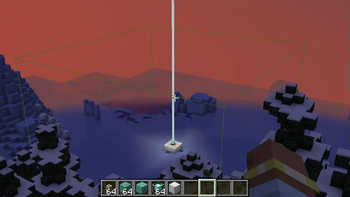
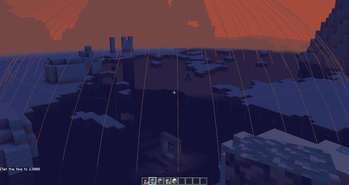
Beacon Bounding Box is a lightweight utility mod that visually displays the area of effect of every beacon in the world using colorful bounding boxes. Each beacon is given a randomly assigned color, making it easy to distinguish between multiple beacons. Even when their ranges overlap.
Key Features
Visual range display: See each beacon’s area of effect as a 3D bounding box.
Random colors: Every beacon gets a unique, randomly generated color.
Toggle support: Easily toggle the bounding box rendering on or off via a keybind (default G).
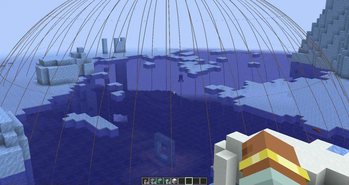
Conduit support: Now also renders a sphere to show the area of effect of conduits! Default toggle key is H.
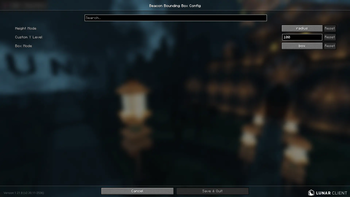
Configurable height: Customize the vertical size of the beacon box in-game using Mod Menu and Cloth Config, or the JSON file in
config/beaconrange.json.NEW! Beacon Extender Compat: Added Compatibility for Beacon Extender in Mod Version 1.1 (Only for Minecraft 1.21.4)
NEW! Box Mode: Added Box Mode, you can switch between Outlines and Boxes in Config. Added in Mod Version 1.2
Whether you're building a mega base, organizing effects, or just want a better visual reference, Beacon Bounding Box helps you manage beacon and conduit coverage with clarity.
Planned Features:
- Make the opacity of box mode's walls configurable.
- Box mode shader support (unlikely).
- Ability to place a "ghost beacon" to test how far it's range expands before even placing the beacon itself.
Available Versions
How to Install Beacon Bounding Box on Your Server
Order Server
Order a Minecraft Java server with at least 3 GB RAM (4 GB recommended).
Set fabric Loader
In the panel under "Egg", select the fabric loader and matching Minecraft version (1.21.11).
Install Mod
Open the mod browser in the dashboard and search for "Beacon Bounding Box". Click "Install" – done! Alternatively, upload the .jar via SFTP to the /mods folder.
Compatibility
Mod Loaders
Minecraft Versions
1.21.11, 1.21.10, 1.21.8 (+3 more)
Server-side
✗ UnsupportedRecommended RAM
4 GB(min. 3 GB)Frequently Asked Questions
Beacon Bounding Box server crashes on startup – what to do?
Most common cause: wrong fabric version or insufficient RAM. Check the server log (latest.log) for "OutOfMemoryError" or "Mixin" errors. With Mado Hosting: ensure at least 3 GB RAM is allocated and the loader matches the mod version (1.21.11). You can switch loaders with one click in the panel.
Is Beacon Bounding Box compatible with fabric and quilt?
Beacon Bounding Box officially supports fabric, quilt for Minecraft 1.21.11, 1.21.10, 1.21.8. The Mado dashboard automatically detects incompatible loader combinations.
Server lagging with Beacon Bounding Box – how to optimize performance?
Recommended RAM: 4 GB (per 8 players). Use /spark profiler to check if Beacon Bounding Box consumes the most tick time. Common fixes: reduce server view-distance to 8-10, install "performant" or "starlight" as supplementary mods on Forge. With Mado Hosting, your server runs on NVMe SSDs with dedicated CPU cores for minimal latency.
Similar Mods




![[ETF] Entity Texture Features](https://cdn.modrinth.com/data/BVzZfTc1/af683d206d50b05258d865b0d6e4aa2f2cee12f2_96.webp)
![[EMF] Entity Model Features](https://cdn.modrinth.com/data/4I1XuqiY/6e5bbd0d06b1741bfdab6c0cfab6de8fdaf0064c_96.webp)
Rent Modded Server
Install Beacon Bounding Box with just one click on your server.