
Beacon Gradient Calculator
Allows the user to generate the stained glass patterns needed to make a specified gradient with beacon beams.
About this Mod
Overview
Allows the user to run a command which will generate the stained glass patterns needed to form a gradient between the two colors they choose.
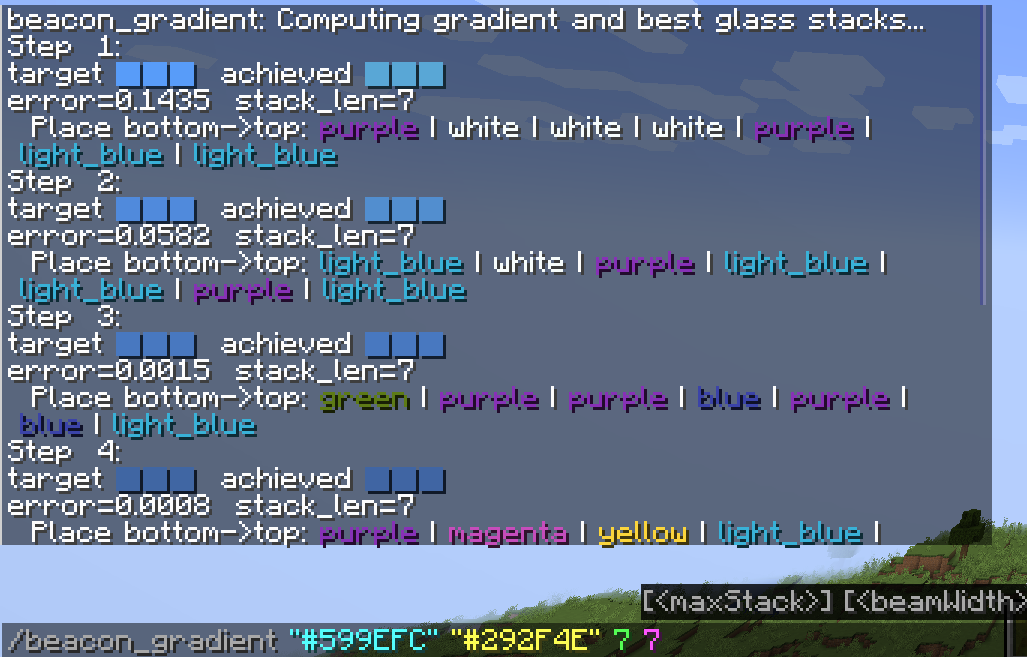
The mod will output the target color and the color it was able to achieve by using glass panes for the beacon beam. This will also give the margin of error the actual color is from the targeted color.
The mod uses the following algorithm to be able to calculate beacon beam colors from stained glass: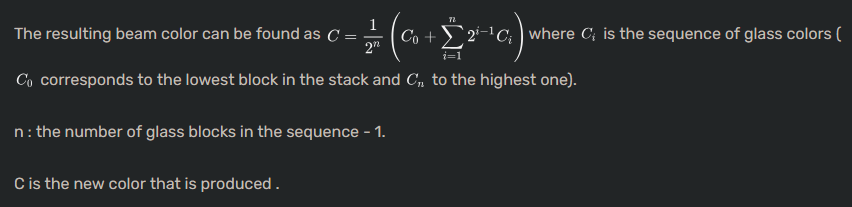
This calculation is referenced from the minecraft wiki page for beacons
Usage
Use /beacon_gradient
startColor- This is the starting color of your gradient. This can be a hex color (Include the # in the hex color) or a basic color written out like
"red"
- This is the starting color of your gradient. This can be a hex color (Include the # in the hex color) or a basic color written out like
Required Parameters
endColor- This is the ending color of your gradient. This can be a hex color (Include the # in the hex color) or a basic color written out like
"red"
- This is the ending color of your gradient. This can be a hex color (Include the # in the hex color) or a basic color written out like
beacons- This is the number of beacons you will be wanting to place
Optional Parameters
maxStack- This is the maximum height of stained glass you are willing to use. The larger the number the more accurate the gradient will be, but the default value of
7is quite accurate and should not need to be increased. WARNING Anything more than 7 will cause computational times to expoentially increase. Lower end hardware be aware
- This is the maximum height of stained glass you are willing to use. The larger the number the more accurate the gradient will be, but the default value of
beamWidth- Controls how many candidate glass stacks are considered simultaneously when the algorithm is trying to approximate the target color for a beacon beam
Example
Available Versions
How to Install Beacon Gradient Calculator on Your Server
Order Server
Order a Minecraft Java server with at least 3 GB RAM (4 GB recommended).
Set fabric Loader
In the panel under "Egg", select the fabric loader and matching Minecraft version (1.21.4).
Install Mod
Open the mod browser in the dashboard and search for "Beacon Gradient Calculator". Click "Install" – done! Alternatively, upload the .jar via SFTP to the /mods folder.
Compatibility
Mod Loaders
Minecraft Versions
1.21.4
Server-side
✗ UnsupportedRecommended RAM
4 GB(min. 3 GB)Frequently Asked Questions
Beacon Gradient Calculator server crashes on startup – what to do?
Most common cause: wrong fabric version or insufficient RAM. Check the server log (latest.log) for "OutOfMemoryError" or "Mixin" errors. With Mado Hosting: ensure at least 3 GB RAM is allocated and the loader matches the mod version (1.21.4). You can switch loaders with one click in the panel.
Is Beacon Gradient Calculator compatible with fabric?
Beacon Gradient Calculator officially supports fabric for Minecraft 1.21.4. The Mado dashboard automatically detects incompatible loader combinations.
Server lagging with Beacon Gradient Calculator – how to optimize performance?
Recommended RAM: 4 GB (per 8 players). Use /spark profiler to check if Beacon Gradient Calculator consumes the most tick time. Common fixes: reduce server view-distance to 8-10, install "performant" or "starlight" as supplementary mods on Forge. With Mado Hosting, your server runs on NVMe SSDs with dedicated CPU cores for minimal latency.
Similar Mods




![[ETF] Entity Texture Features](https://cdn.modrinth.com/data/BVzZfTc1/af683d206d50b05258d865b0d6e4aa2f2cee12f2_96.webp)
![[EMF] Entity Model Features](https://cdn.modrinth.com/data/4I1XuqiY/6e5bbd0d06b1741bfdab6c0cfab6de8fdaf0064c_96.webp)
Rent Modded Server
Install Beacon Gradient Calculator with just one click on your server.