
Bean blaster calculator
Calculate easily the amount of windcharges needed to travel to your destination with the Iddiebean pearl Launcher
Screenshots
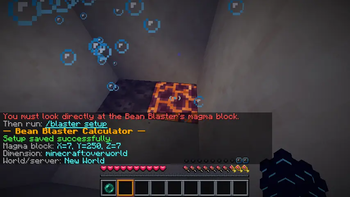
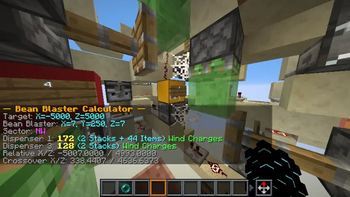
About this Mod
Bean Blaster Calculator
A simple client-side calculator for Bean Blasters / Pearl Launchers.
Use it to calculate how many Wind Charges must be placed in each dispenser to launch an Ender Pearl toward your target coordinates.
Commands
Setup the Bean Blaster
Look directly at the magma block of your Bean Blaster and run:
/bb setup
You can also use:
/beanblaster setup
The mod will save the magma block position for the current world or server.
Calculate a launch
Run:
/bb <x> <z>
Example:
/bb 1250 -840
You can also use:
/beanblaster 1250 -840
The mod will calculate which dispensers need Wind Charges and how many to place in each one.
Help command
Run:
/bb help
or:
/beanblaster help
This shows the available commands and basic usage instructions in-game.
Result Format
The result shows the raw amount and the Minecraft inventory version.
Example:
Dispenser 1: 124 (1 Stack + 60 Items) Wind Charges
Inventory conversion:
1 Stack = 64 items
1 Shulker Box = 27 Stacks = 1728 items
How to Use
- Build or find your Bean Blaster.
- Look directly at the blaster's magma block.
- Run:
/bb setup
- Choose the target coordinates where you want to launch the Ender Pearl.
- Run:
/bb <target x> <target z>
Example:
/bb 3000 -1200
- Put the shown amount of Wind Charges into the listed dispensers.
- Use your Bean Blaster normally.
Notes
- You must run setup before calculating a target.
- Setup is saved separately for each world or server.
- Setup is also separated by dimension.
- If you move or rebuild the Bean Blaster, run setup again.
- Use
/bbinstead of/blasterto avoid conflicts with other mods.
Credits
Pearl Launcher (Bean Blaster) and python code original creator:
@IddieBean on YT
Mod creators:
wavedtime
Sboby_
Albuz999
Modrinth profiles:
Sboby_
Albuz999
:::
Available Versions
How to Install Bean blaster calculator on Your Server
Order Server
Order a Minecraft Java server with at least 3 GB RAM (4 GB recommended).
Set fabric Loader
In the panel under "Egg", select the fabric loader and matching Minecraft version (1.21.11).
Install Mod
Open the mod browser in the dashboard and search for "Bean blaster calculator". Click "Install" – done! Alternatively, upload the .jar via SFTP to the /mods folder.
Compatibility
Mod Loaders
Minecraft Versions
1.21.11
Server-side
✗ UnsupportedRecommended RAM
4 GB(min. 3 GB)Frequently Asked Questions
Bean blaster calculator server crashes on startup – what to do?
Most common cause: wrong fabric version or insufficient RAM. Check the server log (latest.log) for "OutOfMemoryError" or "Mixin" errors. With Mado Hosting: ensure at least 3 GB RAM is allocated and the loader matches the mod version (1.21.11). You can switch loaders with one click in the panel.
Is Bean blaster calculator compatible with fabric?
Bean blaster calculator officially supports fabric for Minecraft 1.21.11. The Mado dashboard automatically detects incompatible loader combinations.
Server lagging with Bean blaster calculator – how to optimize performance?
Recommended RAM: 4 GB (per 8 players). Use /spark profiler to check if Bean blaster calculator consumes the most tick time. Common fixes: reduce server view-distance to 8-10, install "performant" or "starlight" as supplementary mods on Forge. With Mado Hosting, your server runs on NVMe SSDs with dedicated CPU cores for minimal latency.
Similar Mods






Rent Modded Server
Install Bean blaster calculator with just one click on your server.