Bedrock Crafter
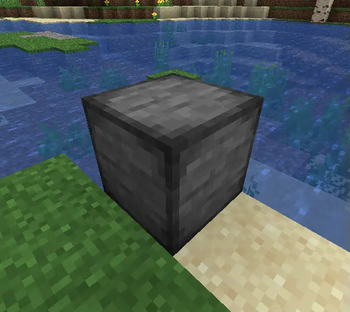
Allows you to craft bedrock and new bedrock building blocks.
Screenshots
About this Mod
Bedrock Crafter
This is a simple mod that allows you to craft bedrock as well as some new building blocks with it. It's supposed to have a "vanilla-like" feeling, though I guess obtaining bedrock makes it not fit vanilla at all :p
Available for Forge, NeoForge and Fabric (Fabric version requires Fabric API). Forge isn't supported starting at Minecraft 1.20.5, however.
Adds:
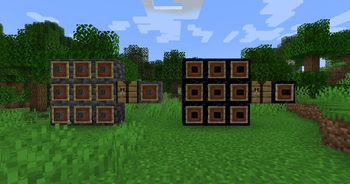
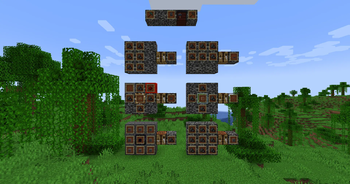
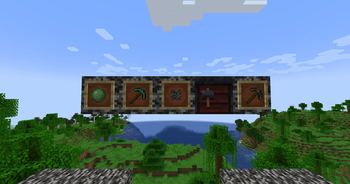
- Compact Deepslate and Compact Obsidian (made from 9 deepslate or obsidian; can be crafted back into their base components. Compact Stone is used in place of Compact Deepslate in Minecraft 1.16.5 versions of the mod starting at mod version 1.3.1, crafted with 9 stone)
- Bedrock Chunks (use 9 to craft Bedrock; crafted from 8 Compact Deepslate and 1 Compact Obsidian)
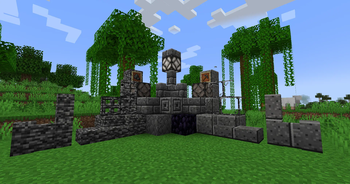
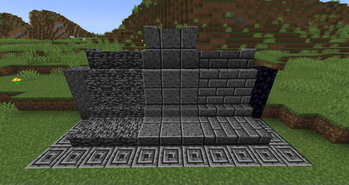
- Polished Bedrock, Polished Bedrock Bricks, and Chiseled Polished Bedrock Bricks
- Slabs, stairs, and walls for Bedrock, Polished Bedrock, and Polished Bedrock Bricks
- Bedrock Door / Trapdoor
- Bedrock Glass / Glass Pane
- Bedrock Lamp
- Bedrock Pickaxe (credit to scratchcrafter1 on Planet Minecraft for the idea; lets you "mine" Bedrock and the mod's Bedrock-based blocks by pressing the "use item" button (you can't mine bedrock at the bottom-most layer (unless you're above a non-bedrock-type block), or top-most in the Nether). Mining Bedrock and Bedrock-based blocks uses 100 durability, it can't mine Bedrock/Bedrock-based blocks when below 100 durability, and it will mine blocks very slowly at 1 durability, but it will never break)
- 4 advancements
The compact stone/deepslate and obsidian are inspired by the compressed blocks in the Extra Utilities mod by rwtema, and in versions of Bedrock Crafter before 1.2.0, they had extra tiers just like the compressed blocks do, but I decided to cut them down to one block.
The new bedrock-based building blocks are unbreakable as you'd expect, and their recipes work just like their vanilla counterparts, meaning 4 Bedrock = Polished Bedrock etc. and you can use the stonecutter as well (the recipes for blocks added in Version 1.3.0 are a bit different). Bedrock is an amazing material, it allows you to cut and chisel it despite being unbreakable (well, unless you have the right pickaxe)!
Since they're unbreakable, be careful where you place them!
NOTE (for datapack creators/users): The Bedrock Pickaxe uses a "bedrock_like" block tag to determine what it can "mine" besides what it mines the normal way. In version 1.3.4+ of the mod, the same tag is also used to prevent you from mining bedrock-type blocks at the lowest Y-level in the world if one is directly under you, instead of only vanilla bedrock. This can be modified using datapacks.
Available Versions
How to Install Bedrock Crafter on Your Server
Order Server
Order a Minecraft Java server with at least 3 GB RAM (4 GB recommended).
Set fabric Loader
In the panel under "Egg", select the fabric loader and matching Minecraft version (26.1.2).
Install Mod
Open the mod browser in the dashboard and search for "Bedrock Crafter". Click "Install" – done! Alternatively, upload the .jar via SFTP to the /mods folder.
Compatibility
Mod Loaders
Minecraft Versions
26.1.2, 26.1.1, 26.1 (+28 more)
Server-side
✓ RequiredRecommended RAM
4 GB(min. 3 GB)Frequently Asked Questions
Bedrock Crafter server crashes on startup – what to do?
Most common cause: wrong fabric version or insufficient RAM. Check the server log (latest.log) for "OutOfMemoryError" or "Mixin" errors. With Mado Hosting: ensure at least 3 GB RAM is allocated and the loader matches the mod version (26.1.2). You can switch loaders with one click in the panel.
Is Bedrock Crafter compatible with fabric and forge and neoforge?
Bedrock Crafter officially supports fabric, forge, neoforge for Minecraft 26.1.2, 26.1.1, 26.1. Note: Forge and Fabric mods are NOT cross-compatible – pick one loader and stick with it. The Mado dashboard automatically detects incompatible loader combinations.
Server lagging with Bedrock Crafter – how to optimize performance?
Recommended RAM: 4 GB (per 8 players). Use /spark profiler to check if Bedrock Crafter consumes the most tick time. Common fixes: reduce server view-distance to 8-10, install "performant" or "starlight" as supplementary mods on Forge. With Mado Hosting, your server runs on NVMe SSDs with dedicated CPU cores for minimal latency.
Similar Mods

![[ETF] Entity Texture Features](https://cdn.modrinth.com/data/BVzZfTc1/af683d206d50b05258d865b0d6e4aa2f2cee12f2_96.webp)
![[EMF] Entity Model Features](https://cdn.modrinth.com/data/4I1XuqiY/6e5bbd0d06b1741bfdab6c0cfab6de8fdaf0064c_96.webp)



Rent Modded Server
Install Bedrock Crafter with just one click on your server.
Details
- License
- Creative Commons Attribution Non Commercial Share Alike 4.0 International
- Server-side
- Required