
Bedwars Mod
A QOL and improvement mod for Hypixel Bedwars.
Screenshots
About this Mod
Bedwars Mod
A Forge 1.8.9 Hypixel Mod to add QOL and stats features to Hypixel Bedwars.
This mod is affiliated with or endorsed by Hypixel, Inc.
Note from the developer:
If anyone has interest in helping maintain this mod please reach out to me. Thank you!
Quick Message
This mod has been inspired by a previous Bedwars utility mod by CalMWolfs that you can find here. The plan for this project is to eventually add the majority of features seen in CalMWolfs' mod, but with improved functionality and more uses. I'm still working to implement a lot of these features and highly recommend you use CalMWolfs' mod until this mod has reached a stable release.
Warning:
This mod and its features are use at your own risk. It is to be used at the user's discretion with full knowledge that it may not be allowed.
Features
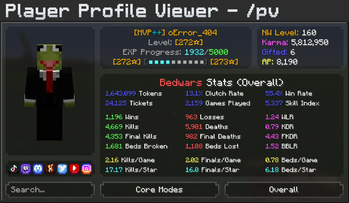
- Interactable profile viewer page to show a player's stats in every mode -
/pv <username>- Find player's stats and skill index
- Find stats for different Bedwars modes
- Find player's socials and links to them
- Ability to search for more players within the GUI
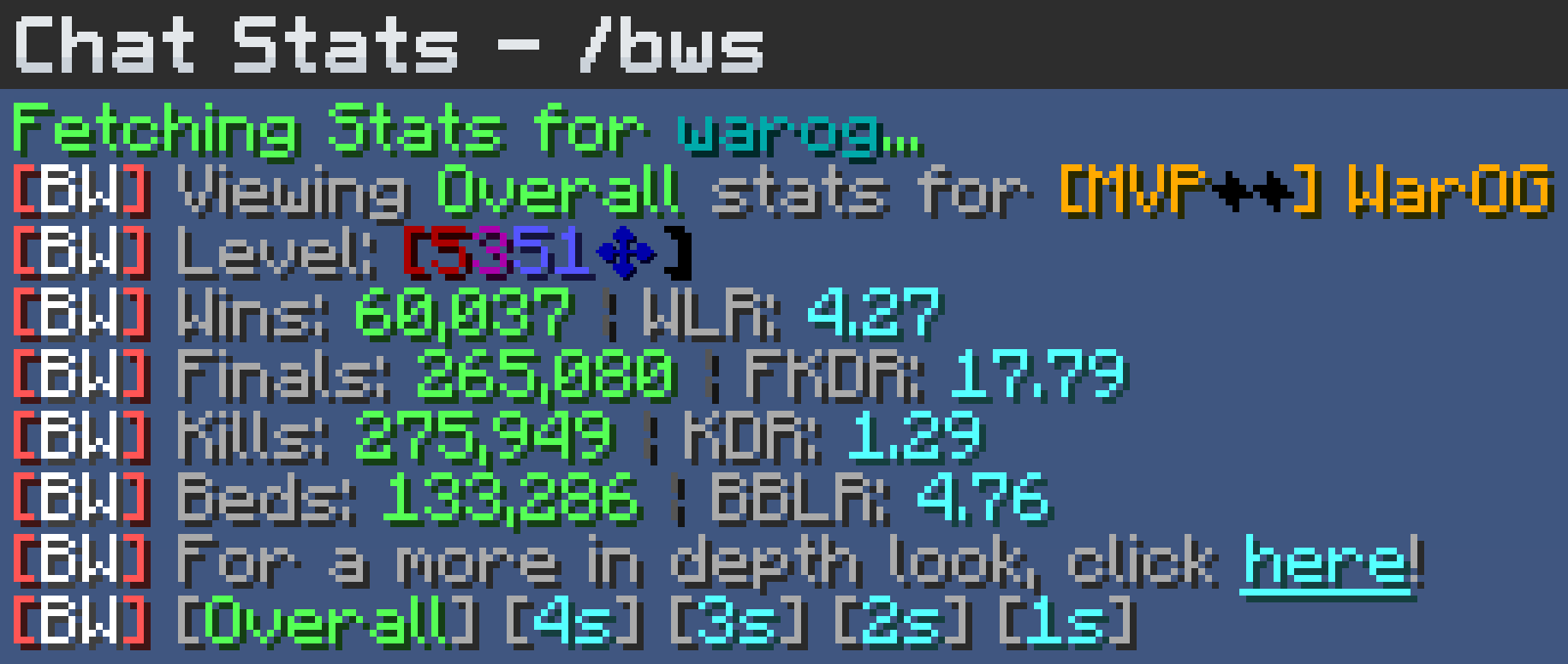
- Chat Stats -
/bws <username>- Prints out a players overall stats
- Toggle between core modes
- Click a message sent in a Bedwars lobby to view that player's stats
- Quick and easy way to assess a player's skill level
- Session Display
- Displays a HUD containing current stats from the session.
- Calculates current and average game time
- Has all basic stats inside the HUD.
- This can be accessed by hitting R-SHIFT or running
/ocfg
- Health bar switches to using hardcore hearts when you become a final kill.
Planned Features
Remember to follow this project for updates!
- Session Display HUD
Creates a HUD showing your stats for your current sessionShows how long you've been playing- Rates the skill level of the games that you have played
- Will implement historical session tracking
- Trap Display HUD
- Creates a HUD to show what traps you have purchased
/gloatcommand- Prints your stats from the last game in chat, ex: Kills: 4 | Finals: 5 | Beds: 2
- Party Skill Rating
- Will add a command to calculate the rough skill level of everyone in your party combined or individually
- Party Contribution Calculator
- Calculates what everyone in your party has contributed in the games you play and ranks them
- Helps eliminate the weakest link from the team (or poke fun at your friends)
- Shop Inventory Overlay
- Shows what items you have already purchased and highlights them
- Highlights items you can and cannot afford
- And many more... (when i think of them)
Questions/Suggestions
If you have any questions or suggestions about the mod then feel free to add me on Discord: page_not_found
Config
To change settings for certain features, hit right-shift or run the command /ocfg. Once inside the OneConfig menu, find the mod named "Bedwars Mod". From here you can now change settings for the majority of the features of the mods.
Uses OneConfig!

Available Versions
How to Install Bedwars Mod on Your Server
Order Server
Order a Minecraft Java server with at least 3 GB RAM (4 GB recommended).
Set forge Loader
In the panel under "Egg", select the forge loader and matching Minecraft version (1.8.9).
Install Mod
Open the mod browser in the dashboard and search for "Bedwars Mod". Click "Install" – done! Alternatively, upload the .jar via SFTP to the /mods folder.
Compatibility
Mod Loaders
Minecraft Versions
1.8.9
Server-side
✗ UnsupportedRecommended RAM
4 GB(min. 3 GB)Frequently Asked Questions
Bedwars Mod server crashes on startup – what to do?
Most common cause: wrong forge version or insufficient RAM. Check the server log (latest.log) for "OutOfMemoryError" or "Mixin" errors. With Mado Hosting: ensure at least 3 GB RAM is allocated and the loader matches the mod version (1.8.9). You can switch loaders with one click in the panel.
Is Bedwars Mod compatible with forge?
Bedwars Mod officially supports forge for Minecraft 1.8.9. The Mado dashboard automatically detects incompatible loader combinations.
Server lagging with Bedwars Mod – how to optimize performance?
Recommended RAM: 4 GB (per 8 players). Use /spark profiler to check if Bedwars Mod consumes the most tick time. Common fixes: reduce server view-distance to 8-10, install "performant" or "starlight" as supplementary mods on Forge. With Mado Hosting, your server runs on NVMe SSDs with dedicated CPU cores for minimal latency.
Similar Mods




![[ETF] Entity Texture Features](https://cdn.modrinth.com/data/BVzZfTc1/af683d206d50b05258d865b0d6e4aa2f2cee12f2_96.webp)
![[EMF] Entity Model Features](https://cdn.modrinth.com/data/4I1XuqiY/6e5bbd0d06b1741bfdab6c0cfab6de8fdaf0064c_96.webp)
Rent Modded Server
Install Bedwars Mod with just one click on your server.