BeeHUD
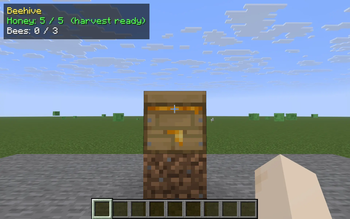
Look at any beehive or bee nest to see its honey level, sheltering bee count, and harvest-ready status on a small HUD.
Screenshots
About this Mod
BeeHUD is a clean info layer for beekeepers. Point your crosshair at any beehive or bee nest and a small readout appears in the top-left of your screen.
What it shows
- Honey level - the exact
0-5fill, with a harvest ready note the moment it hits 5 (when you can shear it for honeycomb or bottle it for honey). - Bees inside - how many bees are currently sheltering in the hive, out of its capacity of 3.
- Type - whether you're looking at a crafted Beehive or a naturally generated Bee Nest.
Why
Vanilla gives you no clean way to read a hive. The honey level is only a subtle texture change, and the number of bees inside is invisible unless you break the hive - which angers the colony. BeeHUD puts honey fill and occupancy on screen so you can time your harvest perfectly (wait for level 5, harvest with a campfire under it to keep the bees calm) and check a hive is fully populated before you move it.
Controls
- B - toggle the readout on/off. An action-bar message confirms the state.
Compatibility
Minecraft 1.21.8, 1.21.9, 1.21.10, 1.21.11 - Fabric Loader 0.16+. One JAR covers all four. Pure client-side: install on your client only, works on any Fabric server, fully vanilla-compatible. Requires Fabric API.
Available Versions
How to Install BeeHUD on Your Server
Order Server
Order a Minecraft Java server with at least 3 GB RAM (4 GB recommended).
Set fabric Loader
In the panel under "Egg", select the fabric loader and matching Minecraft version (1.21.11).
Install Mod
Open the mod browser in the dashboard and search for "BeeHUD". Click "Install" – done! Alternatively, upload the .jar via SFTP to the /mods folder.
Compatibility
Mod Loaders
Minecraft Versions
1.21.11, 1.21.10, 1.21.9 (+1 more)
Server-side
✗ UnsupportedRecommended RAM
4 GB(min. 3 GB)Frequently Asked Questions
BeeHUD server crashes on startup – what to do?
Most common cause: wrong fabric version or insufficient RAM. Check the server log (latest.log) for "OutOfMemoryError" or "Mixin" errors. With Mado Hosting: ensure at least 3 GB RAM is allocated and the loader matches the mod version (1.21.11). You can switch loaders with one click in the panel.
Is BeeHUD compatible with fabric?
BeeHUD officially supports fabric for Minecraft 1.21.11, 1.21.10, 1.21.9. The Mado dashboard automatically detects incompatible loader combinations.
Server lagging with BeeHUD – how to optimize performance?
Recommended RAM: 4 GB (per 8 players). Use /spark profiler to check if BeeHUD consumes the most tick time. Common fixes: reduce server view-distance to 8-10, install "performant" or "starlight" as supplementary mods on Forge. With Mado Hosting, your server runs on NVMe SSDs with dedicated CPU cores for minimal latency.
Similar Mods




![[ETF] Entity Texture Features](https://cdn.modrinth.com/data/BVzZfTc1/af683d206d50b05258d865b0d6e4aa2f2cee12f2_96.webp)
![[EMF] Entity Model Features](https://cdn.modrinth.com/data/4I1XuqiY/6e5bbd0d06b1741bfdab6c0cfab6de8fdaf0064c_96.webp)
Rent Modded Server
Install BeeHUD with just one click on your server.