
Better Amethyst Polymerized
Polymer Port Of Better Amethyst using filament!
Screenshots

About this Mod





Better Amethyst Polymerized
Better Amethyst Polymerized is a Filament-based mod. This mod is a Polymer port of Even Better Amethyst, seamlessly integrating a variety of new blocks into Minecraft using Filament.
Planned Additions:
- Amethyst Tools
- Amethyst Armor
- Amethyst Prism (like a pokeball but for villagers)
- Amethyst Furniture
- More Amethyst block variants and decorations
- Amethyst Chest (Maybe 😉)
Added Blocks:
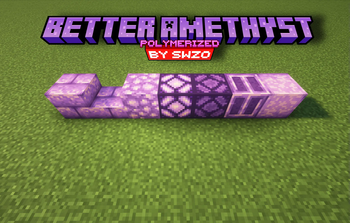
- Smooth Amethyst Crystal Block
- Chiseled Amethyst Crystal Block
- Amethyst Crystal Lamp
- Amethyst Bricks
- Amethyst Bricks Slab
- Amethyst Lamp
Features:
- Seamless Integration: Uses Filament to add and manage these new blocks effortlessly.
- Enhanced Aesthetics: Brings new textures and lighting options to enhance your Minecraft experience.
- Serverside: Use Polymer so no client side mods are required
- Compatibility: A polymer port of the popular Even Better Amethyst mod.
Note:
- Missing Blocks: Due to current limitations of Filament, the Amethyst Stairs and Amethyst Wall are not included in this version but may be added in future updates.
Dependencies:
Crafting Recipes (Spoiler):
Click to view crafting recipes
Amethyst Brick Slabs:

Amethyst Bricks:

Amethyst Crystal Lamp:

Amethyst Lamp:

Chiseled Amethyst Block:

Smooth Amethyst Block:

How to Use:
- Install Filament and Polymer: Ensure you have Filament and Polymer installed and up to date.
- Install The Mod: Place the Better Amethyst Polymerized mod into the
modsfolder of your Minecraft world. - Load the Pack: Use Polymer's Autohost Feature to load the resourcepack into your world.
Credits:
- PatBox: For creating Polymer.
- Tomalbrc: For developing Filament and providing invaluable help and support during the creation of this mod
- FrozenHydrant: For the Even Better Amethyst mod that inspired this mod.
Available Versions
How to Install Better Amethyst Polymerized on Your Server
Order Server
Order a Minecraft Java server with at least 3 GB RAM (4 GB recommended).
Set fabric Loader
In the panel under "Egg", select the fabric loader and matching Minecraft version (1.21.1).
Install Mod
Open the mod browser in the dashboard and search for "Better Amethyst Polymerized". Click "Install" – done! Alternatively, upload the .jar via SFTP to the /mods folder.
Compatibility
Mod Loaders
Minecraft Versions
1.21.1, 1.21
Server-side
✓ RequiredRecommended RAM
4 GB(min. 3 GB)Frequently Asked Questions
Better Amethyst Polymerized server crashes on startup – what to do?
Most common cause: wrong fabric version or insufficient RAM. Check the server log (latest.log) for "OutOfMemoryError" or "Mixin" errors. With Mado Hosting: ensure at least 3 GB RAM is allocated and the loader matches the mod version (1.21.1). You can switch loaders with one click in the panel.
Is Better Amethyst Polymerized compatible with fabric?
Better Amethyst Polymerized officially supports fabric for Minecraft 1.21.1, 1.21. The Mado dashboard automatically detects incompatible loader combinations.
Server lagging with Better Amethyst Polymerized – how to optimize performance?
Recommended RAM: 4 GB (per 8 players). Use /spark profiler to check if Better Amethyst Polymerized consumes the most tick time. Common fixes: reduce server view-distance to 8-10, install "performant" or "starlight" as supplementary mods on Forge. With Mado Hosting, your server runs on NVMe SSDs with dedicated CPU cores for minimal latency.
Similar Mods

![[ETF] Entity Texture Features](https://cdn.modrinth.com/data/BVzZfTc1/af683d206d50b05258d865b0d6e4aa2f2cee12f2_96.webp)
![[EMF] Entity Model Features](https://cdn.modrinth.com/data/4I1XuqiY/6e5bbd0d06b1741bfdab6c0cfab6de8fdaf0064c_96.webp)



Rent Modded Server
Install Better Amethyst Polymerized with just one click on your server.