
Sound Manager
This is the mod for usually used for muting or changing the voice of the mobs,blocks or generall things like death, fall damage , hit etc. You can edit them customly see images for more info
Screenshots

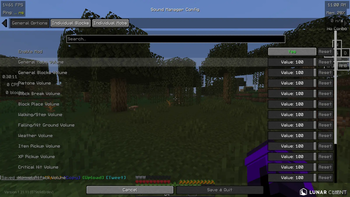
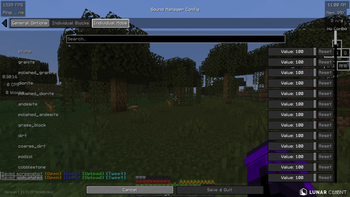
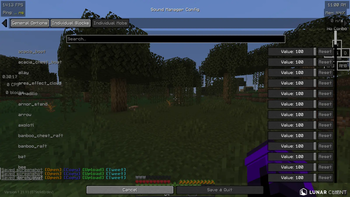
About this Mod
🎧 Better Gameplay – Custom Sound Manager
Better Gameplay is a lightweight Minecraft mod that gives players full control over in-game sounds. It allows you to customize, reduce, or completely mute specific sounds from blocks, mobs, and environmental interactions to create a more comfortable and personalized gameplay experience.
🎯 Purpose
Minecraft includes many repetitive or loud sounds (such as pistons, farming, or mob noises) that can become distracting or annoying over time. This mod is designed to solve that problem by allowing players to adjust or disable individual sounds without affecting the rest of the game.
⚙️ Functionality
With this mod, you can:
Control sound output for specific blocks (e.g., pistons, doors, redstone)
Adjust or mute mob sounds (e.g., animals, hostile mobs)
Manage environmental sounds (e.g., footsteps, farming, ambient noise)
Apply changes either to individual sound events or broader categories
Improve focus and gameplay comfort by removing unwanted audio
The mod works by modifying how Minecraft handles sound events, giving the player more control over what is played and what is not.
🎮 Use Cases
Reduce noise in technical/redstone builds
Create a quieter survival experience
Remove repetitive or distracting sounds
Customize gameplay for recording or streaming
⚠️ Important Notes
This mod does not provide unfair gameplay advantages and is intended for quality-of-life improvements only
Some sound changes may require restarting the game to fully apply
Compatibility may vary depending on other sound-related mods
🧩 Compatibility
Works in singleplayer and multiplayer
Requires a supported mod loader (Fabric – specify yours)
Designed to be lightweight with minimal performance impact
🚀 Future Plans
In-game GUI for easier sound control
Preset profiles (e.g., “Quiet Mode”, “No Redstone Sounds”)
Custom sound replacement system
❤️ Credits
Developed by Jasim
Available Versions
How to Install Sound Manager on Your Server
Order Server
Order a Minecraft Java server with at least 3 GB RAM (4 GB recommended).
Set fabric Loader
In the panel under "Egg", select the fabric loader and matching Minecraft version (1.21.11).
Install Mod
Open the mod browser in the dashboard and search for "Sound Manager". Click "Install" – done! Alternatively, upload the .jar via SFTP to the /mods folder.
Compatibility
Mod Loaders
Minecraft Versions
1.21.11
Server-side
✗ UnsupportedRecommended RAM
4 GB(min. 3 GB)Frequently Asked Questions
Sound Manager server crashes on startup – what to do?
Most common cause: wrong fabric version or insufficient RAM. Check the server log (latest.log) for "OutOfMemoryError" or "Mixin" errors. With Mado Hosting: ensure at least 3 GB RAM is allocated and the loader matches the mod version (1.21.11). You can switch loaders with one click in the panel.
Is Sound Manager compatible with fabric?
Sound Manager officially supports fabric for Minecraft 1.21.11. The Mado dashboard automatically detects incompatible loader combinations.
Server lagging with Sound Manager – how to optimize performance?
Recommended RAM: 4 GB (per 8 players). Use /spark profiler to check if Sound Manager consumes the most tick time. Common fixes: reduce server view-distance to 8-10, install "performant" or "starlight" as supplementary mods on Forge. With Mado Hosting, your server runs on NVMe SSDs with dedicated CPU cores for minimal latency.
Similar Mods




Rent Modded Server
Install Sound Manager with just one click on your server.