Better Happy Ghast Controls
Better controls and movement when riding Happy Ghasts, especially for building. Makes it feel more like creative flight.
Screenshots
About this Mod
Key Features
- Speed Control - Configurable movement speeds in all directions, as well as boosting.
- Creative Feel - Natural movement that feels more like creative mode.
- Context Switching - Multiple config profiles allow for situational control styles.
- Precision Movement - Sharper movements, fixed rotation, maintained Y position.
- Custom Keybinds - Descend, Dismount, Toggle Profile, Open Config.
- Server Controls (optional) - Adjust size and reach, or disable roaming, mining penalty, and ambient sounds.
Default Flight Controls
These map to your default Minecraft movement controls to align with creative flight. Set within Minecraft Options... -> Controls... -> Key Binds.... Your bindings may differ to the default below.
| Happy Ghast Control | Default Key | Minecraft Control |
|---|---|---|
| Forward | W |
Walk Forward |
| Backward | S |
Walk Backward |
| Left | A |
Strafe Left |
| Right | D |
Strafe Right |
| Ascend | Space |
Jump |
| Descend | Left Shift |
Sneak |
| Boost | Left Control Double-Tap W |
Sprint Walk Forward (x2) |
| Dismount | Double-Tap Left Shift |
Sneak (x2) |
Client Settings
Set on the client, does not require the server-side mod. Use Mod Menu to customize settings in-game, or assign a custom keybind for Open Config to open the settings in-game.
Custom Key Binds
Flight controls align with regular creative flight by default, with dismount requiring to double-tap sneak. Descend key can be rebound to restore regular single-press sneak to dismount behaviour.
| Key Bind | Default | Description |
|---|---|---|
| Descend | UnboundUses Sneak unless otherwise disabled. |
A custom keybind that can be assigned instead of Sneak to descend while riding a Happy Ghast. This can be assigned as an alternative to Sneak when using Sneak to dismount. |
| Dismount | Unbound Uses Double-Tap Sneak unless otherwise disabled. |
A custom keybind that can be assigned instead of Sneak or Double-Tap Sneak to dismount while riding a Happy Ghast. This can be assigned as an alternative to Sneak when using Sneak to descend. |
| Toggle Profile | ` (backtick) |
Allows you to toggle between preset profiles while riding a Happy Ghast to switch between control sets. E.g. to toggle between a "Travel" profile adjusted for speed and ease of use, and a "Build" profile adjusted for smaller more precise movements. |
| Open Config | Unbound |
Opens the client config screen from in-game. Saves having to use Mod Menu. |
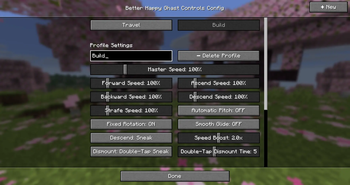
Profile Settings
Create one or more profiles to switch between different situations in real-time, for when you want speed and fluidity while traveling, or sharp precision while building.
| Setting | Description | Default |
|---|---|---|
| Name | A friendly name for the profile. This is shown on screen when toggling between profiles. | Default |
| Master Speed | Sets a consistent speed for all Happy Ghast movements. This simply sets all other speed settings at once. | 1.0 (100%) |
| Forward Speed | Sets the Happy Ghast speed while moving forward (W). | 1.0 (100%) |
| Backward Speed | Sets the Happy Ghast speed while moving backward (S). | 1.0 (100%) |
| Strafe Speed | Sets the Happy Ghast speed while moving sideways (A and D). | 1.0 (100%) |
| Ascend Speed | Sets the Happy Ghast speed while ascending vertically (Space Bar). | 1.0 (100%) |
| Descend Speed | Sets the Happy Ghast speed while descending vertically (Left Ctrl). | 1.0 (100%) |
| Automatic Pitch | Adjusts the Happy Ghast vertical position automatically while moving forward based on whether the player is looking up or down. Turn OFF to maintain the Y position unless using the Ascend/Descend key. | true (ON) |
| Fixed Rotation | Fixes the Happy Ghast rotation to center around the player rider, allowing more precision while stationary and looking around. Turn OFF to restore the standard rotation centering around the Happy Ghast. | true (ON) |
| Smooth Glide | Sets whether movements are smooth or instant while riding Happy Ghasts. Turn OFF for more precise movement. | false (OFF) |
| Speed Boost Rate | Apply a speed boost multiplier when pressing the Sprint key while riding Happy Ghasts. Double-tapping forward also boosts based on the global Minecraft setting. Resulting speed must be within the server maximum. | 2.0 (2x) |
| Descend Key | Select whether to use the Minecraft key bind for Sneak/Crouch to Descend while riding a Happy Ghast, or to only use the custom Descend key bind. If using Double-Tap to Dismount, this should use Custom Key Bind only. | SNEAK other option: CUSTOM_KEYBIND |
| Dismount Key | Select whether to require double tapping the Sneak/Crouch key to dismount while riding Happy Ghasts, or to apply the standard single tap Sneak/Crouch to dismount behaviour, or to only use the custom Dismount key bind. | DOUBLE_TAP_SNEAK other options: SNEAK CUSTOM_KEYBIND |
| Dismount Window | Time window in ticks where double-tapping the Sneak/Crouch key dismounts the Happy Ghast. Only applies when Dismount is set to Double-Tap. | 5 (5 ticks) |
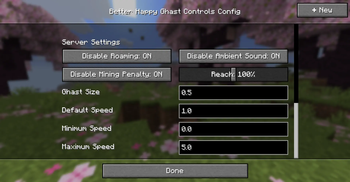
Server Settings
Set on the server, does not require client-side mod. Min/Max Speed can be used to set speed limits on the client-side. If server-side mod is not installed, defaults align with standard Minecraft.
| Setting | Description | Default |
|---|---|---|
| Disable Roaming | Makes all Happy Ghasts stop roaming while not being ridden. Only applies when wearing a Harness. | true (ON) |
| Disable Ambient Sound | Silences all Happy Ghast ambient sounds (does not affect hurt/death sounds). | true (ON) |
| Disable Mining Penalty | Allow players to break blocks at normal speeds while riding a Happy Ghast, rather than having the default 5x slowness applied for not being on the ground. | true (ON) |
| Reach | The multiplier applied to the distance players can reach blocks and entities while riding a Happy Ghast, where 1.0 is the standard reach. | 1.0 (100% or 4.5 blocks) |
| Ghast Size | The size multiplier of all Happy Ghasts, where 1.0 is the standard size. | 0.75 (75% or 3 blocks wide) |
| Default Speed | Sets the default speed while riding Happy Ghasts. This also applies the default speed for anyone not using the client-side mod. Additionally, roaming ghasts move slightly slower than normal too. | 1.0 (100%) |
| Minimum Speed | Sets the minimum client speed settings allowed while riding Happy Ghasts. Overrides any client config that exceeds this. | 0.0 (0%) |
| Maximum Speed | Sets the maximum client speed settings allowed while riding Happy Ghasts. Overrides any client config that exceeds this. | 5.0 (500% or 5x as fast as standard) |
Config File
The config file can be modified under config/ghastcontrols.json. The following JSON represents the default config. Additional profile objects can be added, and the currentProfile represents the currently selected profile. For servers, currentProfile and profiles are ignored.
Default Client Config
{
  "currentProfile": 1,
  "profiles": [
    {
      "name": "Default",
      "forwardSpeed": 1.0,
      "backwardSpeed": 1.0,
      "strafeSpeed": 1.0,
      "ascendSpeed": 1.0,
      "descendSpeed": 1.0,
      "boostRate": 2.0,
      "dynamicPitch": false,
      "fixedRotation": true,
      "smoothGlide": true,
      "descend": "SNEAK",
      "dismount": "DOUBLE_TAP_SNEAK",
      "dismountWindow": 5
    }
  ],
  "disableRoaming": true,
  "disableAmbientSound": true,
  "disableMiningPenalty": true,
  "reach": 1.0,
  "ghastSize": 0.75,
  "defaultSpeed": 1.0,
  "minSpeed": 0.0,
  "maxSpeed": 5.0
}
Default Server Config
{
  "disableRoaming": true,
  "disableAmbientSound": true,
  "disableMiningPenalty": true,
  "reach": 1.0,
  "ghastSize": 0.75,
  "defaultSpeed": 1.0,
  "minSpeed": 0.0,
  "maxSpeed": 5.0
}
Available Versions
How to Install Better Happy Ghast Controls on Your Server
Order Server
Order a Minecraft Java server with at least 3 GB RAM (4 GB recommended).
Set fabric Loader
In the panel under "Egg", select the fabric loader and matching Minecraft version (26.1.2).
Install Mod
Open the mod browser in the dashboard and search for "Better Happy Ghast Controls". Click "Install" – done! Alternatively, upload the .jar via SFTP to the /mods folder.
Compatibility
Mod Loaders
Minecraft Versions
26.1.2, 26.1.1, 26.1
Server-side
~ OptionalRecommended RAM
4 GB(min. 3 GB)Frequently Asked Questions
Better Happy Ghast Controls server crashes on startup – what to do?
Most common cause: wrong fabric version or insufficient RAM. Check the server log (latest.log) for "OutOfMemoryError" or "Mixin" errors. With Mado Hosting: ensure at least 3 GB RAM is allocated and the loader matches the mod version (26.1.2). You can switch loaders with one click in the panel.
Is Better Happy Ghast Controls compatible with fabric and neoforge?
Better Happy Ghast Controls officially supports fabric, neoforge for Minecraft 26.1.2, 26.1.1, 26.1. The Mado dashboard automatically detects incompatible loader combinations.
Server lagging with Better Happy Ghast Controls – how to optimize performance?
Recommended RAM: 4 GB (per 8 players). Use /spark profiler to check if Better Happy Ghast Controls consumes the most tick time. Common fixes: reduce server view-distance to 8-10, install "performant" or "starlight" as supplementary mods on Forge. With Mado Hosting, your server runs on NVMe SSDs with dedicated CPU cores for minimal latency.
Similar Mods




Rent Modded Server
Install Better Happy Ghast Controls with just one click on your server.