
Better Health
Displays health as an XP-bar style progress bar for better visibility.
Screenshots
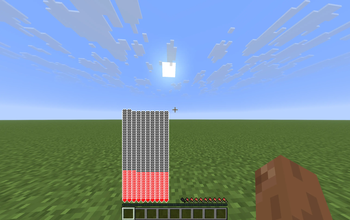
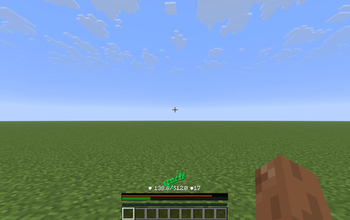
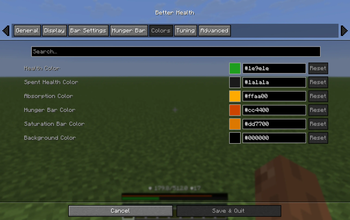
About this Mod
Better Health Bar
A client-side Fabric mod for Minecraft 1.21.11 that replaces the vanilla heart HUD with a clean, scalable bar-based health display when players exceed a configurable health threshold.
Why Better Health Bar?
Vanilla hearts become unreadable in modpacks, RPGs, or high-health gameplay. This mod displays health as a compact, text-based status bar showing current/max health and absorption.
Features
- Threshold Trigger - Switches to bar mode after configurable health
- Layout Options - Full-width or compact bar styles
- Hunger/Saturation - Optional display toggles
- Customizable Appearance - Bar height, spacing, offsets, alignment
- Split Half-Mode - Health and hunger share one row with adjustable width/gap
- Anchor Options - Top or bottom positioning for modern HUD layouts
- Fill Direction - Left-to-right or right-to-left health fills
- Floating Text - Damage/healing numbers with configurable text placement
- Cloth Config Integration - Live in-game adjustments
Compatibility
- Fully client-side (no server installation required)
- Works alongside other mods in modded environments
Issues
- Please report any issues on the github repo
Available Versions
How to Install Better Health on Your Server
Order Server
Order a Minecraft Java server with at least 3 GB RAM (4 GB recommended).
Set fabric Loader
In the panel under "Egg", select the fabric loader and matching Minecraft version (26.1.2).
Install Mod
Open the mod browser in the dashboard and search for "Better Health". Click "Install" – done! Alternatively, upload the .jar via SFTP to the /mods folder.
Compatibility
Mod Loaders
Minecraft Versions
26.1.2, 1.21.11
Server-side
✗ UnsupportedRecommended RAM
4 GB(min. 3 GB)Frequently Asked Questions
Better Health server crashes on startup – what to do?
Most common cause: wrong fabric version or insufficient RAM. Check the server log (latest.log) for "OutOfMemoryError" or "Mixin" errors. With Mado Hosting: ensure at least 3 GB RAM is allocated and the loader matches the mod version (26.1.2). You can switch loaders with one click in the panel.
Is Better Health compatible with fabric?
Better Health officially supports fabric for Minecraft 26.1.2, 1.21.11. The Mado dashboard automatically detects incompatible loader combinations.
Server lagging with Better Health – how to optimize performance?
Recommended RAM: 4 GB (per 8 players). Use /spark profiler to check if Better Health consumes the most tick time. Common fixes: reduce server view-distance to 8-10, install "performant" or "starlight" as supplementary mods on Forge. With Mado Hosting, your server runs on NVMe SSDs with dedicated CPU cores for minimal latency.
Similar Mods




![[ETF] Entity Texture Features](https://cdn.modrinth.com/data/BVzZfTc1/af683d206d50b05258d865b0d6e4aa2f2cee12f2_96.webp)
![[EMF] Entity Model Features](https://cdn.modrinth.com/data/4I1XuqiY/6e5bbd0d06b1741bfdab6c0cfab6de8fdaf0064c_96.webp)
Rent Modded Server
Install Better Health with just one click on your server.