
Better List for Litematica
A Litematica add-on: per-item checkboxes, tracked-chest "stored" counts with in-world highlighting, a targeted-items HUD, and party progress sync.
Screenshots
About this Mod
Better List for Litematica
A Litematica add-on that turns the material list into a full build-tracking tool.
Track what you've placed, what's stored in your chests, and what each teammate is working on — all from one upgraded material list. Works in singleplayer and on servers, solo or in a party.
⚠️ Requires Litematica and MaLiLib (plus Fabric API). Client-side.
✨ Features
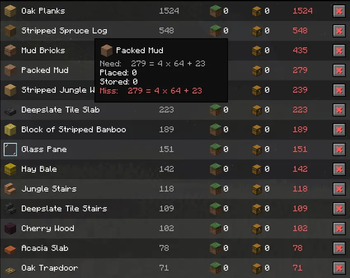
✅ Material checklist
Tick off items per schematic as you gather them. State is saved per server, so your progress is right where you left it next time you log in.
📦 Tracked chests → live "stored" counts
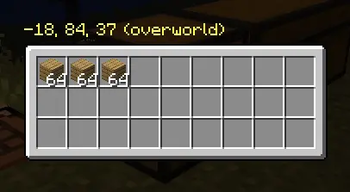
Mark any chest as storage and its contents are counted into a Stored column on the list — so you instantly see how much you still need to craft vs. what's already in your bulk storage.
- 🔍 Preview a chest's contents without walking to it
- 💡 Highlight tracked chests in the world — visible through walls
- ⚙️ Optionally include or exclude your own inventory from the count (toggle in settings) — count only your chests if you prefer
🎯 Targeted-items HUD
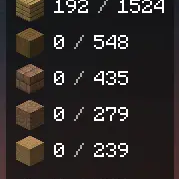
Right-click items on the list to target them, then toggle a compact top-right HUD showing have / need. Once you've gathered enough, a target turns green and moves to the bottom (e.g. 12 / 12) instead of disappearing — so you can see at a glance that a goal is met. Works solo — no party required.
With Auto enabled, the list keeps both Stored and Missing up to date automatically while you're near the build — no manual reload needed.
👥 Party sync
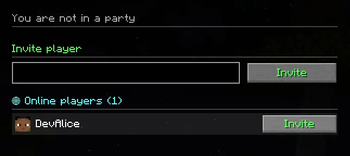
Build together: invite players, share schematic placements, and sync checklist + stored progress between everyone. See which teammates are focusing which items (colored borders + player heads on the list).
- 🗂️ The party admin picks the project schematics (multi-select) and sends them to everyone in one click
- 📨 If a teammate is missing a schematic file, the admin is told exactly who needs it
🔎 Powerful filtering & sorting
- Search by item name
- Hide fully-placed / fully-stored / checked items
- Sort by any column (Need, Done, Have, Miss, …)
- Filter the list to a specific player's targets
🌍 Localization
Fully translated — English (default) and Polish. Switch in Options → Language.
⌨️ Default keybinds
| Key | Action |
|---|---|
. |
Open material list |
R |
Reload list (inside the GUI) |
K |
Open tracked-chests screen |
H |
Toggle chest highlighting |
J |
Toggle targeted-items HUD |
O |
Open party screen |
, |
Open config |
All keybinds are rebindable in the config screen.
📥 Requirements
- Fabric Loader 0.18.2+
- Fabric API
- MaLiLib
- Litematica
- Minecraft 26.1.2
Party sync works through a server-side relay (a Paper/Bukkit plugin or the built-in Fabric server path); without it, all single-player features still work normally.
💡 On a server using the Better List Integration plugin, keep the plugin and the mod on matching versions — teammate heads/targets and project sharing need the up-to-date relay.
💬 Notes
Litematica and MaLiLib are separate projects by masa and are required as dependencies — they are not bundled with this mod. Big thanks to them for the foundation this add-on builds on.
Found a bug or have a suggestion? Open an issue on GitHub.
Available Versions
How to Install Better List for Litematica on Your Server
Order Server
Order a Minecraft Java server with at least 3 GB RAM (4 GB recommended).
Set fabric Loader
In the panel under "Egg", select the fabric loader and matching Minecraft version (26.1.2).
Install Mod
Open the mod browser in the dashboard and search for "Better List for Litematica". Click "Install" – done! Alternatively, upload the .jar via SFTP to the /mods folder.
Compatibility
Mod Loaders
Minecraft Versions
26.1.2
Server-side
~ OptionalRecommended RAM
4 GB(min. 3 GB)Frequently Asked Questions
Better List for Litematica server crashes on startup – what to do?
Most common cause: wrong fabric version or insufficient RAM. Check the server log (latest.log) for "OutOfMemoryError" or "Mixin" errors. With Mado Hosting: ensure at least 3 GB RAM is allocated and the loader matches the mod version (26.1.2). You can switch loaders with one click in the panel.
Is Better List for Litematica compatible with fabric?
Better List for Litematica officially supports fabric for Minecraft 26.1.2. The Mado dashboard automatically detects incompatible loader combinations.
Server lagging with Better List for Litematica – how to optimize performance?
Recommended RAM: 4 GB (per 8 players). Use /spark profiler to check if Better List for Litematica consumes the most tick time. Common fixes: reduce server view-distance to 8-10, install "performant" or "starlight" as supplementary mods on Forge. With Mado Hosting, your server runs on NVMe SSDs with dedicated CPU cores for minimal latency.
Similar Mods




![[ETF] Entity Texture Features](https://cdn.modrinth.com/data/BVzZfTc1/af683d206d50b05258d865b0d6e4aa2f2cee12f2_96.webp)
![[EMF] Entity Model Features](https://cdn.modrinth.com/data/4I1XuqiY/6e5bbd0d06b1741bfdab6c0cfab6de8fdaf0064c_96.webp)
Rent Modded Server
Install Better List for Litematica with just one click on your server.