
Better Looting
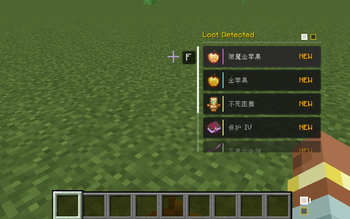
Better Looting completely overhauls the item pickup mechanics in Minecraft. Instead of instantly cluttering your inventory with junk as you walk by, items are displayed in a sleek, immersive HUD. Select exactly what you want—just like in modern RPGs.
Screenshots
About this Mod
Better Looting
📦 Overview
Say no to "vacuum cleaner" looting and experience immersive RPG-style loot management.
Better Looting completely overhauls Minecraft's dropped item interaction mechanics. When you approach dropped items, they will no longer automatically fill your inventory. Instead, they are displayed in an elegant HUD floating window. Just like in various RPGs and games, you can calmly choose the loot you truly need and say goodbye to the annoyance of a cluttered inventory.
✨ Core Features
💎 Immersive HUD Interaction
- Smart floating window: An item list automatically appears on the screen when you approach dropped items;
- Free selection: Browse up and down with the mouse wheel, press [F] (default) to precisely pick up the selected item;
- One-click collect all: In a hurry? Hold [F] to pick up all nearby dropped items instantly;
- Visual optimization:
- Supports visual stacking display for more than 64 items (maximum pick-up per stack is still 64);
- Smart sorting: Rarer items are automatically placed at the top of the list, so you can spot valuable items at a glance.
🧹 Smart Filter & Whitelist
- One-click filter: Press [Left Alt] to toggle "Filter Mode". By default, this mode only displays rare items (such as tools, armor, etc.) and automatically hides junk blocks like cobblestone and dirt;
- Custom whitelist:
- Want to adjust the filter? Open your inventory and press [Left Alt] to open the whitelist settings;
- Add any item to the whitelist to keep it visible in Filter Mode.
- Deep JEI integration: Fully compatible with JEI! Click items directly in the JEI list to add them to your whitelist for effortless operation.
🚀 Super Stacking & Performance Optimization
Break vanilla limits and eliminate lag caused by massive amounts of dropped items:
- Break limits: Similar dropped items ignore the vanilla 64-stack limit and are automatically "compressed" into a single entity;
- Highly controllable: Toggle on/off and freely adjust the X/Z/Y absorption radius in the config.
🎨 Highly Customizable UI
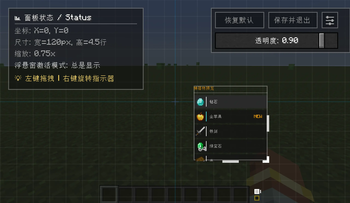
No more obstructed views — you are in full control. Freely adjust the position, size, and transparency of the floating window.
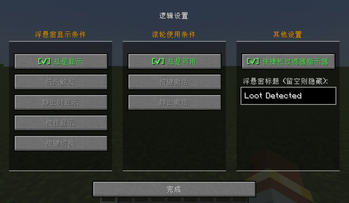
Supports multiple display conditions:
- Always Display: Visible at all times;
- Look-Down Display: Maximum immersion! The list only appears when you look down at the ground (trigger angle is fully adjustable);
- Stationary Display: Only visible when the player is standing still;
- Key-Controlled Display: Only visible when holding or toggling a specific key.
🎮 Flexible Anti-Misoperation Options
Customize mouse wheel behavior to prevent accidental inputs during combat:
- Always enabled;
- Require key activation;
- Only enabled when stationary.
⌨️ Controls
| Key | Function | Notes |
|---|---|---|
| F | Pick up selected item | Default key, configurable |
| Hold F | Pick up all items nearby | Quick looting |
| Mouse Wheel | Switch selected item | Navigate up and down |
| Left Alt | Toggle Filter Mode | Enable/disable junk block hiding |
| Inventory + Left Alt | Open Whitelist Config | Press while inventory is open |
⚠️ Warnings & Compatibility
❌ Compatibility Warning: This mod has built-in dropped item merging optimization. It is incompatible with some item merging/stacking optimization mods (e.g., Staaaaaaaaaaaack). Using them together may cause display or pick-up errors.
Feedback: Feel free to leave comments to point out issues or discuss ideas! If you have features you want to see added, please let me know, and you can also message the author directly for special requests.
Available Versions
How to Install Better Looting on Your Server
Order Server
Order a Minecraft Java server with at least 3 GB RAM (4 GB recommended).
Set fabric Loader
In the panel under "Egg", select the fabric loader and matching Minecraft version (1.21.1).
Install Mod
Open the mod browser in the dashboard and search for "Better Looting". Click "Install" – done! Alternatively, upload the .jar via SFTP to the /mods folder.
Compatibility
Mod Loaders
Minecraft Versions
1.21.1, 1.20.1
Server-side
✓ RequiredRecommended RAM
4 GB(min. 3 GB)Frequently Asked Questions
Better Looting server crashes on startup – what to do?
Most common cause: wrong fabric version or insufficient RAM. Check the server log (latest.log) for "OutOfMemoryError" or "Mixin" errors. With Mado Hosting: ensure at least 3 GB RAM is allocated and the loader matches the mod version (1.21.1). You can switch loaders with one click in the panel.
Is Better Looting compatible with fabric and forge and neoforge?
Better Looting officially supports fabric, forge, neoforge for Minecraft 1.21.1, 1.20.1. Note: Forge and Fabric mods are NOT cross-compatible – pick one loader and stick with it. The Mado dashboard automatically detects incompatible loader combinations.
Server lagging with Better Looting – how to optimize performance?
Recommended RAM: 4 GB (per 8 players). Use /spark profiler to check if Better Looting consumes the most tick time. Common fixes: reduce server view-distance to 8-10, install "performant" or "starlight" as supplementary mods on Forge. With Mado Hosting, your server runs on NVMe SSDs with dedicated CPU cores for minimal latency.
Similar Mods




Rent Modded Server
Install Better Looting with just one click on your server.