Better Name Visibility
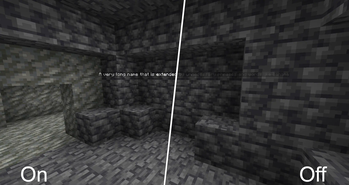
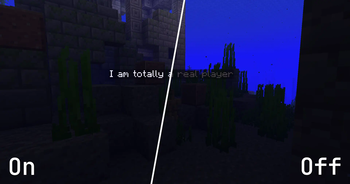
Increases the visibility of names behind blocks
Screenshots
About this Mod
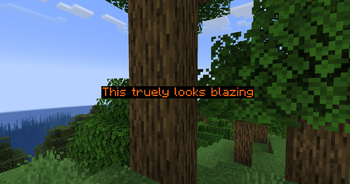
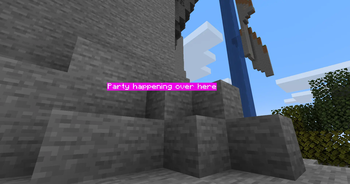
This mod improves the visibility of all vanilla names rendered.
The improved rendering can be turned off or on at any time using a configurable key (Standard: +).

Configuration
Several configuration options are provided through YACL. You can edit the config using Mod Menu.
Foreground Color
Controls the text color and opacity of names. It defaults to fully opaque white.
Background Color
Controls the background color of name tags. It defaults to semi transparent black.
Fullbright Names
Name tags are no longer affected by the current light level. This only affects names that are not rendered behind other blocks. Names behind other blocks are always fullbright. It defaults to on.
Distant Name Scaling
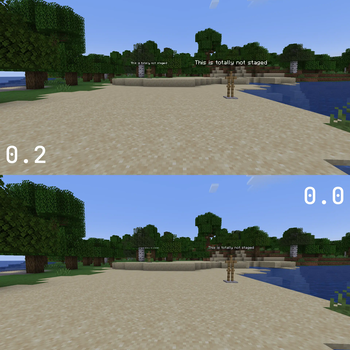
Sets the scaling of distant names from 0.0 to 1.0. At 0.0 names are not scaled at all. At 1.0 all names appear the same size, regardless of distance. It defaults to 0.2.
Render Names At Any Distance
By default Minecraft stops rendering names farther away than 64 blocks. This limit can be disabled, but is only recommended with decent name scaling enabled. It is disabled by default.
Disable Team Colors
Team Colors will by default overwrite the RGB components of your custom foreground colors. You may enable this option to force the use of your configured text color. It is not enabled by default.
Shader Support
Correct functionality in combination with shaders is not guaranteed. Some shaderpacks may support all functionality, while other shaderpacks will only work partly, i. e. not renderering names through walls.
Available Versions
How to Install Better Name Visibility on Your Server
Order Server
Order a Minecraft Java server with at least 3 GB RAM (4 GB recommended).
Set fabric Loader
In the panel under "Egg", select the fabric loader and matching Minecraft version (1.21.11).
Install Mod
Open the mod browser in the dashboard and search for "Better Name Visibility". Click "Install" – done! Alternatively, upload the .jar via SFTP to the /mods folder.
Compatibility
Mod Loaders
Minecraft Versions
1.21.11, 1.21.10, 1.21.9 (+22 more)
Server-side
✗ UnsupportedRecommended RAM
4 GB(min. 3 GB)Frequently Asked Questions
Better Name Visibility server crashes on startup – what to do?
Most common cause: wrong fabric version or insufficient RAM. Check the server log (latest.log) for "OutOfMemoryError" or "Mixin" errors. With Mado Hosting: ensure at least 3 GB RAM is allocated and the loader matches the mod version (1.21.11). You can switch loaders with one click in the panel.
Is Better Name Visibility compatible with fabric?
Better Name Visibility officially supports fabric for Minecraft 1.21.11, 1.21.10, 1.21.9. The Mado dashboard automatically detects incompatible loader combinations.
Server lagging with Better Name Visibility – how to optimize performance?
Recommended RAM: 4 GB (per 8 players). Use /spark profiler to check if Better Name Visibility consumes the most tick time. Common fixes: reduce server view-distance to 8-10, install "performant" or "starlight" as supplementary mods on Forge. With Mado Hosting, your server runs on NVMe SSDs with dedicated CPU cores for minimal latency.
Similar Mods




![[ETF] Entity Texture Features](https://cdn.modrinth.com/data/BVzZfTc1/af683d206d50b05258d865b0d6e4aa2f2cee12f2_96.webp)
![[EMF] Entity Model Features](https://cdn.modrinth.com/data/4I1XuqiY/6e5bbd0d06b1741bfdab6c0cfab6de8fdaf0064c_96.webp)
Rent Modded Server
Install Better Name Visibility with just one click on your server.