
Better No Chat
Toggle Minecraft chat instantly. Hide player messages, keep system messages visible. Fabric 1.21.11.
Screenshots
About this Mod
Better No Chat
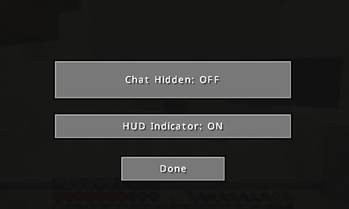
Better No Chat is a lightweight, client-side Fabric mod for Minecraft 1.21.11 that gives players complete control over in-game chat visibility. Instantly toggle player chat on or off with a customizable keybind while keeping important system messages, server notifications, and command feedback visible.
Whether you're recording content, streaming, focusing on gameplay, avoiding chat spam, or simply prefer a cleaner HUD, Better No Chat provides a seamless and vanilla-friendly solution without requiring server installation.
Features
- Toggle chat visibility with a customizable keybind
- Hide all player chat messages when chat is disabled
- Keep system messages and command feedback visible
- Optional whitelist for specific usernames
- Small HUD indicator showing current chat status
- Easy configuration with Cloth Config
- Lightweight and optimized for performance
- Fully client-side — works on any server
- Compatible with Minecraft 1.21.11 Fabric
Why Use Better No Chat?
Minecraft chat can often become distracting due to spam, advertisements, excessive conversations, or simply too much on-screen clutter. Better No Chat allows players to instantly disable player chat while still receiving important game information. This makes it ideal for:
- Content creators and streamers
- PvP players
- Speedrunners
- Builders
- AFK sessions
- Accessibility and focus improvements
- Multiplayer servers with active chat
Compatibility
- Minecraft 1.21.11
- Fabric Loader
- Fabric API
- Cloth Config
Keywords
Minecraft chat mod, disable chat Minecraft, Fabric chat toggle mod, Minecraft 1.21.11 Fabric mod, client-side chat mod, hide player chat Minecraft, chat filter Fabric, Minecraft HUD indicator mod, Fabric utility mod, Minecraft quality of life mod, Better No Chat, Minecraft chat control, multiplayer chat toggle, Minecraft chat management, Fabric QoL mod.
Available Versions
How to Install Better No Chat on Your Server
Order Server
Order a Minecraft Java server with at least 3 GB RAM (4 GB recommended).
Set fabric Loader
In the panel under "Egg", select the fabric loader and matching Minecraft version (1.21.11).
Install Mod
Open the mod browser in the dashboard and search for "Better No Chat". Click "Install" – done! Alternatively, upload the .jar via SFTP to the /mods folder.
Compatibility
Mod Loaders
Minecraft Versions
1.21.11
Server-side
✗ UnsupportedRecommended RAM
4 GB(min. 3 GB)Frequently Asked Questions
Better No Chat server crashes on startup – what to do?
Most common cause: wrong fabric version or insufficient RAM. Check the server log (latest.log) for "OutOfMemoryError" or "Mixin" errors. With Mado Hosting: ensure at least 3 GB RAM is allocated and the loader matches the mod version (1.21.11). You can switch loaders with one click in the panel.
Is Better No Chat compatible with fabric?
Better No Chat officially supports fabric for Minecraft 1.21.11. The Mado dashboard automatically detects incompatible loader combinations.
Server lagging with Better No Chat – how to optimize performance?
Recommended RAM: 4 GB (per 8 players). Use /spark profiler to check if Better No Chat consumes the most tick time. Common fixes: reduce server view-distance to 8-10, install "performant" or "starlight" as supplementary mods on Forge. With Mado Hosting, your server runs on NVMe SSDs with dedicated CPU cores for minimal latency.
Similar Mods




Rent Modded Server
Install Better No Chat with just one click on your server.