
Better World Loading
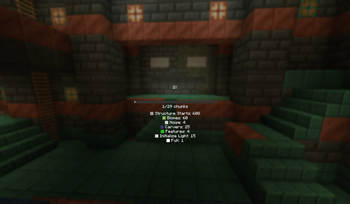
Adds more info to the world loading screen
Screenshots
About this Mod
Better World Loading
Enhance your Minecraft world loading screen with a sleek progress bar, detailed chunk generation stats, and optional sound feedback!
Features
📊 Modern Progress Display
- Replaces the default chunk map with a clean progress bar
- Shows exact chunk count (e.g., "125/256 chunks")
- Configurable through MidnightLib
🔍 Detailed Chunk Information (Optional)
- Toggleable detailed chunk status breakdown:
- Shows count of chunks in each generation phase
- Color-coded for easy reading
- Includes: Empty, Structure Starts, Biomes, Features, Light, Full, etc.
🔊 Progress Sounds (Optional)
- Gentle "hat" note sound plays as generation progresses
Configuration
Features can be toggled via MidnightLib:
- Show/hide detailed chunk info
- Toggle progress sounds
Why Choose This Mod?
- Cleaner visual feedback during world generation
- Actually useful information about what's loading
- Lightweight - won't impact loading performance
- Fully customizable to your preferences
Perfect for speedrunners, technical players, or anyone who wants better feedback during world loading!
Contact me on Discord @h1ggsk if you need help with any part of the mod!
Requirements
- Fabric Loader
- Fabric API (required)
If you found this mod helpful, please consider donating!
Bitcoin wallet address: bc1qzhuf0phu508ktrghw3x42cgvp9r7y0m36lt8wp
Available Versions
How to Install Better World Loading on Your Server
Order Server
Order a Minecraft Java server with at least 3 GB RAM (4 GB recommended).
Set fabric Loader
In the panel under "Egg", select the fabric loader and matching Minecraft version (1.21.4).
Install Mod
Open the mod browser in the dashboard and search for "Better World Loading". Click "Install" – done! Alternatively, upload the .jar via SFTP to the /mods folder.
Compatibility
Mod Loaders
Minecraft Versions
1.21.4, 1.21.3, 1.21.1 (+1 more)
Server-side
✗ UnsupportedRecommended RAM
4 GB(min. 3 GB)Frequently Asked Questions
Better World Loading server crashes on startup – what to do?
Most common cause: wrong fabric version or insufficient RAM. Check the server log (latest.log) for "OutOfMemoryError" or "Mixin" errors. With Mado Hosting: ensure at least 3 GB RAM is allocated and the loader matches the mod version (1.21.4). You can switch loaders with one click in the panel.
Is Better World Loading compatible with fabric and forge and neoforge?
Better World Loading officially supports fabric, forge, neoforge for Minecraft 1.21.4, 1.21.3, 1.21.1. Note: Forge and Fabric mods are NOT cross-compatible – pick one loader and stick with it. The Mado dashboard automatically detects incompatible loader combinations.
Server lagging with Better World Loading – how to optimize performance?
Recommended RAM: 4 GB (per 8 players). Use /spark profiler to check if Better World Loading consumes the most tick time. Common fixes: reduce server view-distance to 8-10, install "performant" or "starlight" as supplementary mods on Forge. With Mado Hosting, your server runs on NVMe SSDs with dedicated CPU cores for minimal latency.
Similar Mods




![[ETF] Entity Texture Features](https://cdn.modrinth.com/data/BVzZfTc1/af683d206d50b05258d865b0d6e4aa2f2cee12f2_96.webp)
![[EMF] Entity Model Features](https://cdn.modrinth.com/data/4I1XuqiY/6e5bbd0d06b1741bfdab6c0cfab6de8fdaf0064c_96.webp)
Rent Modded Server
Install Better World Loading with just one click on your server.