
Better-X-BOP
A custom datapack that fixes and enhances Biomes O' Plenty Nether Biomes when using BetterX world types
Screenshots

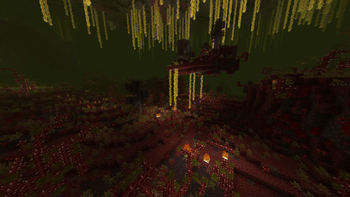
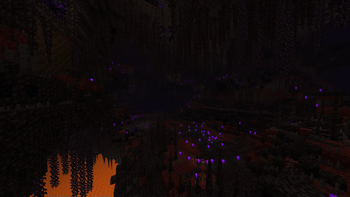


About this Mod
The Problem
The way that Biomes O' Plenty (and potentially other Terablender biome mods) generates it's Biome data is not compatible with the data-driven systems used by BCLib / WorldWeaver, and the Biomes O' Plenty biomes end up generating with incorrect surface generation. This also results in Biomes O' Plenty biome specific generation features not being placed correctly.
The Datapack Problem
If you are using something like the Global Datapacks or Global Packs mod to inject datapacks automatically - you NEED to read this! BetterNether does not seem load the datapack customizaitions properly on the very first world load if you are using these mods to inject datapacks into your worlds automatically on world creation. More recently these style of mods are also offering "optional" global datapacks, that are injected into a world automatically but are 'disabled' by default. Trying to enable the datapack after world creation seems to always fail. I suspect this happens because BetterNether tries to look for datapack customizations before datapacks are injected from these "Global Datapack" type mods.
This does not affect adding the datapack normally (Create world save > stop world > add datapack to world save > load world). If you are using a "global datapack" style mod, add the datapack to the "required" datapacks folder (so that the datapack is injected as 'enabled' and NOT 'disabled') and just be sure to stop and reload the world after it's initial creation!
The Solution
This datapack attempts to re-create these biomes using data files that BCLib / WorldWeaver can understand. But that's not all - to make these biomes feel more in line with BetterNether biomes I've sprinkled in some of my own customizations / additions. BetterNether biomes are dense, and very feature rich, so some of the BOP biomes get a complete face-lift while the rest get a sprinkling of BetterNether biome features to make them feel like they belong next to their BetterNether neighbors
Available Versions
How to Install Better-X-BOP on Your Server
Order Server
Order a Minecraft Java server with at least 4 GB RAM (6 GB recommended).
Set datapack Loader
In the panel under "Egg", select the datapack loader and matching Minecraft version (1.21.1).
Install Mod
Open the mod browser in the dashboard and search for "Better-X-BOP". Click "Install" – done! Alternatively, upload the .jar via SFTP to the /mods folder.
Compatibility
Mod Loaders
Minecraft Versions
1.21.1, 1.21, 1.20.1
Server-side
✓ RequiredRecommended RAM
6 GB(min. 4 GB)Frequently Asked Questions
Better-X-BOP server crashes on startup – what to do?
Most common cause: wrong datapack version or insufficient RAM. Check the server log (latest.log) for "OutOfMemoryError" or "Mixin" errors. With Mado Hosting: ensure at least 4 GB RAM is allocated and the loader matches the mod version (1.21.1). You can switch loaders with one click in the panel.
Is Better-X-BOP compatible with datapack and fabric?
Better-X-BOP officially supports datapack, fabric for Minecraft 1.21.1, 1.21, 1.20.1. The Mado dashboard automatically detects incompatible loader combinations.
Server lagging with Better-X-BOP – how to optimize performance?
Recommended RAM: 6 GB (per 5 players). Use /spark profiler to check if Better-X-BOP consumes the most tick time. Common fixes: reduce server view-distance to 8-10, install "performant" or "starlight" as supplementary mods on Forge. With Mado Hosting, your server runs on NVMe SSDs with dedicated CPU cores for minimal latency.
Similar Mods

![[ETF] Entity Texture Features](https://cdn.modrinth.com/data/BVzZfTc1/af683d206d50b05258d865b0d6e4aa2f2cee12f2_96.webp)
![[EMF] Entity Model Features](https://cdn.modrinth.com/data/4I1XuqiY/6e5bbd0d06b1741bfdab6c0cfab6de8fdaf0064c_96.webp)



Rent Modded Server
Install Better-X-BOP with just one click on your server.