
BetterBlockZ: DecorZ
A decorative addon for BetterBlockZ that adds custom-modeled blocks.
Screenshots
About this Mod
BetterBlockZ: DecorZ
Custom model decorative blocks add-on for BetterBlockZ.
BLOCK FEATURES and MECHANICS:
Cyber Lights
Full-bright decorative light fixtures with flexible placement and modular building options.
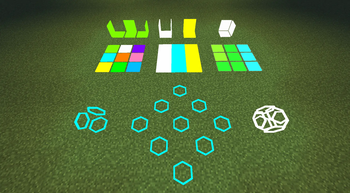
Modular Blocks
- Panel
- Cut Panel
- Strip
- Place side-by-side to create seamless custom light layouts.
- Sneak-place to start a separate connection network.
Multi-Face Stacking
- Plate
- Cover
- Flat Lamp
- Hexagon Lamp
- Up to 6 can occupy a single block space.
- Supports placement on the floor, ceiling, and all four walls.
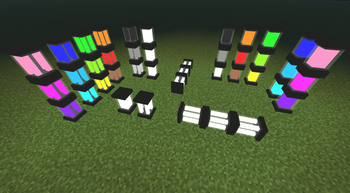
Omni-Directional Blocks
- Lantern
- Quad Lantern
- Can be attached to floors, walls, and ceilings.
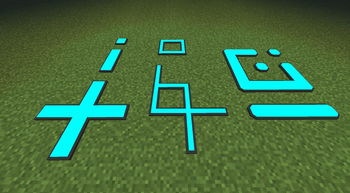
Number Decals
- Flat number decals.
- Right-click to cycle numbers from 0-9.
- Can be placed on all sides of a block.
- Placement rotation adjusts automatically based on facing.
Placement & Building Support
- Blocks do not require support and will not break when floating.
- Supports rotation and mirroring for easier use with tools like Building Gadgets.
More blocks coming in future updates!
Available Versions
How to Install BetterBlockZ: DecorZ on Your Server
Order Server
Order a Minecraft Java server with at least 3 GB RAM (4 GB recommended).
Set neoforge Loader
In the panel under "Egg", select the neoforge loader and matching Minecraft version (26.1.2).
Install Mod
Open the mod browser in the dashboard and search for "BetterBlockZ: DecorZ". Click "Install" – done! Alternatively, upload the .jar via SFTP to the /mods folder.
Compatibility
Mod Loaders
Minecraft Versions
26.1.2
Server-side
✓ RequiredRecommended RAM
4 GB(min. 3 GB)Frequently Asked Questions
BetterBlockZ: DecorZ server crashes on startup – what to do?
Most common cause: wrong neoforge version or insufficient RAM. Check the server log (latest.log) for "OutOfMemoryError" or "Mixin" errors. With Mado Hosting: ensure at least 3 GB RAM is allocated and the loader matches the mod version (26.1.2). You can switch loaders with one click in the panel.
Is BetterBlockZ: DecorZ compatible with neoforge?
BetterBlockZ: DecorZ officially supports neoforge for Minecraft 26.1.2. The Mado dashboard automatically detects incompatible loader combinations.
Server lagging with BetterBlockZ: DecorZ – how to optimize performance?
Recommended RAM: 4 GB (per 8 players). Use /spark profiler to check if BetterBlockZ: DecorZ consumes the most tick time. Common fixes: reduce server view-distance to 8-10, install "performant" or "starlight" as supplementary mods on Forge. With Mado Hosting, your server runs on NVMe SSDs with dedicated CPU cores for minimal latency.
Similar Mods

![[ETF] Entity Texture Features](https://cdn.modrinth.com/data/BVzZfTc1/af683d206d50b05258d865b0d6e4aa2f2cee12f2_96.webp)
![[EMF] Entity Model Features](https://cdn.modrinth.com/data/4I1XuqiY/6e5bbd0d06b1741bfdab6c0cfab6de8fdaf0064c_96.webp)



Rent Modded Server
Install BetterBlockZ: DecorZ with just one click on your server.