
BetterChunkBorders
Makes those ugly borders better. Has custom keybind and colors!
Screenshots



About this Mod
Better Chunk Borders
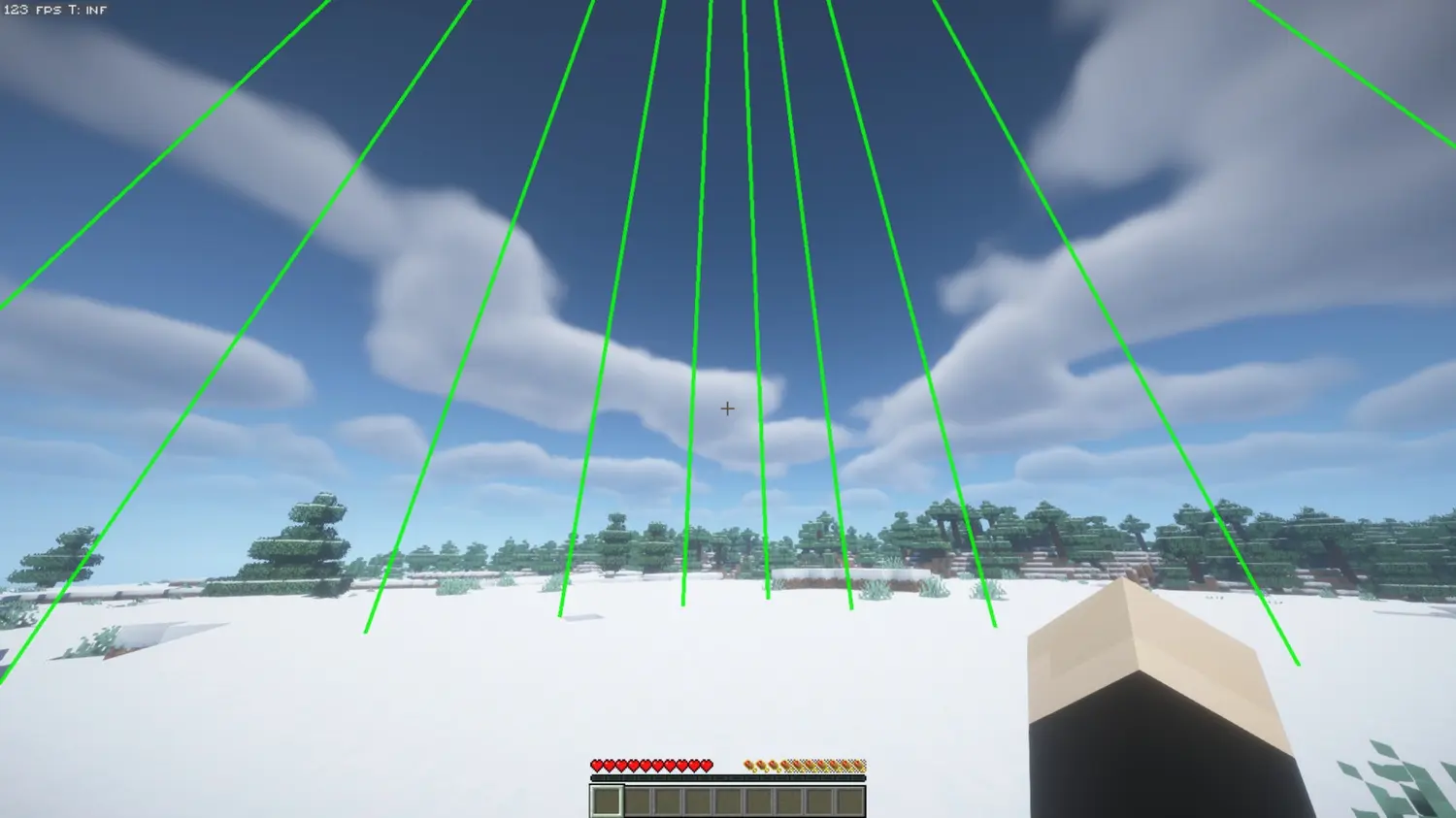
Better Chunk Borders is a lightweight, client sided utility mod that brings chunk boundaries with fully customizable grid lines. Whether you are planning intricate builds, hunting slime chunks, or making redstone stuff and contraptions, this mod gives you precise chunk awareness at a glance without looking ugly.
Features
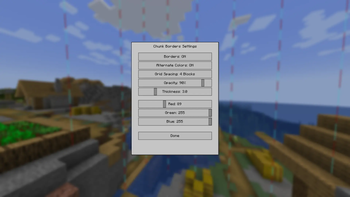
Sleek Custom GUI & Easy Keybinds
- Press B (default) to instantly open the intuitive, custom-designed settings panel.
- Toggle chunk borders on and off directly from the menu.
- All settings are automatically saved to your configuration file.
Flexible Grid Spacing
- Display chunk borders as vertical grid lines extending 64 blocks above and below your position.
- Adjustable Line Spacing: Cycle the grid density along the chunk walls to show lines every 16, 8, 4, 2, or 1 block.
- Keeps the inside of your chunks clear while perfectly outlining the perimeter.
Extensive Customization
- Infinite Colors: Dial in your exact preference using the custom Red, Green, and Blue (RGB) sliders.
- Line Thickness: Adjust the thickness of the borders from thin and subtle to thick and bold.
- Opacity Control: Fine tune transparency to reduce visual clutter.
- Alternate Y Colors: Toggle a mode that inverts the border colors every alternating block along the Y axis, making it incredibly easy to count blocks and gauge depth.
Performance-Optimized
- Minimal impact on frame rates thanks to efficient rendering.
- Only renders what you see.
Use Cases
- Build Planning: Align structures perfectly with chunk boundaries for optimal organization.
- Slime Chunk Hunting: Quickly identify chunk borders to locate slime gen chunks.
- Farm + Redstone Optimization: Ensure technical builds span chunks correctly for maximum efficiency.
- Navigation: Always know which chunk you are in at a glance.
Getting Started
- Press B to open the settings menu.
- Click Borders: OFF to toggle them ON.
- Customize your RGB color, opacity, line thickness, and grid spacing to your preference.
- Click Done and apply your new settings.
Compatibility
- Minecraft Versions: Fully compatible with 1.21.x and 26.x
- Server Compatibility: Works on any server without the need for special permissions, plugins, or setup.
- Client-Side Only: Install strictly on your client.
Available Versions
How to Install BetterChunkBorders on Your Server
Order Server
Order a Minecraft Java server with at least 4 GB RAM (6 GB recommended).
Set fabric Loader
In the panel under "Egg", select the fabric loader and matching Minecraft version (26.1.2).
Install Mod
Open the mod browser in the dashboard and search for "BetterChunkBorders". Click "Install" – done! Alternatively, upload the .jar via SFTP to the /mods folder.
Compatibility
Mod Loaders
Minecraft Versions
26.1.2, 26.1.1, 26.1 (+12 more)
Server-side
✗ UnsupportedRecommended RAM
6 GB(min. 4 GB)Frequently Asked Questions
BetterChunkBorders server crashes on startup – what to do?
Most common cause: wrong fabric version or insufficient RAM. Check the server log (latest.log) for "OutOfMemoryError" or "Mixin" errors. With Mado Hosting: ensure at least 4 GB RAM is allocated and the loader matches the mod version (26.1.2). You can switch loaders with one click in the panel.
Is BetterChunkBorders compatible with fabric?
BetterChunkBorders officially supports fabric for Minecraft 26.1.2, 26.1.1, 26.1. The Mado dashboard automatically detects incompatible loader combinations.
Server lagging with BetterChunkBorders – how to optimize performance?
Recommended RAM: 6 GB (per 5 players). Use /spark profiler to check if BetterChunkBorders consumes the most tick time. Common fixes: reduce server view-distance to 8-10, install "performant" or "starlight" as supplementary mods on Forge. With Mado Hosting, your server runs on NVMe SSDs with dedicated CPU cores for minimal latency.
Similar Mods




Rent Modded Server
Install BetterChunkBorders with just one click on your server.