
BetterGeysers
Customize the behavior of Geysers in a detailed way. Lava, Infinite Height, Damage, and Eruption Timing.
Screenshots
About this Mod
BetterGeysers
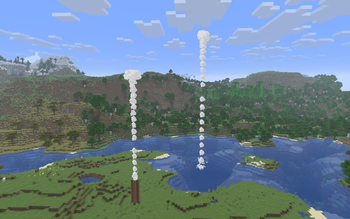
BetterGeysers is a straightforward overhaul of the geyser mechanics introduced in 26.2-snapshot 5 (the Chaos Cubed update). In the vanilla game, geysers produced by Potent Sulfur are limited to a maximum height of 4 blocks. This mod removes that hardcoded limit and replaces it with logic that actually respects the environment around it.
Dynamic Scaling
The mod works by scanning the water column above a Potent Sulfur block. Instead of stopping at a fixed number, the geyser will grow as long as it finds water source blocks, potentially reaching the top of your world. If it hits a solid ceiling or the surface of the water, it adapts its visuals and physics to match that exact spot.
Advanced Transport
This change transforms geysers from a minor decorative feature into a legitimate tool for world-building and transport. If you place a geyser at the bottom of a deep ocean trench, it will create a massive plume of particles that shoots all the way to the surface.
For players who want to use geysers as elevators, the mod includes a setting called constant travel time. When enabled, this ignores vanilla physics and instead calculates exactly how much force is needed to launch you to the top of the plume in a set amount of time.
Lava and Hazard Support
Beyond just water, BetterGeysers expands the functionality of Potent Sulfur to more extreme environments:
- Lava Geysers: Optionally allow geysers to function under lava pools, complete with unique sounds and particles.
- Lethal Eruptions: Enable damage scaling where deeper geysers deal more damage, making deep-sea vents as dangerous as they look.
- Noxious Gas: Customize or disable the gas clouds and nausea effects produced by the sulfur.
In-Game Editing
You do not need to restart your game or mess with text editors to change how this mod behaves. You can type /bettergeysers config in the chat to see your current settings. Every line in that message is clickable. If you click a setting, it will provide a menu in the chat where you can toggle booleans with buttons or click a prompt to type in a new number. Once you make a change, the mod updates in memory and saves to the config file instantly.
Configuration Reference
The settings are stored in bettergeysers.json inside your config folder. Below is a breakdown of every available parameter:
| Setting | Description |
|---|---|
maxWaterSources |
The maximum number of blocks the mod will scan upwards. |
geyserHeightPerWaterSource |
Controls the multiplier for the eruption plume height (Vanilla uses 5). |
constantTravelTime |
A toggle that makes the launch speed relative to the geyser height. |
travelTimeTicks |
How many ticks (1/20th of a second) it should take to reach the top. |
allowLavaGeyser |
Allows geysers to function under lava pools. |
requireMagmaBlock |
If true, requires a Magma Block underneath the sulfur to activate. |
scaleSound |
Whether deep-sea geysers should sound more powerful than shallow ones. |
noxiousGasFumes |
Enables or disables gas cloud particles and nausea logic. |
disableNausea |
Disables just the nausea effect (fumes stay visible). |
nauseaDuration |
Duration of the nausea effect in seconds. |
enableDamage |
Whether geysers deal damage to entities in the plume. |
dynamicDamage |
If true, damage scales based on geyser depth; if false, uses damagePerTick. |
damagePerTick |
Base damage dealt per tick while erupting. |
dormantMultiplier |
Controls how much water depth affects the duration of dormant phases. |
eruptingMultiplier |
Controls how much water depth affects the duration of eruption phases. |
minEruptionOffset |
Minimum random time (seconds) added to the eruption phase. |
maxEruptionOffset |
Maximum random time (seconds) added to the eruption phase. |
minDormantOffset |
Minimum random time (seconds) added to the dormant phase. |
maxDormantOffset |
Maximum random time (seconds) added to the dormant phase. |
Compatibility
- Requirements: Fabric API
- Version: Minecraft 26.2-snapshot 5 or newer.
Available Versions
How to Install BetterGeysers on Your Server
Order Server
Order a Minecraft Java server with at least 3 GB RAM (4 GB recommended).
Set fabric Loader
In the panel under "Egg", select the fabric loader and matching Minecraft version (26.2-pre-4).
Install Mod
Open the mod browser in the dashboard and search for "BetterGeysers". Click "Install" – done! Alternatively, upload the .jar via SFTP to the /mods folder.
Compatibility
Mod Loaders
Minecraft Versions
26.2-pre-4, 26.2-pre-3, 26.2-pre-2 (+3 more)
Server-side
✓ RequiredRecommended RAM
4 GB(min. 3 GB)Frequently Asked Questions
BetterGeysers server crashes on startup – what to do?
Most common cause: wrong fabric version or insufficient RAM. Check the server log (latest.log) for "OutOfMemoryError" or "Mixin" errors. With Mado Hosting: ensure at least 3 GB RAM is allocated and the loader matches the mod version (26.2-pre-4). You can switch loaders with one click in the panel.
Is BetterGeysers compatible with fabric?
BetterGeysers officially supports fabric for Minecraft 26.2-pre-4, 26.2-pre-3, 26.2-pre-2. The Mado dashboard automatically detects incompatible loader combinations.
Server lagging with BetterGeysers – how to optimize performance?
Recommended RAM: 4 GB (per 8 players). Use /spark profiler to check if BetterGeysers consumes the most tick time. Common fixes: reduce server view-distance to 8-10, install "performant" or "starlight" as supplementary mods on Forge. With Mado Hosting, your server runs on NVMe SSDs with dedicated CPU cores for minimal latency.
Similar Mods




Rent Modded Server
Install BetterGeysers with just one click on your server.