
BetterMineTeam
a Reforged version of Mine Team mod which allows players to convert mobs to teammates and fight together in the battle.
Screenshots


About this Mod
Introduction
Better Mine Team is an unofficial "Reforged" version of the original MineTeam mod. It retains the core philosophy—allowing players to join 16 different teams and ally with monsters—while introducing completely rewritten AI, new management tools, and expanded features.
Important: Required Dependency
Starting with Better Mine Team Forge 0.1.0 and Better Mine Team NeoForge 0.3.0, this mod requires i113w's Camera Lib.
Please install it together with Better Mine Team:
This dependency provides the RTS camera system used by Better Mine Team, including the overhead tactical camera, Free camera, and Orthographic camera modes.
Key Features
Revamped Taming System
- No more timers: Removed the unstable timer mechanic from the original mod.
- Simple Taming: You can now tame creatures directly by right-clicking with a Golden Apple.
- Customization: Includes default taming materials and extensive configuration options to suit your modpack.
Advanced Team Management
- Management Panel: Use commands or items to open a comprehensive dashboard.
- Detailed Control: Open a member's inventory (within a configurable range) to manage their armor, main hand, and off-hand items.
- Tactical Commands: Toggle creature states (Follow/Stay), rename them, or teleport them to your location instantly.
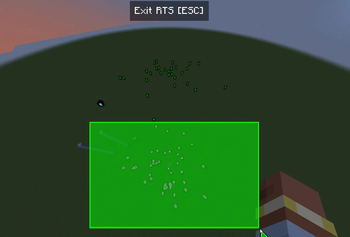
RTS-Style Command System:
- Added an RTS-style overhead camera for tactical command.
- Camera modes are powered by i113w's Camera Lib, with support for RTS, Free, and Orthographic camera styles.
- Control Mode: Issue move and attack commands to your teammates with formation support, Attack Move, and intelligent target switching.
- Recruit Mode: Players with
TeamsLordadvanced permissions can instantly recruit wild mobs into their team (Left-click to box select; Right-click to confirm). - Controls:
- Open the Team Management Panel (default
Kkey) → Click the "RTS Mode" button. - WASD to move camera, Ctrl+Mouse drag to rotate, screen edge auto-adjusts pitch angle.
- Left-click to select units (box selection supported), Right-click ground to move, Right-click enemies to attack.
- Press ESC to exit RTS Mode.
- Open the Team Management Panel (default
- Configuration: Adjustable unit movement speed, pathfinding failure threshold, and more.
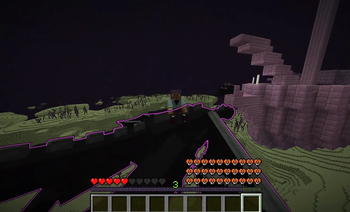
Ender Dragon Riding
- Taming: With advanced permissions, you can tame the Ender Dragon using a Golden Apple.
- Flight Control: Ride the dragon by right-clicking with an empty hand.
- Space: Accelerate
- Shift: Decelerate
Command System
/mngteam get: Check the team and member list of a specific player./mngteam set: Set team captains or grant administrative permissions./mngteam menu: Quickly open the Team Management Panel.
Configuration
- Almost every feature is configurable via the CONFIG file, making it perfect for modpack authors to tweak balance.
About This Project
This project is an unofficial Reforged version of MineTeam.
Special thanks to the original author XiaoHuNao, contributor Westernat, and artist Lazy-Pillow for their pioneering work. This project retains the original team/PvP icons and the core concept but features rewritten code for creature AI, logic, and new GUI systems. It is developed with AI assistance and is fully open-source under the MIT License.
Note: Due to extensive code rewriting, this mod is not compatible with the original MineTeam.
Compatibility Notes
- Mixin Warning: This mod uses Mixin to modify the Ender Dragon's AI. It is theoretically compatible with mods like Savage Ender Dragon, but 100% compatibility cannot be guaranteed. If you encounter a crash, please report it with your log files.
- Scoreboard Teams: This mod relies on the vanilla Scoreboard Team system.
- Compatible: Mods that use or respect vanilla scoreboard logic.
- Incompatible: Mods that completely overhaul or replace the scoreboard system.
- Note: The team switching button in the inventory GUI will not appear if using non-vanilla team providers.
Installation
- Install Minecraft 1.21.1 (NeoForge only) or Minecraft 1.20.1 (Forge only).
- Install NeoForge 21.1.209+ or the latest recommended Forge version for 1.20.1.
- Install the required dependency: i113w's Camera Lib.
- Download the Better Mine Team
.jarfile and place it in yourmodsfolder.
Credits
- XiaoHuNao: Original Author
- Westernat: Original Contributor
- Lazy-Pillow: Original Artist




Available Versions
How to Install BetterMineTeam on Your Server
Order Server
Order a Minecraft Java server with at least 3 GB RAM (4 GB recommended).
Set forge Loader
In the panel under "Egg", select the forge loader and matching Minecraft version (26.1.2).
Install Mod
Open the mod browser in the dashboard and search for "BetterMineTeam". Click "Install" – done! Alternatively, upload the .jar via SFTP to the /mods folder.
Compatibility
Mod Loaders
Minecraft Versions
26.1.2, 1.21.1, 1.20.1
Server-side
✓ RequiredRecommended RAM
4 GB(min. 3 GB)Frequently Asked Questions
BetterMineTeam server crashes on startup – what to do?
Most common cause: wrong forge version or insufficient RAM. Check the server log (latest.log) for "OutOfMemoryError" or "Mixin" errors. With Mado Hosting: ensure at least 3 GB RAM is allocated and the loader matches the mod version (26.1.2). You can switch loaders with one click in the panel.
Is BetterMineTeam compatible with forge and neoforge?
BetterMineTeam officially supports forge, neoforge for Minecraft 26.1.2, 1.21.1, 1.20.1. The Mado dashboard automatically detects incompatible loader combinations.
Server lagging with BetterMineTeam – how to optimize performance?
Recommended RAM: 4 GB (per 8 players). Use /spark profiler to check if BetterMineTeam consumes the most tick time. Common fixes: reduce server view-distance to 8-10, install "performant" or "starlight" as supplementary mods on Forge. With Mado Hosting, your server runs on NVMe SSDs with dedicated CPU cores for minimal latency.
Similar Mods
![[EMF] Entity Model Features](https://cdn.modrinth.com/data/4I1XuqiY/6e5bbd0d06b1741bfdab6c0cfab6de8fdaf0064c_96.webp)


Rent Modded Server
Install BetterMineTeam with just one click on your server.