
BetterPingDisplay
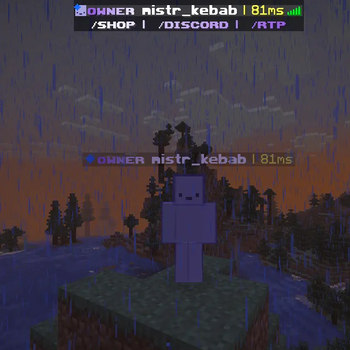
BetterPingDisplay appends a color-coded ping to player names in the tab list and above their heads. It’s a lightweight, configuration-free mod compatible with all Fabric 1.21+ versions.
Screenshots
About this Mod
BetterPingDisplay
BetterPingDisplay is a minimalist, client-side Fabric mod designed to give you instant feedback on your connection quality. It seamlessly integrates real-time ping indicators into the Minecraft interface, showing you exactly how much latency every player (including yourself) has at any given moment.
🌟 Key Features
- Tab List Integration: Automatically appends the ping value to every player's name in the player list (Tab).
- Nametag Support: Displays the ping directly above player heads in the world, so you always know who might be lagging during a fight or interaction.
- Smart Color-Coding: Uses an intuitive traffic-light system to represent connection quality:
- 🟢 Green (< 80ms): Smooth gameplay, excellent connection.
- 🟡 Yellow (80-150ms): Noticeable latency, keep an eye on it.
- 🔴 Red (> 150ms): High lag, gameplay might be affected.
- Premium UI Design: Features a neutral white separator (
|) to keep the interface clean, while highlighting the actual ping value in its corresponding status color.
🚀 Why BetterPingDisplay?
- Zero Configuration: Just drop it in and play. No commands, no menus, no fluff.
- Maximum Performance: Built to be as lightweight as possible. It runs standalone and does not require the Fabric API, reducing memory usage and load times.
- Version Compatibility: Specifically engineered for the new rendering systems in Minecraft 1.21, but compatible with all versions from 1.21 up to 1.21.11 and beyond.
📦 Installation
- Ensure you have the Fabric Loader installed for Minecraft 1.21+.
- Download the mod.
- Place the file into your
modsfolder. - Launch the game and enjoy a better overview of your connection!
Standalone | Lightweight | 1.21.x Ready
Available Versions
How to Install BetterPingDisplay on Your Server
Order Server
Order a Minecraft Java server with at least 3 GB RAM (4 GB recommended).
Set fabric Loader
In the panel under "Egg", select the fabric loader and matching Minecraft version (26.1.2).
Install Mod
Open the mod browser in the dashboard and search for "BetterPingDisplay". Click "Install" – done! Alternatively, upload the .jar via SFTP to the /mods folder.
Compatibility
Mod Loaders
Minecraft Versions
26.1.2, 26.1.1, 26.1 (+12 more)
Server-side
✗ UnsupportedRecommended RAM
4 GB(min. 3 GB)Frequently Asked Questions
BetterPingDisplay server crashes on startup – what to do?
Most common cause: wrong fabric version or insufficient RAM. Check the server log (latest.log) for "OutOfMemoryError" or "Mixin" errors. With Mado Hosting: ensure at least 3 GB RAM is allocated and the loader matches the mod version (26.1.2). You can switch loaders with one click in the panel.
Is BetterPingDisplay compatible with fabric?
BetterPingDisplay officially supports fabric for Minecraft 26.1.2, 26.1.1, 26.1. The Mado dashboard automatically detects incompatible loader combinations.
Server lagging with BetterPingDisplay – how to optimize performance?
Recommended RAM: 4 GB (per 8 players). Use /spark profiler to check if BetterPingDisplay consumes the most tick time. Common fixes: reduce server view-distance to 8-10, install "performant" or "starlight" as supplementary mods on Forge. With Mado Hosting, your server runs on NVMe SSDs with dedicated CPU cores for minimal latency.
Similar Mods




![[ETF] Entity Texture Features](https://cdn.modrinth.com/data/BVzZfTc1/af683d206d50b05258d865b0d6e4aa2f2cee12f2_96.webp)
![[EMF] Entity Model Features](https://cdn.modrinth.com/data/4I1XuqiY/6e5bbd0d06b1741bfdab6c0cfab6de8fdaf0064c_96.webp)
Rent Modded Server
Install BetterPingDisplay with just one click on your server.