
BetterSulfurCubes
BetterSulfurCubes takes the Sulfur Cube to another level! Sulfur Cubes can now swallow almost any block and fully assume its behavior — turning these bouncy little creatures into some of the most useful mobs in the game.
Screenshots
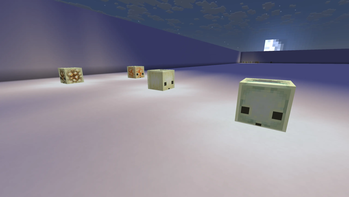
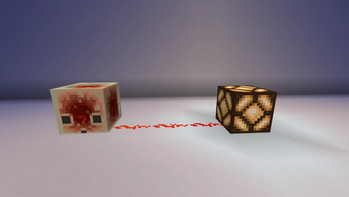
About this Mod

Better Sulfur Cubes takes the Sulfur Cube to another level! Sulfur Cubes can now swallow almost any block and fully assume its behavior — turning these bouncy little creatures into some of the most useful mobs in the game.
Swallowable Blocks
Redstone Block
A Redstone Cube is a living, bouncing signal source — full strength in all directions. Hit it, slide it, or leash it into position. Build circuits that actually move.
TNT
Light it up with flint & steel, a fire charge, arrows, fire, or redstone — and four seconds later it goes off. Keep it far from your base, or lean into the chaos and launch it at your enemies like an explosive cannonball.
Any Light-Emitting Block
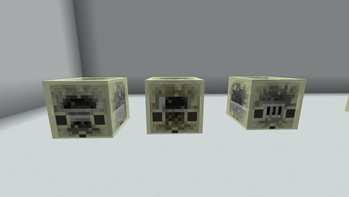
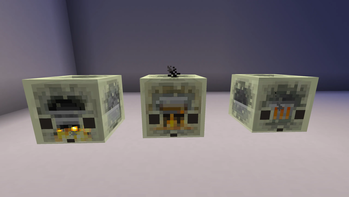
Torches, lanterns, glowstone, sea lanterns, shroomlights — any light-emitting block turns the cube into a roaming light source. Leash it and drag it wherever you need light. Furnace-type cubes even glow brighter when they start smelting!
Chest & Barrel
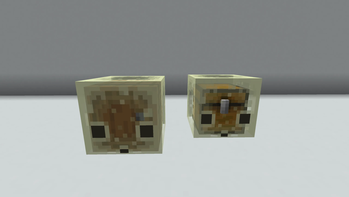
Right-click to open a 27-slot inventory you can leash and drag around with you. Hoppers push and pull from it too. Pick it up in a bucket and you have essentially a Shulker Box — before you even reach the End. Shear it to pop the chest out along with everything inside.
Crafting Table
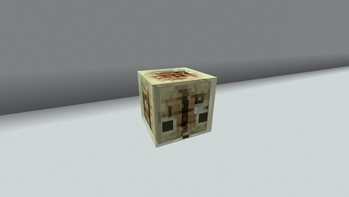
Right-click to open a full crafting grid, anywhere, anytime.
Furnace, Blast Furnace & Smoker
A fully functional furnace on the move. Load it up, leash it, and smelt while you explore. Pick it up in a bucket mid-smelt and put it back down somewhere else — it picks right back up where it left off.
Cosmetics
Dye Coloring
Right-click any cube that has swallowed a block with a dye to splash it with color. All 16 dyes are supported. Use a water bucket to wash it off.
Invisible Shell
Right-click with a Phantom Membrane to dissolve the outer shell entirely — leaving only the swallowed block visible inside. Creepy, cool, or both. Water bucket restores the shell.
Potent Sulfur Cubes
Feed a Sulfur Cube Potent Sulfur to turn it into a Potent Sulfur Cube. Keep feeding it — up to four times — and watch it grow into something massive and useful:
| Potent Sulfur fed | Size |
|---|---|
| 1 | 3×3×3 |
| 2 | 5×5×5 |
| 3 | 7×7×7 |
| 4 | 9×9×9 |
A Potent Sulfur Cube is stationary and players walk straight through the shell. Step inside and you have open space to build freely — a hidden home, a secret farm, a redstone contraption, whatever you can dream up.
Pick it up with an empty bucket and everything inside is saved into it. The cube and your entire build become a single item you can carry in your inventory and place anywhere in the world.
Shear the Potent Sulfur Cube to burst it open and set your build free!
Feedback & Suggestions
Have a bug to report, a feature idea, or just want to share what you've built with a Potent Sulfur Cube? I'd love to hear it! Drop a comment, open an issue, or reach out — every bit of feedback helps shape where this mod goes next.
Requirements
- Minecraft 26.2-snapshot-2
- Fabric Loader 0.18.6
- Fabric API 0.145.5+26.2
Disclaimer
This mod is built on 26.2-snapshot-2, a pre-release version of Minecraft. It is developed ahead of the full Chaos Cubed drop, which means things may break when the release arrives. That said, the release may also bring new possibilities — so expect updates, and possibly new features, once it lands.
Available Versions
How to Install BetterSulfurCubes on Your Server
Order Server
Order a Minecraft Java server with at least 3 GB RAM (4 GB recommended).
Set fabric Loader
In the panel under "Egg", select the fabric loader and matching Minecraft version (26.2-snapshot-2).
Install Mod
Open the mod browser in the dashboard and search for "BetterSulfurCubes". Click "Install" – done! Alternatively, upload the .jar via SFTP to the /mods folder.
Compatibility
Mod Loaders
Minecraft Versions
26.2-snapshot-2
Server-side
✓ RequiredRecommended RAM
4 GB(min. 3 GB)Frequently Asked Questions
BetterSulfurCubes server crashes on startup – what to do?
Most common cause: wrong fabric version or insufficient RAM. Check the server log (latest.log) for "OutOfMemoryError" or "Mixin" errors. With Mado Hosting: ensure at least 3 GB RAM is allocated and the loader matches the mod version (26.2-snapshot-2). You can switch loaders with one click in the panel.
Is BetterSulfurCubes compatible with fabric?
BetterSulfurCubes officially supports fabric for Minecraft 26.2-snapshot-2. The Mado dashboard automatically detects incompatible loader combinations.
Server lagging with BetterSulfurCubes – how to optimize performance?
Recommended RAM: 4 GB (per 8 players). Use /spark profiler to check if BetterSulfurCubes consumes the most tick time. Common fixes: reduce server view-distance to 8-10, install "performant" or "starlight" as supplementary mods on Forge. With Mado Hosting, your server runs on NVMe SSDs with dedicated CPU cores for minimal latency.
Similar Mods




Rent Modded Server
Install BetterSulfurCubes with just one click on your server.