beyondheights
Expand the upper and lower limits of world height without loading terrain.
Screenshots
About this Mod
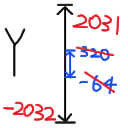
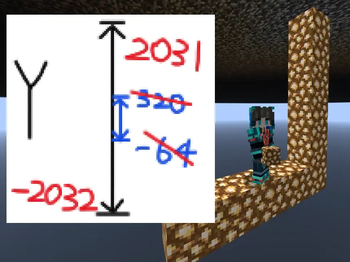
The upper and lower limits of world elevation have been expanded without loading terrain.
Default settings: Both the Main World and End are -20322031, the Nether is 02031, and the cloud is 1024.
You can modify the height data via the current instance directory /config/beyondheights/beyondheights.properties file.
If the default value (-2032~2032) remains after modifying the configuration file, it means the data has been entered incorrectly.
If the mod is completely ineffective, it means you added other terrain mods that would otherwise modify the height limit.
对世界高度上下限进行了拓展,不加载地形。
默认设定:主世界和末地都是 -20322031,下界是 02031,云层 1024。
可通过 当前实例目录/config/beyondheights/beyondheights.properties 文件修改高度数据。
如果修改配置文件后仍然是默认值(-2032~2032),说明填错了数据。
如果模组完全不生效,说明加了其他本身就会修改限高的地形模组 。
Available Versions
How to Install beyondheights on Your Server
Order Server
Order a Minecraft Java server with at least 4 GB RAM (6 GB recommended).
Set fabric Loader
In the panel under "Egg", select the fabric loader and matching Minecraft version (1.21.11).
Install Mod
Open the mod browser in the dashboard and search for "beyondheights". Click "Install" – done! Alternatively, upload the .jar via SFTP to the /mods folder.
Compatibility
Mod Loaders
Minecraft Versions
1.21.11, 1.21
Server-side
✓ RequiredRecommended RAM
6 GB(min. 4 GB)Frequently Asked Questions
beyondheights server crashes on startup – what to do?
Most common cause: wrong fabric version or insufficient RAM. Check the server log (latest.log) for "OutOfMemoryError" or "Mixin" errors. With Mado Hosting: ensure at least 4 GB RAM is allocated and the loader matches the mod version (1.21.11). You can switch loaders with one click in the panel.
Is beyondheights compatible with fabric?
beyondheights officially supports fabric for Minecraft 1.21.11, 1.21. The Mado dashboard automatically detects incompatible loader combinations.
Server lagging with beyondheights – how to optimize performance?
Recommended RAM: 6 GB (per 5 players). Use /spark profiler to check if beyondheights consumes the most tick time. Common fixes: reduce server view-distance to 8-10, install "performant" or "starlight" as supplementary mods on Forge. With Mado Hosting, your server runs on NVMe SSDs with dedicated CPU cores for minimal latency.
Similar Mods



Rent Modded Server
Install beyondheights with just one click on your server.