
BGM Fields
BGM Fields lets you place Realm Blocks that create server-authoritative “BGM zones” (Realms).
Screenshots


About this Mod
BGM Fields (Forge 1.20.1)
🎥 **Watch the BGM Fields demo:**
https://www.youtube.com/shorts/meaJewowPdg
BGM Fields lets you place Realm Blocks that create server-authoritative “BGM zones” (Realms). When a player is inside a Realm, the Realm can:
- Switch BGM (single track or playlist)
- Apply “Vision” visuals (fog / overlay / sky-only tint / particles / colored precipitation)
- Optionally render a glowing boundary ring (visible from inside and outside)
This mod does not send .ogg audio files over the network. Music is referenced by Sound Event IDs; you provide the actual audio via a client resource pack (per-player) or a server-pushed resource pack.
Multiplayer: install the mod on both the server and all clients.
Getting Started
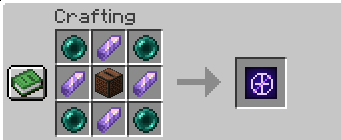
- Craft and place a Realm Block.
- Right-click the Realm Block to open the settings screen.
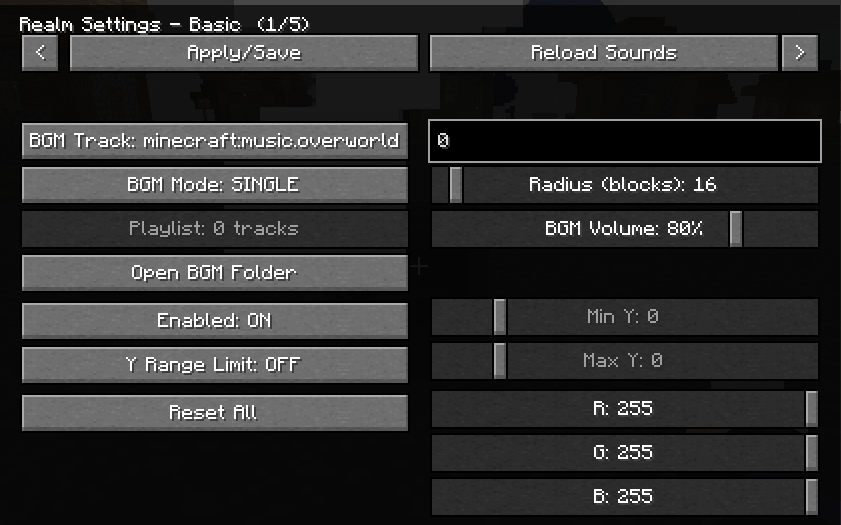
- Set:
- Radius (max 300)
- Y-range (optional; you can limit the realm vertically)
- Realm color (used by visuals)
- BGM settings (track or playlist)
- Per-realm BGM volume (0–100, default 80)
Only the owner can edit the Realm. OPs (permission level 2) can also edit.
Realm Placement Rules
- If another player’s Realm overlaps the new one, placement is denied.
- Even for the same owner, partial overlap is denied.
- Full nesting is allowed (one Realm completely inside the other).
BGM: How Tracks Work
A track is a Sound Event ID (namespace:path). Examples:
- Vanilla music:
minecraft:music.overworld - User BGM generated by this mod:
bgmfieldmod:bgm.my_song
BGM Modes:
- Single: play one Sound Event.
- Playlist: multiple entries; each entry has:
track(Sound Event ID)loop(true/false)
Add Your Own Music (Client-side, per player)
BGM Fields auto-creates a folder resource pack called:
BGMFields_UserBGM
Put your .ogg files under:
resourcepacks/BGMFields_UserBGM/assets/bgmfieldmod/sounds/bgm/
Then reload resources (in-game “Reload” button or F3+T).
You do not need to write sounds.json yourself; BGM Fields generates it automatically.
Sound ID mapping:
my_song.ogg→bgmfieldmod:bgm.my_songdungeon/boss.ogg→bgmfieldmod:bgm.dungeon.boss
Notes:
- Filenames are sanitized to valid resource paths (spaces, uppercase, etc. are converted).
- The resource pack still needs to be enabled in Minecraft’s Resource Packs menu (that is vanilla behavior). There is also an optional client config that can attempt to auto-enable it.
Provide Music to Everyone (Server Resource Pack Push)
BGM Fields can ask clients to apply a server resource pack on join.
Two modes:
- external-url: set
serverResourcePack.urlto a public URL to a.zipresource pack. - internal-http: leave
serverResourcePack.urlempty; the server hosts the.zipvia a built-in HTTP server.
Config keys (in the Forge common config):
serverResourcePack.enabledserverResourcePack.requiredserverResourcePack.publicHostserverResourcePack.urlserverResourcePack.portserverResourcePack.packFileserverResourcePack.sha1serverResourcePack.prompt
Zip requirements:
pack.mcmetaandassets/must be at the zip root (zipping the parent folder often breaks this).
Vision (Visual Effects)
Each Realm has a “Vision” visual module (server-authoritative settings synced to nearby clients). You can control:
- Master enable
- Strength (0–100)
- Ramp up/down (fade in/out)
- Fog
- Overlay
- Sky Tint (sky-only)
- Gradient is optional
- Can follow the realm color or use an independent RGB
- Particles
- Colored precipitation (rain/snow via custom particles)
- Boundary visualization (glowing ring)
Realm Vision Keybind (Owner Utility)
There is a client keybind:
V= toggle “Realm Vision” ON/OFF
This is used for owners to reveal the real Realm Block when the Realm is disguised:
- Owner + Realm Vision ON + Sneak (Shift) → show the real block
Commands (OP)
/bgmfields_rp start/bgmfields_rp stop/bgmfields_rp send/bgmfields_rp reload
Notes / Tips
- If your particle setting is “Minimal”, some Vision particles/precipitation may be hard to see.
- The boundary ring is designed to be visible both from inside and outside the Realm (useful for large radii).
Available Versions
How to Install BGM Fields on Your Server
Order Server
Order a Minecraft Java server with at least 4 GB RAM (6 GB recommended).
Set forge Loader
In the panel under "Egg", select the forge loader and matching Minecraft version (1.20.6).
Install Mod
Open the mod browser in the dashboard and search for "BGM Fields". Click "Install" – done! Alternatively, upload the .jar via SFTP to the /mods folder.
Compatibility
Mod Loaders
Minecraft Versions
1.20.6, 1.20.5, 1.20.4 (+3 more)
Server-side
✓ RequiredRecommended RAM
6 GB(min. 4 GB)Frequently Asked Questions
BGM Fields server crashes on startup – what to do?
Most common cause: wrong forge version or insufficient RAM. Check the server log (latest.log) for "OutOfMemoryError" or "Mixin" errors. With Mado Hosting: ensure at least 4 GB RAM is allocated and the loader matches the mod version (1.20.6). You can switch loaders with one click in the panel.
Is BGM Fields compatible with forge?
BGM Fields officially supports forge for Minecraft 1.20.6, 1.20.5, 1.20.4. The Mado dashboard automatically detects incompatible loader combinations.
Server lagging with BGM Fields – how to optimize performance?
Recommended RAM: 6 GB (per 5 players). Use /spark profiler to check if BGM Fields consumes the most tick time. Common fixes: reduce server view-distance to 8-10, install "performant" or "starlight" as supplementary mods on Forge. With Mado Hosting, your server runs on NVMe SSDs with dedicated CPU cores for minimal latency.
Similar Mods

![[ETF] Entity Texture Features](https://cdn.modrinth.com/data/BVzZfTc1/af683d206d50b05258d865b0d6e4aa2f2cee12f2_96.webp)
![[EMF] Entity Model Features](https://cdn.modrinth.com/data/4I1XuqiY/6e5bbd0d06b1741bfdab6c0cfab6de8fdaf0064c_96.webp)



Rent Modded Server
Install BGM Fields with just one click on your server.