
BiaoHealthBarX
replaces Minecraft’s classic hearts with a clean, modern
Screenshots
About this Mod
English Description
BiaoHealthBarX replaces Minecraft’s classic hearts with a clean, modern “RPG-style health bar” — a long red HP bar with a centered numeric value, giving players precise, easy-to-read health information at a glance.
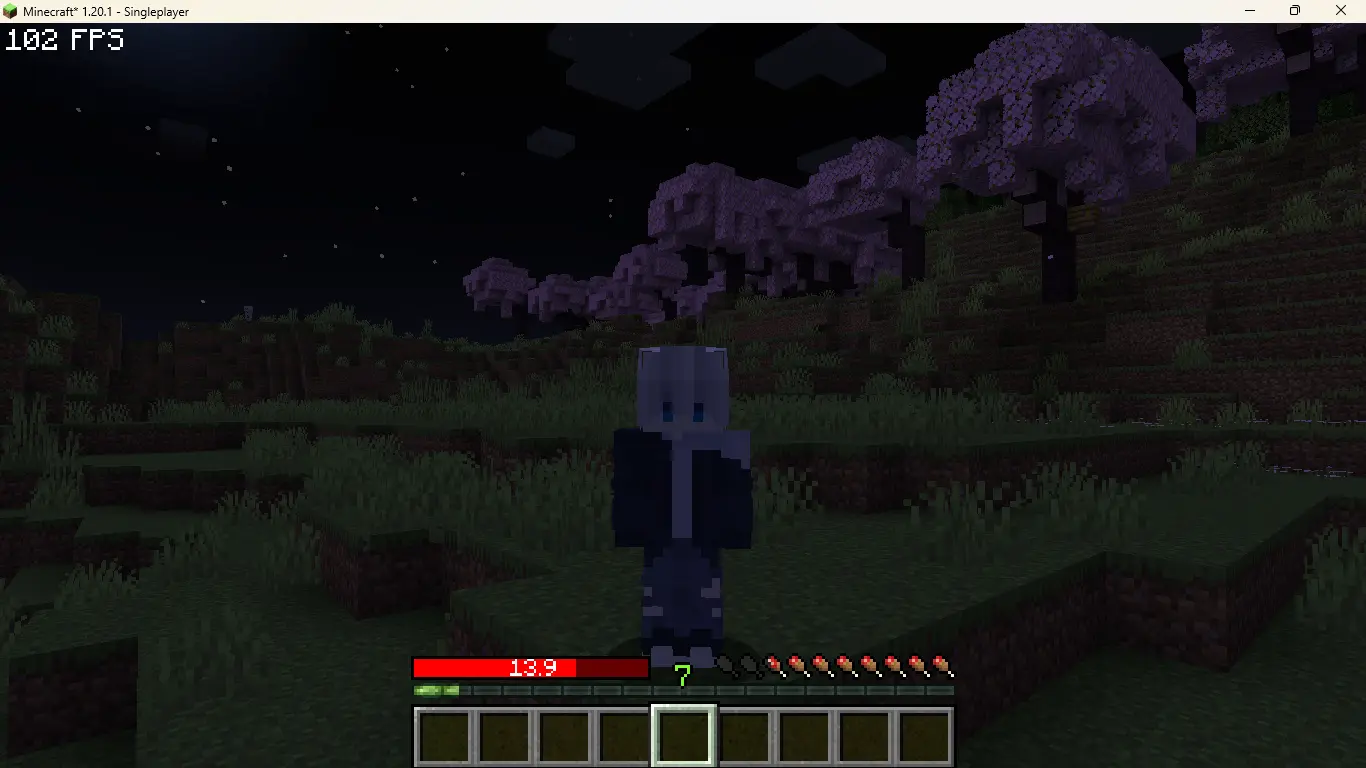
The stylish horizontal health bar makes your HUD feel more polished and immersive, perfect for players who want a clearer combat experience or a more cinematic UI.
Ideal for:
Roleplay servers that want a sleek, modern interface
RPG-focused modpacks seeking a more immersive HUD
Players who prefer accurate, readable HP instead of vanilla hearts
Enhance your gameplay with a refined, RPG-inspired health bar — BiaoHealthBarX.
คำอธิบายภาษาไทย
BiaoHealthBarX คือ Mod ปรับแต่งหลอดเลือดแบบใหม่ที่แทนที่หัวใจคลาสสิกของ Minecraft ให้กลายเป็น “แถบพลังชีวิตแนว RPG” พร้อมตัวเลขแสดง HP แบบชัดเจน ทำให้การมองสถานะเลือดของผู้เล่นแม่นยำและสวยงามกว่าที่เคย
ด้วยแถบพลังชีวิตแบบยาวสีแดงสว่างและตัวเลข HP ตรงกลาง
คุณจะรู้ได้ทันทีว่าตัวเองเหลือเลือดเท่าไหร่ ไม่ต้องคาดเดาอีกต่อไป
ยิ่งเหมาะสุด ๆ สำหรับ:
เซิร์ฟเวอร์ Roleplay ที่ต้องการ UI สวยงามและอ่านง่าย
Modpack RPG ที่ต้องการสไตล์เกมแฟนตาซีสมัยใหม่
ผู้เล่นที่ชอบความ “ชัดเจน เท่ และดูจริงจัง” ในการต่อสู้
เปลี่ยนเกมเพลย์ให้มีสไตล์มากขึ้น — ด้วยหลอดเลือดแบบใหม่จาก BiaoCraft Studio
Discord Community Discord (TH)
Available Versions
How to Install BiaoHealthBarX on Your Server
Order Server
Order a Minecraft Java server with at least 3 GB RAM (4 GB recommended).
Set fabric Loader
In the panel under "Egg", select the fabric loader and matching Minecraft version (1.20.1).
Install Mod
Open the mod browser in the dashboard and search for "BiaoHealthBarX". Click "Install" – done! Alternatively, upload the .jar via SFTP to the /mods folder.
Compatibility
Mod Loaders
Minecraft Versions
1.20.1
Server-side
✗ UnsupportedRecommended RAM
4 GB(min. 3 GB)Frequently Asked Questions
BiaoHealthBarX server crashes on startup – what to do?
Most common cause: wrong fabric version or insufficient RAM. Check the server log (latest.log) for "OutOfMemoryError" or "Mixin" errors. With Mado Hosting: ensure at least 3 GB RAM is allocated and the loader matches the mod version (1.20.1). You can switch loaders with one click in the panel.
Is BiaoHealthBarX compatible with fabric and forge?
BiaoHealthBarX officially supports fabric, forge for Minecraft 1.20.1. Note: Forge and Fabric mods are NOT cross-compatible – pick one loader and stick with it. The Mado dashboard automatically detects incompatible loader combinations.
Server lagging with BiaoHealthBarX – how to optimize performance?
Recommended RAM: 4 GB (per 8 players). Use /spark profiler to check if BiaoHealthBarX consumes the most tick time. Common fixes: reduce server view-distance to 8-10, install "performant" or "starlight" as supplementary mods on Forge. With Mado Hosting, your server runs on NVMe SSDs with dedicated CPU cores for minimal latency.
Similar Mods


Rent Modded Server
Install BiaoHealthBarX with just one click on your server.