
Biome Spreader
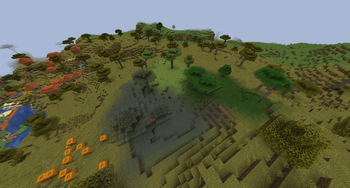
Adds recipes for potions that can spread biomes
Screenshots
About this Mod
Biome Spreader
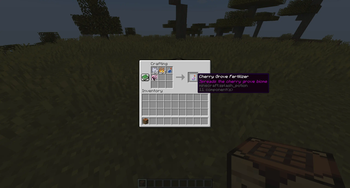
This mod works by creating a datapack when the server loads a world which provides the crafting recipes. For that reason, the potions to spread the biomes need to be crafted at the crafting table and can't be brewed. It is written in a way that new potions can be added without modifying the mod itself.
The event that spreads the biomes looks for potions with a specific naming scheme and then spreads the corresponding biome, so you can add custom biome potions yourself if the provided ones aren't enough. It looks for the "potion_contents" nbt compound and checks the custom name of the potion. If the name ends with "_fertilizer", the prefix is converted to a biome. So to add a potion that spreads the ocean biome, you need to name the potion "ocean_fertilizer".
For examples you can look through the datapack in the assets directory of the mod.
Even though the mod is a server-only mod, it can also be installed on the client to be used in singleplayer.
Configuration
The following things can be configured in the config.json:
Radius
In blocks
How the biomes are spread on the vertical axis
Possible values in the config are CYLINDER and SPHERE
If the datapack that provides the recipes should be recreated on startup
This is on by default, but can be disabled after the first start
Whether the potions can be used in each dimension
By default, potions can only spread biomes in the overworld dimension
Biomes that should not be overwritten
The names have to include the namespace, eg. "minecraft:lush_caves"
By default, biomes are spread in a 16 block radius from the bottom of the world to the top, but can't replace lush and dripstone caves. Keep in mind, since biomes are stored in 4x4x4 cubes and not for each block, the biome will not be spread perfectly centered where the potion lands.
Also, setting the radius to a number that is not divisible by 4 might not work as expected.
Recipes
Every recipe is shapeless and follows the same pattern:
1x bone meal, 1x blaze powder, 1x splash potion of water and 1 item or block that represents the biome.
These are the biomes that can be spread by default:
- Badlands (Dead Bush)
- Bamboo Jungle (Bamboo)
- Birch Forest (Birch Sapling)
- Cherry Grove (Cherry Sapling)
- Dark Forest (Dark Oak Sapling)
- Desert (Cactus)
- Flower Forest (Allium)
- Forest (Oak Sapling)
- Jungle (Jungle Sapling)
- Mangrove Swamp (Propagule)
- Meadow (Dandelion)
- Mushroom Fields (Mycelium)
- Pale Garden (Pale Oak Sapling)
- Plains (Short Grass)
- Savanna (Acacia Sapling)
- Snowy Plains (Snowball)
- Sunflower Plains (Sunflower)
- Swamp (Lilypad)
- Taiga (Spruce Sapling)
Available Versions
How to Install Biome Spreader on Your Server
Order Server
Order a Minecraft Java server with at least 4 GB RAM (6 GB recommended).
Set fabric Loader
In the panel under "Egg", select the fabric loader and matching Minecraft version (1.21.11).
Install Mod
Open the mod browser in the dashboard and search for "Biome Spreader". Click "Install" – done! Alternatively, upload the .jar via SFTP to the /mods folder.
Compatibility
Mod Loaders
Minecraft Versions
1.21.11, 1.21.10, 1.21.9 (+4 more)
Server-side
✓ RequiredRecommended RAM
6 GB(min. 4 GB)Frequently Asked Questions
Biome Spreader server crashes on startup – what to do?
Most common cause: wrong fabric version or insufficient RAM. Check the server log (latest.log) for "OutOfMemoryError" or "Mixin" errors. With Mado Hosting: ensure at least 4 GB RAM is allocated and the loader matches the mod version (1.21.11). You can switch loaders with one click in the panel.
Is Biome Spreader compatible with fabric?
Biome Spreader officially supports fabric for Minecraft 1.21.11, 1.21.10, 1.21.9. The Mado dashboard automatically detects incompatible loader combinations.
Server lagging with Biome Spreader – how to optimize performance?
Recommended RAM: 6 GB (per 5 players). Use /spark profiler to check if Biome Spreader consumes the most tick time. Common fixes: reduce server view-distance to 8-10, install "performant" or "starlight" as supplementary mods on Forge. With Mado Hosting, your server runs on NVMe SSDs with dedicated CPU cores for minimal latency.
Similar Mods

![[ETF] Entity Texture Features](https://cdn.modrinth.com/data/BVzZfTc1/af683d206d50b05258d865b0d6e4aa2f2cee12f2_96.webp)
![[EMF] Entity Model Features](https://cdn.modrinth.com/data/4I1XuqiY/6e5bbd0d06b1741bfdab6c0cfab6de8fdaf0064c_96.webp)



Rent Modded Server
Install Biome Spreader with just one click on your server.